

To create product ads from a product page, choose one reason to buy, collect the product photos and facts that support it, and turn that angle into a static ad, a carousel and a short video. Adapt each asset for its placement, check the product and offer, then hand the approved files to the person running the campaign.
Product page → one ad angle → images, carousel and video → placement adaptations → review and launch handoff
Start with a small set you can inspect together. A static ad makes the promise at a glance; a carousel explains it in sequence; a video shows the product or use case in motion. Each should lead to the product page that supports the same promise.
This guide covers creative production, not the setup of dynamic catalogue ads. Feed-driven ads are useful when prices, stock and product selection change frequently; a deliberate creative set is useful when a launch, offer or hero product needs a story.
Build the first asset set
- Choose the angle. Write one sentence connecting a published feature to the buyer's situation. Keep the product page open while you work.
- Prepare the source. Use the current product image, logo, approved claim and destination. Supply missing product views rather than asking AI to invent them.
- Make the static. Combine the product, one headline and one next step. Choose the placement before setting the crop.
- Make the carousel. Give each slide a job: the buyer's problem, the product mechanism, supporting detail and the next step.
- Make the video. Show the product, its relevant feature and the intended use. Use real footage when a physical demonstration is the proof; generated motion is not evidence of performance.
- Review the set. Compare the packaging, UI, offer and wording against the source. Export for the selected placements and keep paid-campaign setup separate.
A real static-ad pair to inspect
Advibly's public image-ad gallery includes two Coffeeverse examples: a coffee-launch creative and a flat-lay creative. Open the finished images beside each other and compare how the product, headline and scene divide the work.
These are existing generated examples, not a new production test or evidence of ad performance. The public gallery does not establish the original product-page input or a matching carousel and video. Use the pair to inspect real static outputs; use the recipe to brief the other formats for your own product.
First, decide which kind of product ads you need
Use bespoke creative when you need to introduce a launch, explain a benefit, dramatize a problem, present an offer, or build a narrative around a hero product. Each concept is intentionally developed, then adapted for the placements that matter.
Use catalog or feed-driven ads when inventory, price, availability, and SKU coverage change often. Structured product data lets an ad platform select relevant products at scale. This is usually the stronger system for a large, changing catalog.
The two approaches can work together. Feed ads cover the catalog; bespoke creative gives priority products and campaigns a deliberate point of view.
Use the recipe above for the first asset set. The campaign matrix below becomes useful when you expand into several angles, concepts and placements.
The product-page-to-campaign blueprint
Once the first set is clear, record the source facts, creative decisions and final files together. This keeps the next variation connected to the product rather than starting another disconnected brief.
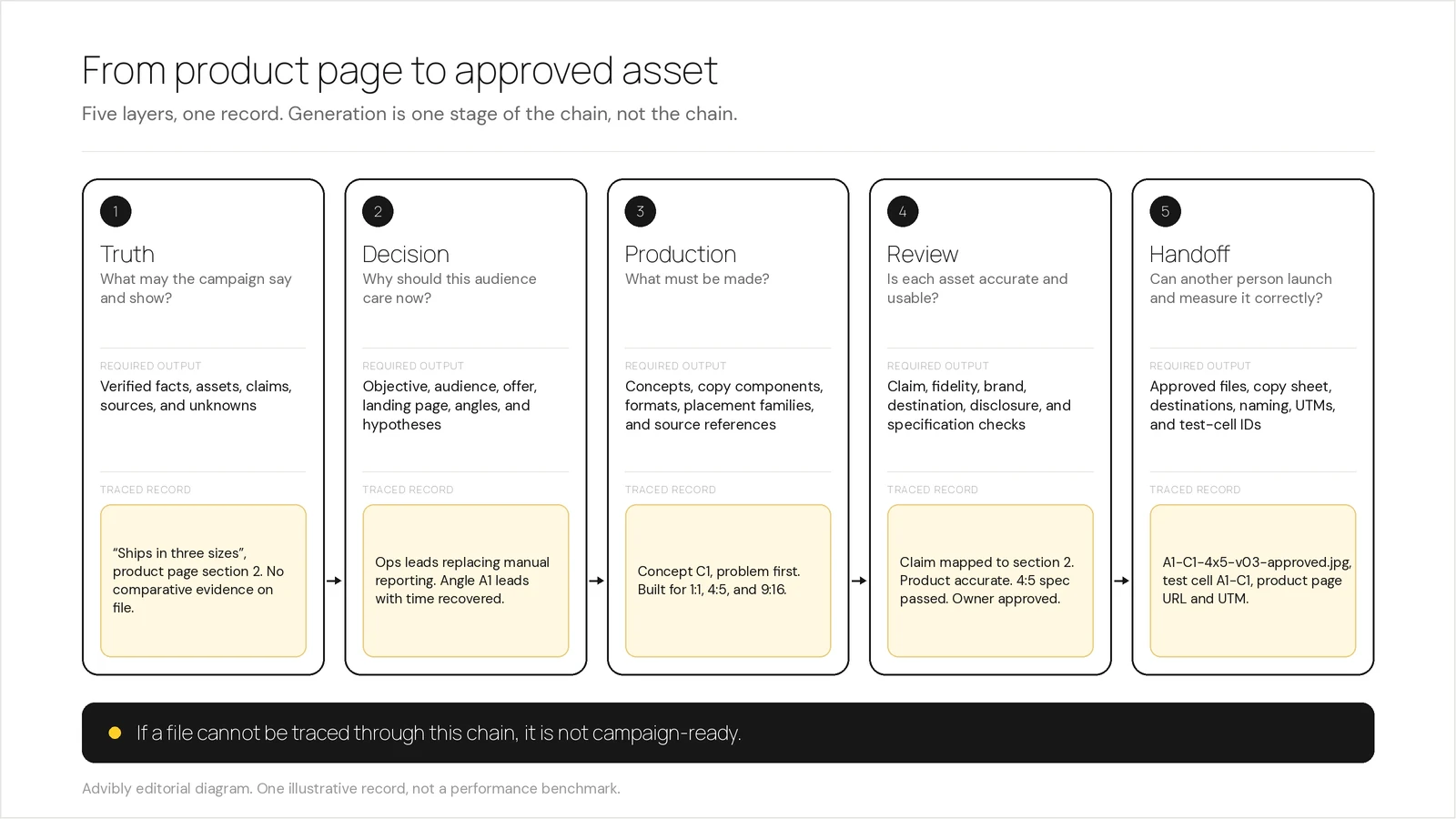
A useful blueprint has five connected layers:
|
Layer |
Decision it controls |
Required output |
|---|---|---|
|
Truth |
What may the campaign say and show? |
Verified facts, assets, claims, sources, and unknowns |
|
Decision |
Why should this audience care now? |
Objective, audience, offer, landing page, angles, and hypotheses |
|
Production |
What must be made? |
Concepts, copy components, formats, placement families, and source references |
|
Review |
Is each asset accurate and usable? |
Claim, fidelity, brand, destination, disclosure, and specification checks |
|
Handoff |
Can another person launch and measure it correctly? |
Approved files, copy sheet, destinations, naming, UTMs, and test-cell IDs |
The traceability chain is simple:
verified product truth → audience and offer → angle → concept → placement adaptation → review → approved asset
If a file cannot be traced through that chain, it is not ready for a campaign package.
1. Build a truth packet before a creative brief
Start by extracting only what the source material establishes. A product page is authoritative for its own published facts, but it is not permission to infer a stronger benefit.
Capture:
- product name, category, features, and supported use cases;
- current price and offer terms, including dates or eligibility;
- approved product images, screenshots, packaging, logos, colors, and fonts;
- evidence available for performance, comparison, or outcome claims;
- exact wording for required qualifications or disclosures;
- claims the campaign must not make;
- facts that remain unresolved.
Use a claim ledger rather than a loose notes document:
|
Proposed claim |
Express or implied? |
Evidence source |
Approved wording |
Status |
|---|---|---|---|---|
|
The product includes feature X |
Express |
Product page |
Exact published wording |
Approved |
|
The product is faster than alternatives |
Comparative |
None supplied |
None |
Exclude |
|
Offer saves 20% |
Express |
Current pricing terms |
Include eligibility and end date |
Review |
This is not legal theatre. In the US, the FTC says advertisers must have evidence for express and implied claims before an ad runs. Other jurisdictions and regulated categories may add further requirements.
When a source field is empty, mark it unknown. Do not let an agent fill the silence with persuasive-sounding fiction.
2. Separate the campaign decisions from the product facts
The truth packet constrains the campaign. It does not choose the campaign.
Add a decision layer with six fields:
- Objective: What should happen after someone sees the ad?
- Audience: Which specific buyer situation is this campaign addressing?
- Offer: What is available now, under what conditions?
- Destination: Which page continues the exact promise in the ad?
- Angle: What distinct, source-backed reason should this audience care?
- Hypothesis: What belief are you testing with that angle?
The hardest field is the angle. Teams often call every visible change a new angle, then learn nothing from the result.
Keep four types of variation separate:
- Angle variant: a different reason to care.
- Execution variant: a different visual treatment of the same reason.
- Placement adaptation: the same concept rebuilt for a different shape or environment.
- Copy component: a headline, description, or other modular text element that a platform may combine with different assets.
A new background color is not a new hypothesis. Neither is a crop. The spreadsheet may be impressed; the experiment will not be.
Give each angle one testable statement. For example: “For operations leads replacing manual reporting, leading with time recovered will attract more qualified interest than leading with dashboard flexibility.” That is a hypothesis. “Blue version” is a filename waiting for supervision.
3. Turn the decisions into a campaign matrix
Use the campaign matrix to expand the set without confusing new ideas with new crops. It tells a person or agent what to produce and how each file relates to the original angle.
Imagine a marketer has one verified product page, approved screenshots, a brand kit, a confirmed offer and destination, and three source-backed angles. The team develops two genuinely different concepts for each angle, then adapts each concept for square, portrait feed, and vertical placements.
The calculation is transparent:
- 3 angles × 2 concepts = 6 core concepts
- 6 concepts × 3 placement families = 18 rendered files
Those 18 files are not 18 independent ideas. They are six core concepts built from three angle hypotheses, each expressed in three shapes. This is an illustrative planning example, not an optimal campaign size or a performance benchmark.
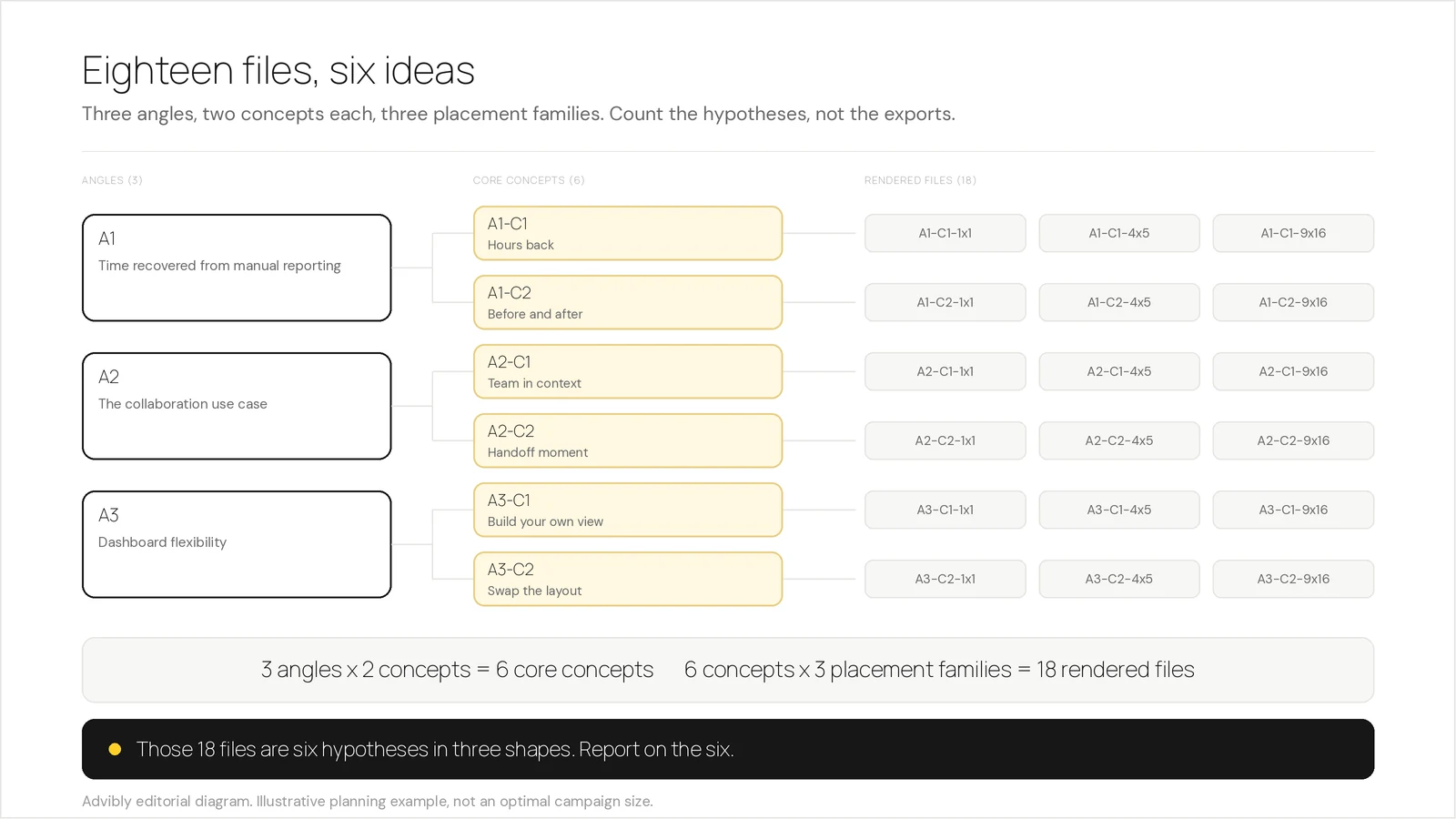
A compact matrix might look like this:
|
Angle ID |
Concept ID |
Hypothesis |
Placement family |
Claim source |
Destination |
Test cell |
|---|---|---|---|---|---|---|
|
A1 |
C1 |
Lead with the manual-work problem |
1:1, 4:5, 9:16 |
Product page section 2 |
Product page |
A1-C1 |
|
A1 |
C2 |
Show the workflow before and after |
1:1, 4:5, 9:16 |
Approved screenshots |
Product page |
A1-C2 |
|
A2 |
C1 |
Lead with the collaboration use case |
1:1, 4:5, 9:16 |
Product page section 4 |
Product page |
A2-C1 |
For every row, also store the audience, offer, primary text, headline, CTA, product identifier, asset filename, review status, and owner.
Design modular components to survive recombination
Some platforms do not serve a fixed ad exactly as you assembled it. Google says Performance Max asset groups can combine images, logos, headlines, descriptions, videos, and other assets across channels. Its responsive display guidance also warns that combinations are assembled automatically, so each component needs special care.
That changes how you write and review:
- a headline must still make sense beside more than one approved image;
- a description should not depend on text visible in only one asset;
- an image should not imply a claim that the paired copy fails to qualify;
- one asset group should retain a coherent audience and theme;
- the product and final URL must remain aligned.
Google’s asset-group documentation describes a concrete continuity failure: an automatically generated video may show a product that does not match the landing page when product selection and the final URL are misaligned. Preserve the product identifier and destination in the matrix so the handoff does not rely on memory.
Adapt concepts; do not merely resize them
A square feed ad, a portrait feed ad, and a vertical story occupy different visual environments. Preserve the concept, but reconsider hierarchy, safe areas, crop, text size, pacing, and CTA visibility for each placement family.
Do not freeze one universal specification table into the workflow. Meta’s Ads Guide varies design and technical requirements by objective, format, and placement. Validate the live specification when producing the final export.
4. Treat campaign-ready as a review state
A finished render is only generated. It becomes campaign-ready after it passes the gates that matter for its destination.
Claim and product review
- Does every express or implied claim map to approved evidence?
- Are price, offer, product name, packaging, UI, and availability current?
- Does generated imagery preserve the actual product rather than inventing controls, packaging, or results?
- Are AI-generated people, demonstrations, or UGC-style scenes described honestly rather than presented as authentic customer evidence?
Creative and combination review
- Is the angle still clear without reading the internal brief?
- Is this a new concept, an execution variant, or only a placement adaptation?
- Can modular headlines, descriptions, and visuals be recombined without contradiction?
- Does each placement preserve legibility and the intended hierarchy?
Destination and platform review
- Does the landing page continue the product, offer, and promise shown in the ad?
- Does the file meet the current requirement for the exact platform, placement, format, and objective?
- Are disclosures present where needed?
- Has the final human owner approved the package before upload or publication?
This gate should reject an asset with a reason, not return it with “make it better.” Useful rejection labels include unsupported_claim, product_mismatch, destination_mismatch, placement_spec_failed, and owner_approval_required.
5. Package the handoff so the campaign remains measurable
The final handoff needs more than a folder of images. Include:
- stable filenames containing angle, concept, and placement IDs;
- approved copy components;
- source product and product identifier;
- destination URL and UTM convention;
- platform, objective, format, and placement;
- test-cell ID and the hypothesis it represents;
- review status, reviewer, and approval date;
- a link to the current platform specification used for validation.
A useful filename such as A2-C1-vertical-v03-approved.mp4 tells the operator what the file represents. The test-cell ID tells the analyst which strategic idea it belongs to. Keep both. Otherwise, reporting will quietly treat resizing as innovation.
When a different workflow is the better choice
The blueprint is not the best production system for every job.
For a video-first workflow, a dedicated URL-to-video product may remove more steps. Creatify says its URL-to-Video workflow can pull assets from a product link, write a script, support avatar selection, and produce a video ad. That is a credible better fit when speed from product link to UGC-style or avatar video is the dominant need. These are vendor-published capabilities, not a hands-on quality comparison.
For a large, changing catalog, use a reliable product feed and the platform’s dynamic product-ad system as the operational base. Bespoke concepts still make sense for launches, hero products, offers, and campaigns where the narrative matters more than automatic SKU coverage.
Use the campaign matrix when you need deliberate angles, coordinated formats, traceable claims, and clean creative learning. Use the narrower or more automated alternative when that is the actual job.
How Advibly fits into the workflow
Give Advibly the product page, usable product images, the audience and the angle. Save the product and brand context once, then use it across the static ad, carousel and video rather than rebuilding the brief for each format.
Advibly is useful here because it can reuse product and brand context while an agent coordinates image and video generation. Its AI image ad generator accepts product, URL, brand-kit, and reference inputs, supports batch variants, and provides multiple aspect ratios and supported output resolutions. Its MCP connection exposes documented tools for image and video generation, brand access, generation retrieval, and credit checks. Advibly also publishes repeatable creative skills for formats including UGC-style ads, explainers, animation, collage motion, and video restyling. If you are assembling the wider system rather than a single campaign, the same context layer feeds ads and social posts from one brand engine.
You can direct this work in the Advibly portal or let a compatible AI assistant coordinate it through MCP. Advibly also supports scheduling and publishing social content to connected accounts, subject to the destination and plan. That is different from launching or managing paid campaigns in Meta Ads Manager or Google Ads. Review product fidelity, claims and the final files before either handoff.
Start with one angle and the formats you actually need. Create the assets, compare them with the product page, and export the approved set. Add the matrix when more concepts or placements make the handoff harder to follow.
Sources
- Google Ads Help: Build an asset group, accessed August 4, 2026
- Google Ads Help: Best practices for responsive display ads, accessed August 4, 2026
- Meta Ads Guide, accessed August 4, 2026
- FTC: Advertising FAQs for small businesses, accessed August 4, 2026
- Advibly: AI Image Ads, accessed August 4, 2026
- Advibly MCP setup, accessed August 4, 2026
- Advibly Skills, accessed August 4, 2026
- Creatify: URL to Video, accessed August 4, 2026