

Choose AI marketing agents by the work they finish: a planner returns a usable plan, a copilot helps you produce the work, and an executor uses tools to complete a defined job. The same product can play different roles. Creating a video doesn't prove that it can publish the video, update your CRM or manage paid campaigns.
For brand content, Advibly connects product and brand context to images, videos, carousels, social publishing and post-publication analytics. You can operate it in the portal or through a compatible AI assistant. If your job also requires email, SEO execution or paid-ad buying, evaluate that wider scope separately.
A separate product-source example you can inspect
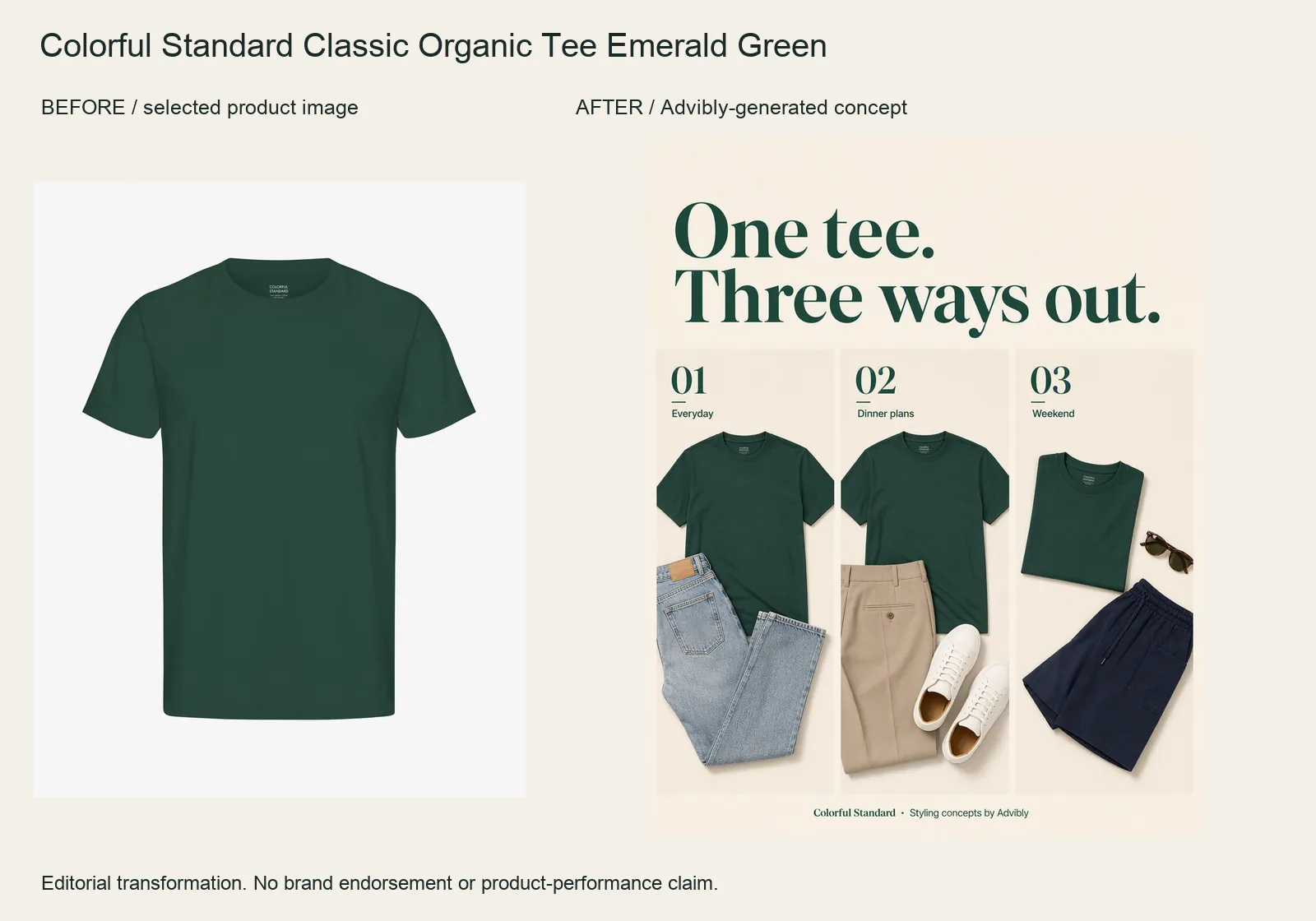
The Emerald Green tee becomes a three-panel styling collage. Jeans, tailored trousers and shorts create three different outfit ideas around the same plain crewneck.
Keep the reference tee’s color, cut and lack of print fixed. Request distinct styling panels rather than inventing three new SKUs. Other clothes are styling props, not an offered bundle; the generated arrangements do not prove physical fit.
Colorful Standard Classic Organic Tee Emerald Green product source · Open the finished editorial image
This new example was generated through Advibly’s native image tool from the linked product reference. It is an output example, not proof of a Claude or Codex skill session, a full campaign handoff or social publication. The older creative family below remains a separate demonstration.
What completed creative work looks like
Here is an actual Advibly-generated campaign image, not a sample calendar or a proposed prompt. Its archived brief specifies an unbranded peach can, a studio pedestal, water and paper shapes. The output gives you something concrete to judge: subject, composition, product continuity and suitability for adaptation.

Existing 1152 × 2048 Advibly campaign image. The unbranded can, orange circle, peach slices and paper arcs are generated concept art, not a photographed product.
Actual Advibly-generated concept creative, not a real beverage, customer campaign or measured result. The examples establish output and creative choices, not a recorded Claude or Codex session.
Use this distinction when buying an agent: a plan is valuable if planning is the job. If production is the job, require the file. If distribution is included, require a separate result for each destination. This example proves creative output only, not a published social campaign.
Key takeaways
- Compare the complete job, including retrieval, revisions and distribution, rather than one attractive generation.
- A planner can be the right choice. More delegated authority isn't automatically better.
- Price proof assets, retries, assembly and connected accounts before approving a production run.
- Confirm each destination separately. One failed post should not cause duplicate posts on successful channels.
Classify the workflow, not the company
Use these three roles as an editorial buying framework, not an industry certification or maturity ranking.
|
Role |
What you should receive |
|---|---|
|
Planner |
A decision-ready strategy, calendar or brief with visible assumptions. You still execute it. |
|
Copilot |
Useful copy, layouts or analysis while you steer production and transfer the work. |
|
Executor |
Completed, retrievable artifacts from delegated actions, with checks against the brief. |
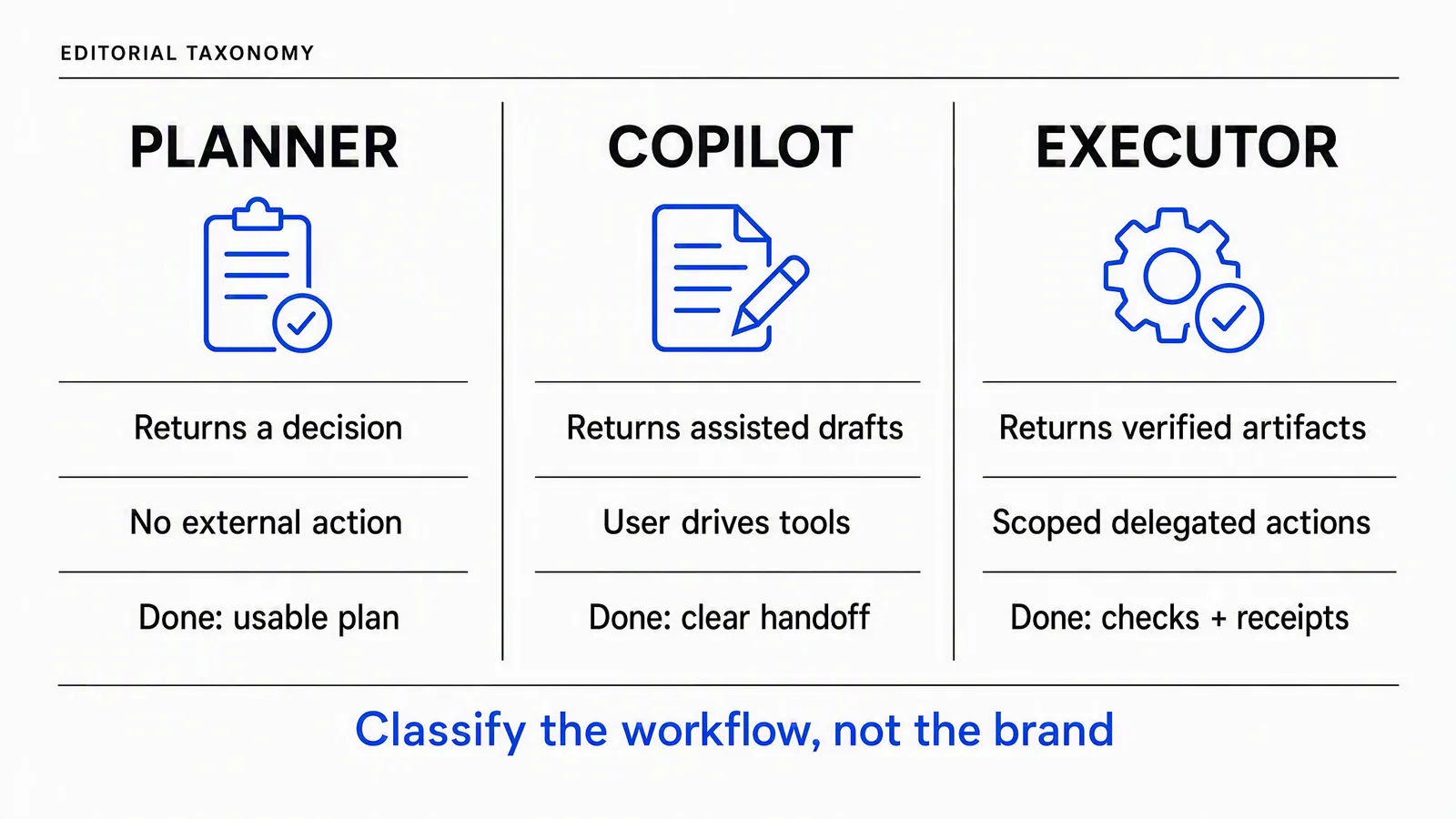
The roles describe responsibility for a particular job. A planner can use research tools; “no external action” means executing the marketing plan isn't part of its required delivery.
Agentic marketing becomes useful when that responsibility is explicit. “Help with our launch” could produce anything from ideas to public posts. “Produce one reviewed vertical feature video and a four-slide carousel, then prepare two posts for approval” is a job you can inspect.
The full chain is product truth, saved context, a production method, creative tools, review, asset retrieval and optional distribution. Check the handoffs between those stages. A system that stops at a generation ID still needs someone to retrieve and inspect the file.
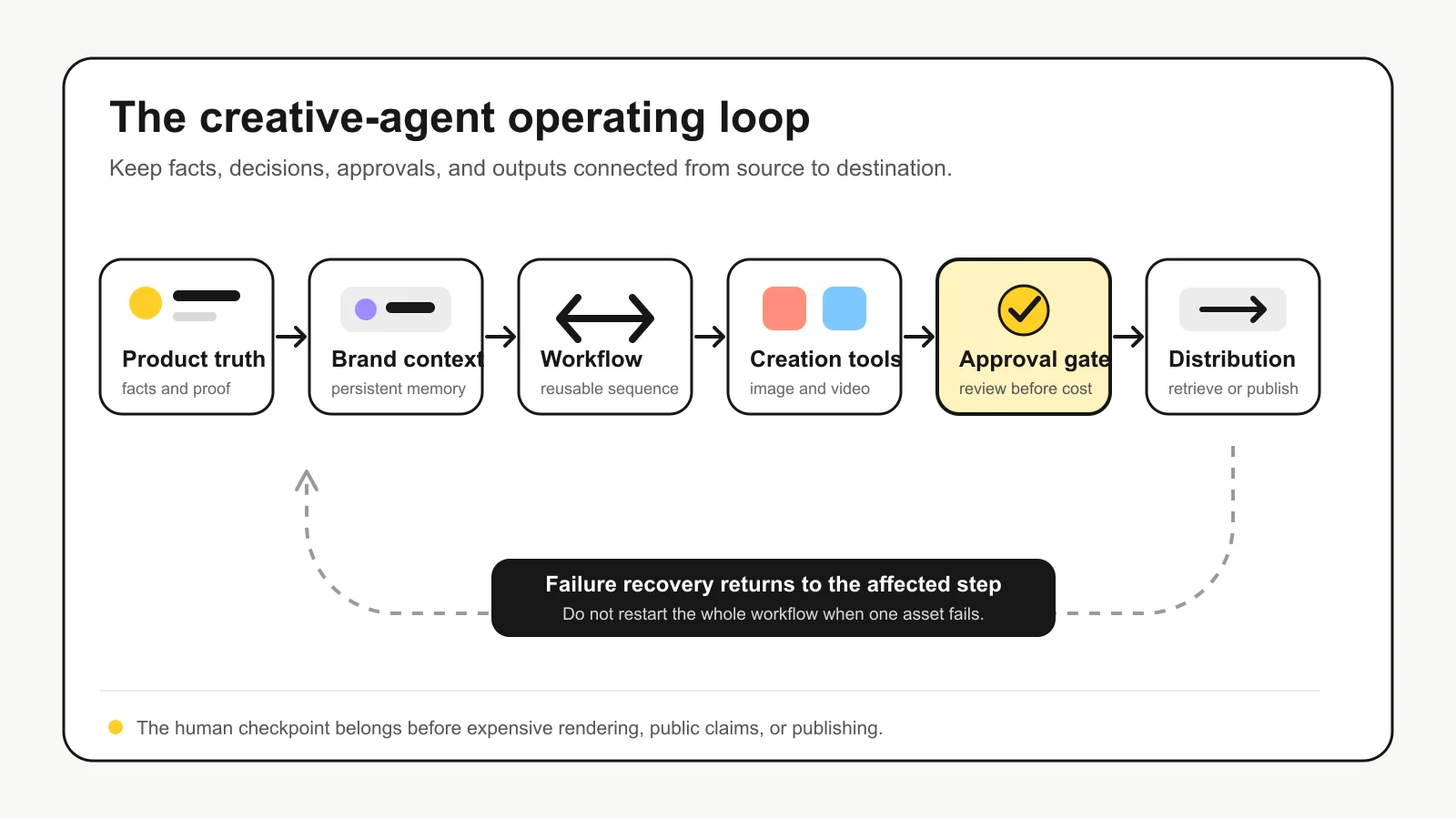
Editorial operating model. Approve paid work before generation and the finished content before public release; the diagram's single approval box doesn't replace those separate checkpoints.
Build a shortlist around your actual marketing job
The following fit distinctions come from current official product information checked on September 12, 2026. They are not scores for output quality, reliability or return on investment. Where a requirement isn't established by the reviewed material, ask the vendor to demonstrate it rather than assuming it is absent.
Advibly: product-led creative and social publishing
Consider Advibly when your source material is a website, app listing, store, screenshots or product photos, and you want that context carried into campaign assets. Its scope includes static images, UGC-style videos, explainers, carousels, social scheduling, publishing and analytics.
Saved brand context and reusable creative methods are useful when an existing assistant is coordinating the work through Advibly MCP. You can also use the portal without an agent connection. This isn't a claim that Advibly operates your CRM, email campaigns or paid-ad budget.
Pletor: custom production workflows
Pletor's MCP workflow documentation describes agents passing context and parameters into workflows built in Pletor. Its examples connect production with other sources and destinations through orchestration.
Evaluate it when you want to design reusable pipelines around your own stack. Ask who maintains those pipelines, which integrations the agent needs separately and how failed outputs are recovered. The linked examples aren't proof that your own stack is already connected.
Higgsfield: agent-accessible media creation
Higgsfield's current agent page presents image and video creation through its ChatGPT plugin, alongside MCP and CLI routes. It also shows skills for creator ads, faceless content and motion design.
Consider it when creative-model access and media workflows are central. Test your required brand-context persistence, asset retrieval and downstream publishing as part of the same brief. Don't assume a missing mention of a feature on this page proves the product lacks it.
Helena: a broader cross-channel remit
Enrich Labs' Helena describes SEO content, email, social, paid-campaign operation and reporting. That is a wider proposed responsibility than a creative-production layer.
Evaluate it when those jobs genuinely belong in the same purchase. Ask for the exact integrations, review settings and budget authority you need. Vendor descriptions of autonomous operation are not independent proof of reliable performance across your accounts.
Predis.ai: a dashboard-led social workflow
Predis.ai's scheduling product brings content creation and scheduling into one app and calendar. That makes it relevant when your operator wants to plan and prepare social content in a dashboard.
If an agent-callable interface is essential, test the current integration route instead of treating the dashboard as equivalent to MCP. Conversely, don't make MCP a requirement when your team would rather work directly in the calendar.
Ask five questions before granting access
Role, knowledge, actions, guardrails and channels form a compact buying test. Apply them to one job, not the vendor's entire feature list.
|
Question |
Evidence to request |
|---|---|
|
Role: what will it finish? |
Named files or decisions, quantity and stopping point. |
|
Knowledge: what does it know? |
The selected product, current source assets and offer version. |
|
Actions: what can it do here? |
Available account-specific tools and a completed representative action. |
|
Guardrails: what happens at a boundary? |
Spend limit, approval checkpoints and a failed-step recovery example. |
|
Channels: where does the work go? |
The intended connected account, supported format and delivery or publication state. |
Persistent context can preserve an obsolete offer as easily as a correct one. Ask the operator to show the source it used. For multi-brand work, include a check that the run uses the right client's screenshots, logos and account destinations.
MCP is useful infrastructure, but it is not the whole operating system. The official architecture documentation describes context exchange and callable primitives, not how an application should judge a campaign. Its authorization guidance addresses protected-resource access. Being authorized to call a tool does not approve a claim or public release.
Test one source-to-output job before a whole marketing remit
Ask candidates to turn your approved product image into one studio concept and one distinct campaign angle. Keep product facts, reference and output format the same. Require written directions first, one proof next, and a bounded revision allowance. This is a recommended evaluation, not a matched vendor benchmark.
The holiday image below illustrates the kind of change worth asking for. The existing prompt keeps the peach-can design but changes the setting to a lounger, peach raft and parasol. The output is an actual creative variation; the scene is fictional and does not prove the product works in water.

A second existing Advibly output: the peach-can design on a miniature lounger under a parasol. This is a surreal holiday concept, not a real product-use demonstration.
A useful executor returns the selected files and reference relationships. A copilot may help you build and choose interactively. Neither needs permission to run your paid-ad budget to finish these assets.
Add motion only when it changes the message
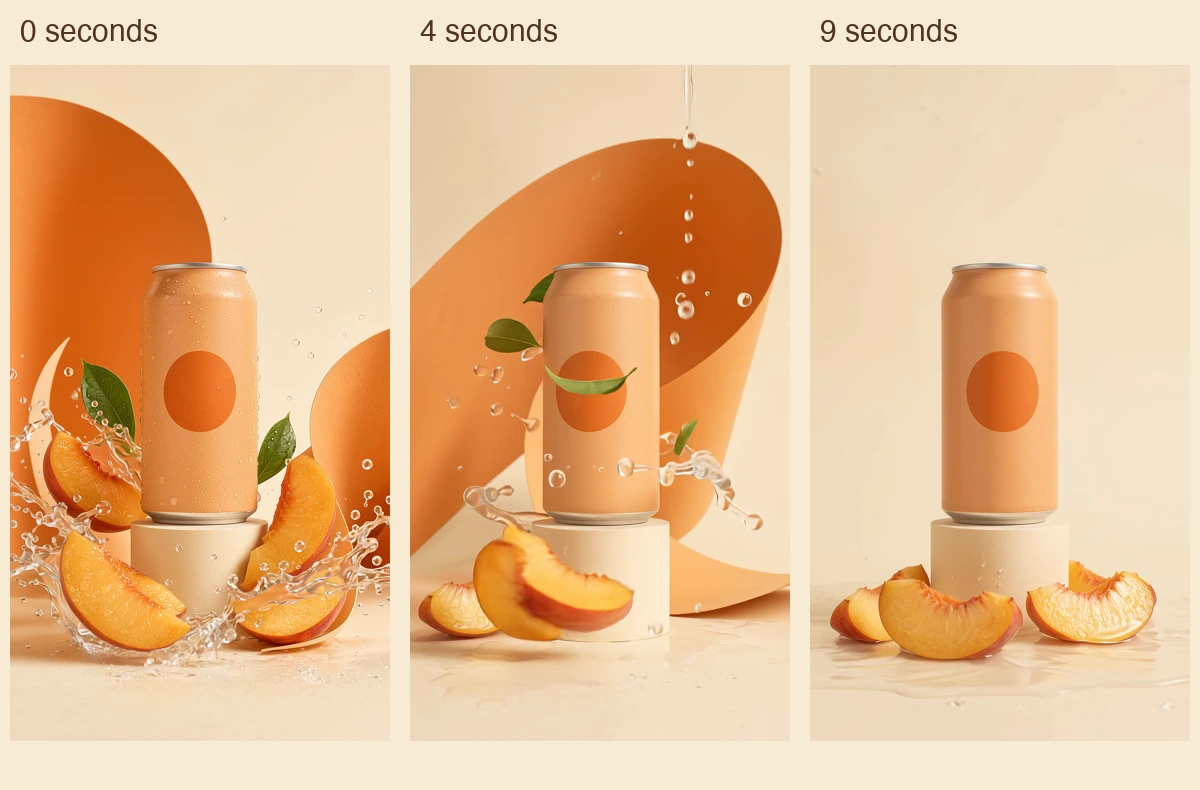
Actual frames from the existing 1080 × 1920 animation at 0, 4 and 9 seconds. Picture unchanged; audio removed for this example. No TikTok interface or campaign-performance result is shown.
Watch the 10-second peach-can animation (silent MP4)
The associated animation uses the campaign image as its visual starting point and develops the splash into a final hero hold. It shows production continuity, not evidence of who operated the client. Its original generated audio did not meet the no-speech instruction; this educational copy removes audio. That failure is a reason to include playback in acceptance, not to reject every unaffected asset.
Price the full production sequence
Ask for generation, corrections, assembly, subscription requirements and distribution separately. A quote for one successful clip cannot price an assembled film plus a carousel and posts.
Advibly's monthly pricing page, checked September 12, lists Create at US$29 with 30 monthly credits and Publish at US$59 with 40 monthly credits. Publish includes up to five brands and ten connected social accounts. The page describes displayed output counts as estimates, not fixed entitlements. Check the current selected model and settings before committing your run.
For a different example, Advibly's public five-shot UGC recipe documents one creator image, five storyboard frames, approval, five eight-second clips and one composition. This is a documentary count, not a hands-on benchmark:
1 creator image + 5 frames + 5 clips + 1 composition = 12 core creation/render operations.
5 clips × 8 seconds = 40 nominal source seconds before editing.
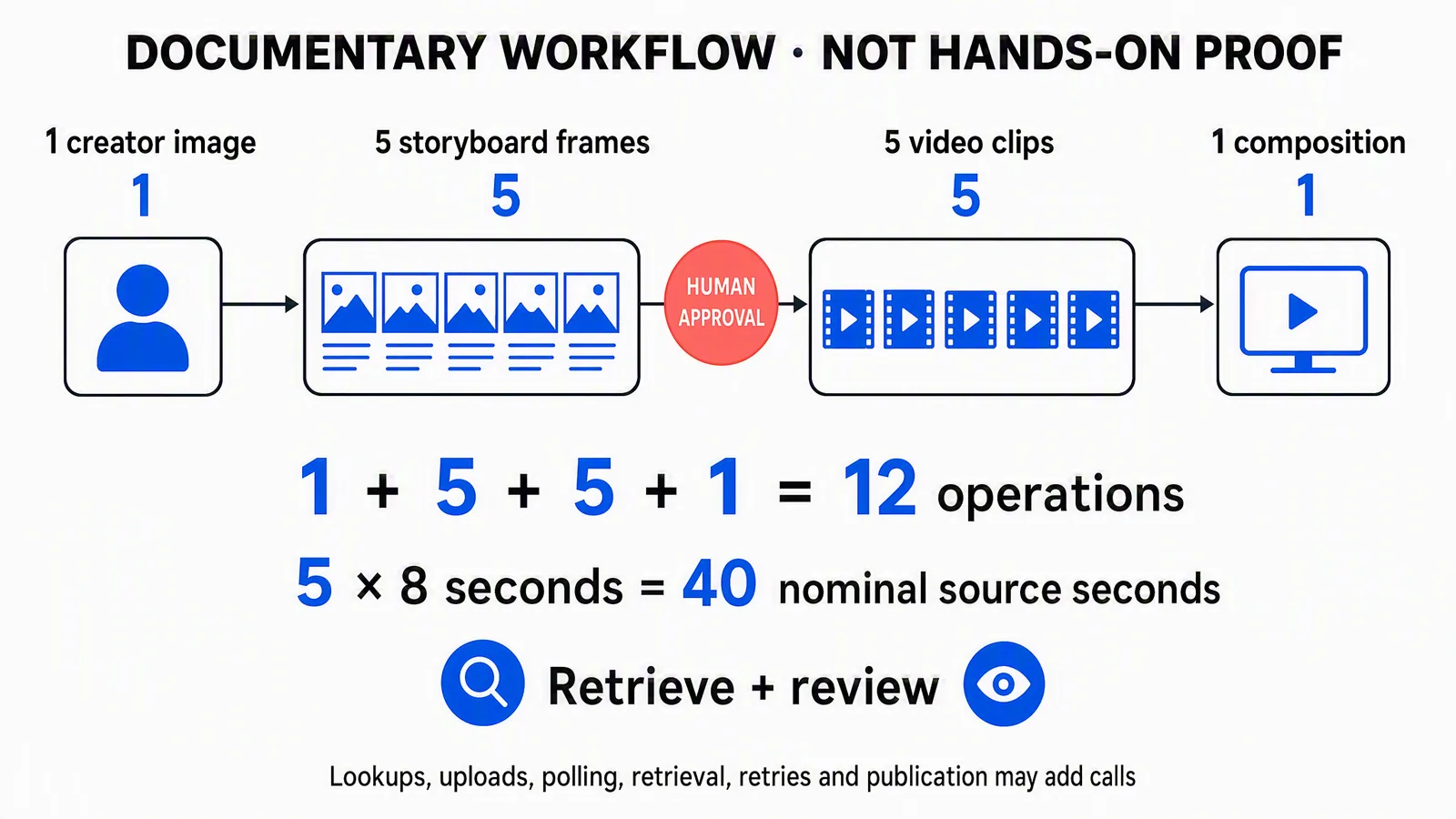
Documentary workflow, not a tested result. This five-shot recipe is separate from the shorter TrailNote evaluation brief; lookup, polling, retrieval, retries and publishing can add calls.
The recipe uses GPT Image 2 for images and Gemini Omni Flash for clips. Inspect and approve the storyboard before rendering video. Check the resulting voice, product details and transitions during final assembly rather than assuming matching reference images guarantee continuity. A synthetic presenter must not be passed off as a real customer's experience.
A useful budget has an initial production allowance and a bounded correction reserve. If one frame and its dependent clip need replacement, count both. Keep accepted siblings, and ask for approval before exceeding the reserve. Parallel execution changes waiting patterns, not how many generations were requested.
Test recovery without creating a public mess
In a review-only test, reject one asset for a specific reason while accepting the others. For instance, reject storyboard C because it shows an invented control; preserve A, B, D and E. Ask for a corrected C2 tied to the genuine product source.
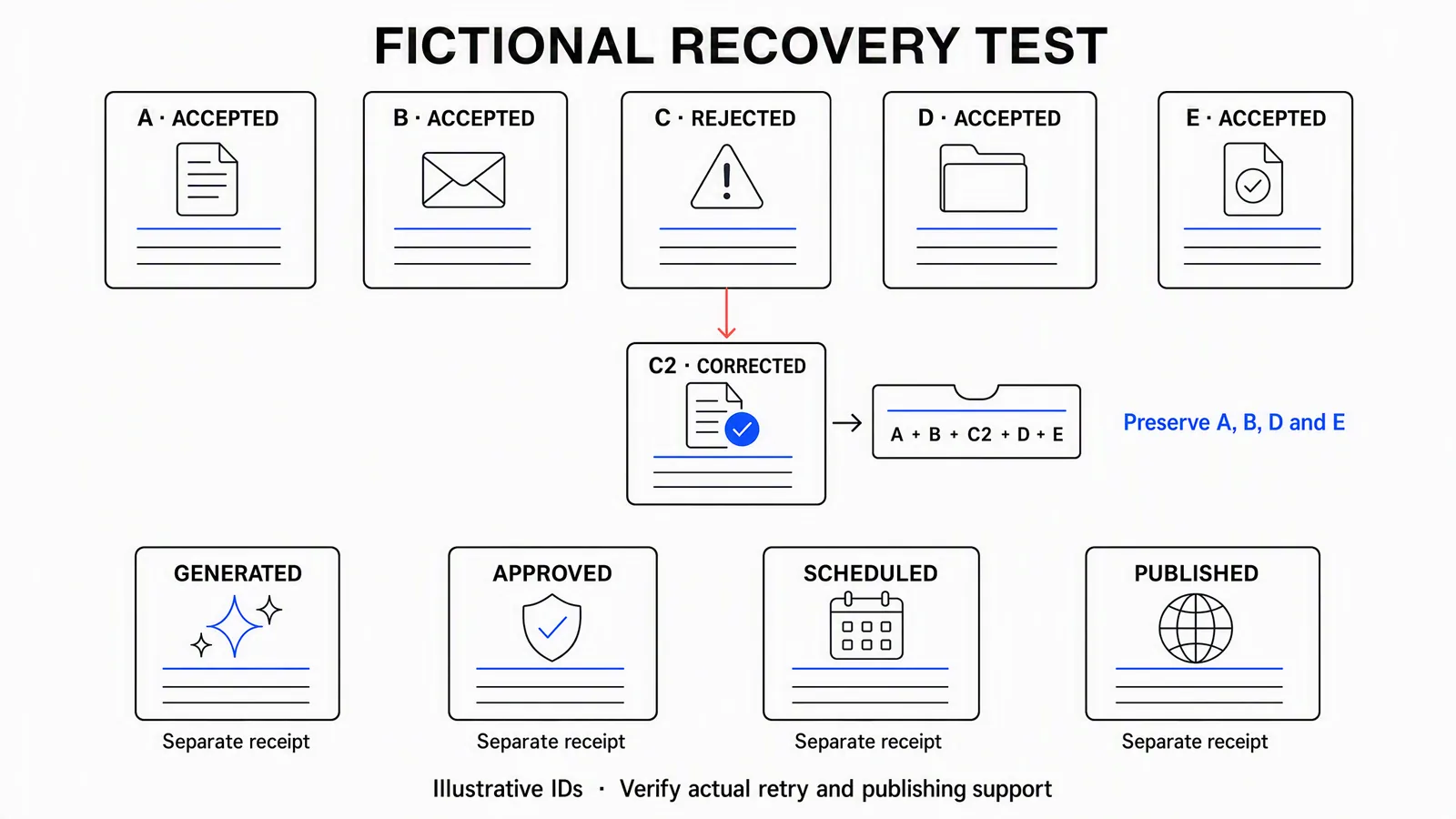
Illustrative labels, not actual job IDs. Use the platform's real references when running the test and verify that the selected route supports the recovery method.
The test passes when the agent identifies the defect, retains accepted work, returns the replacement and updates the final selection. It fails if it silently changes the approved claim, reruns everything or says “fixed” without returning a usable file.
Distribution needs a different recovery rule. If Instagram succeeds and LinkedIn fails, inspect the failed destination's status before resubmitting. If the status is uncertain, reconcile it first. A blind retry can create a duplicate. You shouldn't need to regenerate the approved video or repost to the successful channel.
These are operator acceptance checks, not a claim that every product has native reviewer roles, resumable jobs or all the suggested record fields.
Publication needs evidence of its own
After approving a real final asset, select the intended connected account, destination-specific caption, time and supported format. Advibly exposes social creation, scheduling and post-status tools. Generated, approved, scheduled and published are different states. Creating this peach image did not authorize or demonstrate a social post.
For Instagram, a separately configured keyword comment-to-DM flow can deliver the link promised in the caption. It is not cold outreach or a universal messaging bot. A configured trigger also does not prove that a particular person received the message.
If one destination succeeds and another fails, inspect the failed post before resubmitting. Keep the successful post and approved media. Review available analytics against the campaign's purpose; engagement is not proof of sales, and publishing tools are not autonomous paid-budget management.
Generate your first creatives for free. Start with your own product source and starter credits; output quantity depends on the model and settings. Generation and social publication are separate decisions.