
To create 30 days of social media content with AI, start with one verified brand brief, choose the questions your posts will answer, and map those questions to a manageable mix of formats. Generate and review a small first batch before filling the rest of the calendar. Schedule completed posts, not ideas that happen to have dates beside them.
A month of content does not have to mean 30 separate posts. The worked plan below uses Advibly's own documented product capabilities to plan 12 Instagram posts across 30 days: five statics, four carousels and three Reels. It includes usable draft copy and production briefs. It is an example plan, not a report that 12 media assets were generated, approved or published.
The brief: explain one product to one reader
For this example, the reader is a social media manager who repeatedly moves from product research to an AI generator, then to a scheduling tool. The product is Advibly: reusable brand context, image and video generation, carousels and scheduling to supported connected accounts. The goal is to help the reader understand that workflow and try creating from their own product source.
- Source: the current product page, real product screenshots, approved logo and brand files. Use the actual screenshots for any interface demonstration; do not invent controls.
- Messages: start from the product; reuse the brief; choose a format that explains the idea; review the output; schedule to the correct account.
- Proof: show the real input and resulting asset only when both exist. A production brief is not a screenshot, finished video or customer result.
- Boundaries: no guaranteed sales, engagement or time savings; no invented testimonials; no claim that a month of generation or publishing is free.
- Next step: try creating from one product source. Offer scheduling only with the relevant connected-account and plan requirements.
A concrete 30-day content plan
This calendar deliberately leaves gaps for replies, production and learning. It is a chosen cadence, not a platform recommendation. Each row is one planned Instagram post, even when a carousel needs several slide images.
|
Day |
Format |
Question or angle |
What must be made or supplied |
|---|---|---|---|
|
1 |
Static |
What can one product source become? |
A source-to-formats graphic and introductory caption |
|
3 |
Carousel |
What belongs in a useful brand brief? |
Five slides: source, facts, audience, visual rules, review |
|
5 |
Reel |
How does a product source become an asset? |
Real source, actual generation output and screen recording |
|
8 |
Static |
Why does generic prompting miss the product? |
An annotated brief excerpt; no invented product comparison |
|
10 |
Carousel |
How can one feature support several angles? |
Problem, mechanism, objection and demonstration slides |
|
12 |
Static |
What must be checked before a post goes out? |
Readable product-fact, rights and crop checklist |
|
15 |
Reel |
How can an assistant run a creative workflow? |
Actual connected-client recording and completed output |
|
17 |
Carousel |
What is the difference between planned and published? |
Brief, draft, approved asset, schedule and live-result slides |
|
19 |
Static |
Which source should a brand start with? |
Website, app listing and storefront input examples |
|
22 |
Reel |
How do approved assets move into scheduling? |
Real supported account and format walkthrough, with private data removed |
|
26 |
Carousel |
What changes when one idea moves to another channel? |
Format and caption adaptations, not identical cross-posts |
|
30 |
Static |
What should the reader make first? |
One-product, one-asset invitation with the starter-credit boundary |
The mix adds up to 12 posts: 5 statics + 4 carousels + 3 Reels. It does not add up to 12 generations. Each carousel may need several images; a Reel may need multiple clips, narration and assembly. Variants and rejected outputs add work and credit cost without adding a finished post.
Three draft samples from that brief
These are AI-written copy samples for the plan, not screenshots or evidence of media generated inside Advibly. They show the level of specificity to request before production.
Day 1 static: start from the product
On-image line: “One product source. More ways to explain it.”
Caption: “Your website, app listing or storefront already contains the facts your creative needs. Use that source to build reusable brand context, then create an image, carousel or video around one clear idea. Start with the product—not another blank prompt.”
Production brief: create a simple source-to-formats composition using the approved Advibly identity. Show labelled format cards, not fabricated app screens. Review the final text and logo before using it.
Day 3 carousel: the brief before the prompt
- “Before you ask AI for 30 days of content, give it these five things.”
- “The source: your real product page, listing or screenshots.”
- “The facts: what the product does, who it helps and which claims are supported.”
- “The direction: audience, voice, visual rules and the question this post answers.”
- “The review: check the product, text, rights and final crop before scheduling.”
Caption: “A content calendar cannot fix a missing brief. Save the product facts once, then reuse them when you create the next asset. Update that context whenever the product or offer changes.”
Day 5 Reel: show the result, not only the prompt
Opening text: “A content idea is not a finished asset.”
Sequence: show the real product source, the brief, the generation workflow and the completed creative. End with the reviewed asset large enough to inspect. If the output is still processing or needs correction, the Reel is not ready to make this demonstration.
Caption: “The useful AI workflow ends with something you can review and use. Start from product context, create the asset, inspect the result, then decide where it belongs in your calendar.”
Produce a small batch before committing the whole month
Start with the first static, carousel and Reel. In Advibly, use the saved brand context and a suitable format or skill to generate the required components. Retrieve completed outputs and inspect them together. Fix a shared problem in the brief before repeating it across the remaining posts.
Keep a production sheet with separate columns for planned slot, copy draft, completed media, approved version and scheduled post. At the start of this example, there are 12 planned slots and three draft-copy samples—not 12 completed assets. Move a row to completed media only when every required file opens and is ready to review.
Set a credit budget before generation. Check the actual price of each selected model, format and setting, and allow for revisions. Starter credits are a way to try the product, not an entitlement to a month of content or free publishing. A generation workflow can take multiple steps even when one initiating prompt describes the whole month.
Hand completed posts to the scheduler
For each approved row, keep the final file or generation ID, caption, destination account, format, date, time and time zone together. Confirm that the connected account and publishing plan support the chosen format before scheduling it through the Advibly social media scheduler. AI assistants can use the current native MCP post tools as well as the portal workflow.
Set the target and scheduled time explicitly: the native post tool can otherwise target all connected accounts and publish immediately. Save the returned scheduled-post identity, then verify publication after its due time. An idea in a calendar, a completed asset and a published post are three different outcomes.
For the Instagram-specific creation and publishing steps, follow how to automate Instagram posts. For a Facebook adaptation, use the separate Facebook Page scheduling guide. Adapt the caption, crop and destination rather than counting one unchanged upload as several new ideas.
Keep the brand memory and angle map useful next month
The calendar above is only one example. The reusable part is the source-to-angle-to-asset method. Use the following brand and creative guidance to build the next plan around your own product rather than copying this publishing cadence.
What a brand creative engine actually is
A creative engine is not an image generator, a scheduler, or a prompt library. It is the connective tissue between five pieces of work.
- Brand memory: product facts, audience, offer, visual style, tone, claims, proof, and banned language. This is what a brand kit and a structured brand profile are for.
- Angle map: the problems, desires, objections, use cases, and moments that deserve a creative test.
- Asset factory: repeatable generation of statics, UGC-style videos, product visuals, carousels, and platform-specific posts.
- Distribution calendar: a plan for where each asset goes and why.
- Learning loop: performance notes that make the next batch sharper than the last.
The goal is not to replace strategy with automation. It is to stop treating every new ad as a blank page.
Step 1: Build a source of truth before you generate anything
Weak AI creative almost always starts from a weak brief. Give a model nothing but "make me a TikTok ad for this product" and it will fill the missing strategy with the average of everything it has seen.
Start with a living brand brief covering five things:
- The product: what it is, how it works, what makes it different, and what people misunderstand about it.
- The buyer: pains, goals, objections, triggers, use cases, and the language they actually use.
- The proof: reviews, before-and-after moments, founder story, ingredients, specs, outcomes, guarantees, press, demos.
- The taste: colors, typography, composition, camera style, creator style, pacing, vocabulary, and examples of what feels off-brand.
- The rules: claims you can make, claims you cannot, required disclaimers, sensitive categories, compliance guardrails.
Here is a test that works. Hand the brief to someone outside your company. If they can write a decent product page, a short ad script, and three plausible objections from it alone, the brief is strong enough to generate from. If they cannot, no amount of prompt craft will rescue the output.
Step 2: Turn brand context into an angle map
A creative angle is not a caption. It is the reason a specific person should stop, care, and believe. Strong brands do not only test new visuals. They test new explanations of value.
For each product or offer, build angles across six buckets:
- Problem: "I keep buying X and still have Y problem."
- Outcome: "Here is the state this gets you to."
- Mechanism: "Here is why this works differently."
- Objection: "You might think X, but the real answer is Y."
- Moment: "This is the exact situation where it becomes useful."
- Proof: "Here is the demo, result, quote, or comparison that makes it believable."
For a supplement brand that might become a morning routine, a taste objection, an ingredient mechanism, subscription convenience, founder credibility, and a travel use case. For a SaaS product it might become spreadsheet pain, speed to setup, a comparison against the manual workflow, a security objection, team handoff, and proof from a real dashboard.
Step 3: Generate in batches, not one-offs
One-off generation creates a false sense of progress. A single good image is not a campaign. A useful batch carries enough variation to learn from and enough structure to compare.
Use the 12-post example above as a starting plan, then adjust the mix to your actual production capacity. Count each carousel and video by its required components before estimating the cost.
- Group assets by the question or angle they answer.
- Generate a small representative set before repeating the style.
- Keep variants and rejected generations separate from completed posts.
Keep the variables clean. Change the hook, visual style, claim, audience, and offer all at once and you will not know why anything worked. Batch by angle first, then vary format and treatment inside the angle. Prebuilt creative templates help here because they hold the format steady while you swap the idea.
Step 4: Match creative to the job of each platform
Cross-posting is fine. Lazy cross-posting weakens the system. One idea can travel across channels, but it should be translated into the native job of each feed.
- TikTok and Reels: lead with the hook, the visible product moment, or a creator-style demonstration. Move fast, explain less.
- LinkedIn: turn the same angle into a business problem, a founder note, a customer insight, or a sharp point of view.
- YouTube Shorts: favour tutorial, comparison, and demonstration structures that work without context.
- Instagram feed: make the asset inspectable. Product detail, lifestyle scene, social proof, or a tight carousel.
- X and Threads: compress the point into a useful observation, then attach proof or a visual when it helps.
A calendar should not just say "post daily". It should say what each post is trying to learn or reinforce. That is the difference between a publishing schedule and a plan.
Refresh the next batch from useful feedback
Review audience questions, useful replies, profile or site visits and the business outcome the campaign was meant to support. A weak post may have the wrong angle, insufficient proof or an unreadable presentation; making more of it is not automatically the answer.
Watch for four refresh triggers:
- Which questions did people ask after seeing the post?
- Which product explanations earned relevant interest?
- Which claims, screenshots or offers have changed?
- Which assets need a new angle rather than another cosmetic variation?
A good refresh queue holds three kinds of work: new hooks for proven angles, new visuals for proven hooks, and new angles drawn from customer questions.
Background: why the production method matters
These earlier industry and search studies provide context for the brand-memory approach. They are not results from the example month above and do not measure Advibly performance.
AI adoption does not tell you whether your next post is useful
IAB’s report published on 14 July 2026 says nearly two-thirds of US video ad buyers use generative AI for digital video creative. It estimates that one-third of their ad assets will use GenAI in 2026, up from one-fourth in 2025, with 43% projected for 2027.
The 2025 edition had forecast a 40% share for 2026. The figure compares those editions; the label “2026 actual” should be read as the July 2026 estimate, not a final full-year measurement.
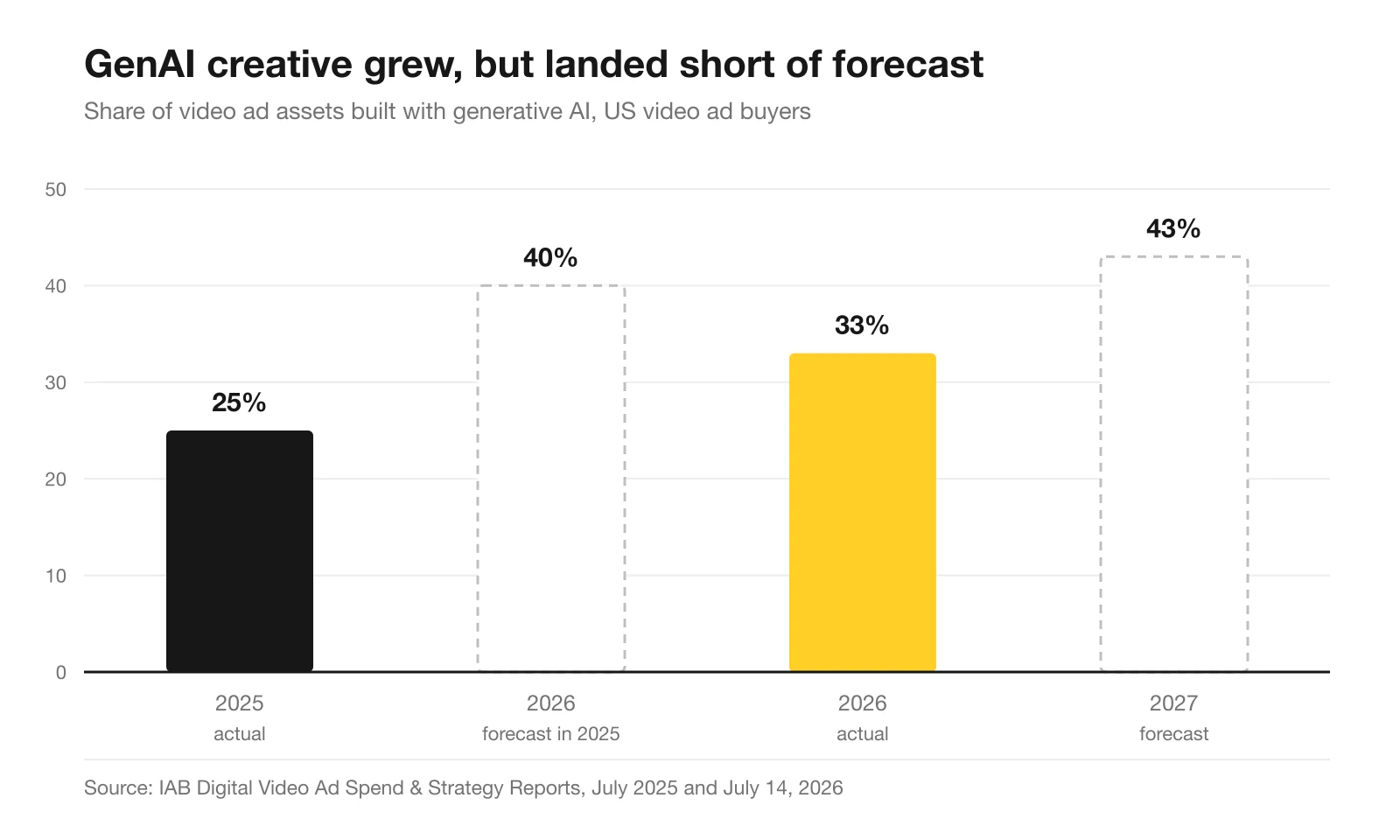
The comparison does not prove why adoption changed. For a small content team, the useful takeaway is narrower: access to a generator does not settle the brief, review, rights or scheduling work.
IAB also reports that 96% of smaller buyers were not satisfied with their current level of GenAI use for creative ad production. More than four in ten wanted more proof of performance and easier integrations. Those are buyer concerns, not evidence that any one tool solves them.
Creator-style content became performance infrastructure
IAB’s creator-economy report, announced on 20 November 2025, projected $37 billion in US creator ad spend for 2025, versus $29.5 billion in 2024 and $13.9 billion in 2021. The chart’s 2025 endpoint is that projection, not a verified final spend figure.
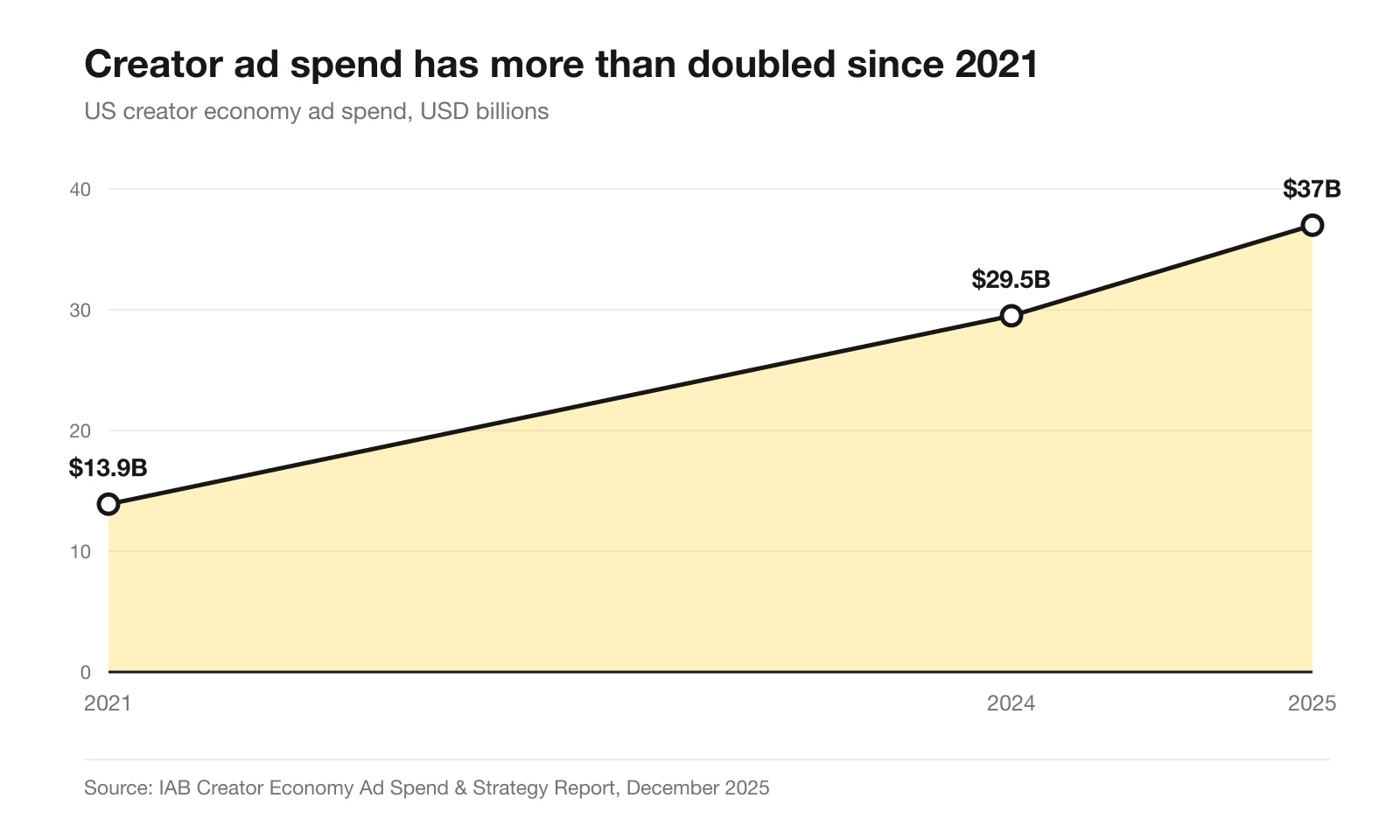
The same IAB announcement reports that 95% of advertisers had concerns about AI in creator marketing, with loss of human connection the leading concern. Keep generated creators distinct from real customers and do not manufacture testimonials.
That is why the example Reel requires a genuine product demonstration rather than a synthetic customer endorsement.
Search turned answer-first
When Google shows an AI summary, users click through to a traditional result on 8% of visits, against 15% when no summary appears. Clicks on links inside the summary itself are rarer still, at 1% of all visits. Pew Research Center produced those figures from a browsing panel of 900 US adults covering 68,879 Google queries in March 2025.
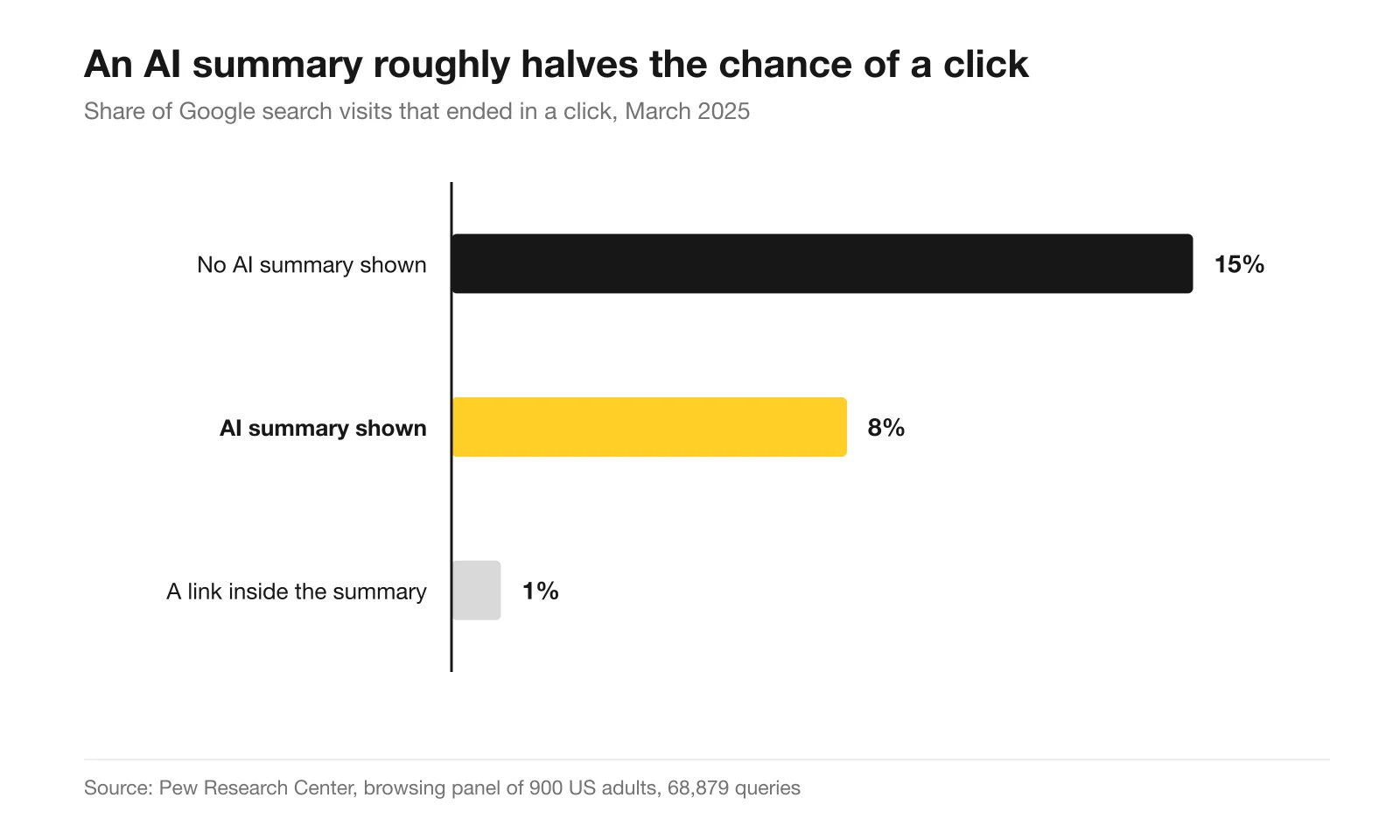
Pew’s browsing-panel observation is not a causal test or a guarantee of AI-search visibility. Keep your product explanations clear and reusable, but do not count social posts as evidence that a search engine will cite the brand.
Use the research as context. Judge your own content plan by the assets actually completed, the posts actually published and the relevant audience response—not by industry adoption rates.
Start with the first three posts
Build the source brief, choose one static, one carousel and one Reel, and complete that small set before committing the rest of the month. Start creating with Advibly from a website, app listing or storefront. Generation uses credits; scheduling and connected accounts depend on the current plan. The goal is a repeatable month of useful content, not a calendar full of unfinished promises.
Sources
- IAB, 2026 Digital Video Ad Spend & Strategy Report, 14 July 2026. GenAI share of video ad assets, buyer adoption, and smaller-buyer satisfaction.
- IAB, 2025 Digital Video Ad Spend & Strategy Report, July 2025. The earlier 40%-by-2026 forecast used in the comparison above.
- IAB, U.S. Digital Video Ad Spend to Surpass $80B in 2026, 5 May 2026. Market size and growth context.
- IAB, Creator Economy Ad Spend & Strategy Report, November 2025. Creator spend, AI use, and authenticity concerns.
- Pew Research Center, Do people click on links in Google AI summaries?, 22 July 2025. Browsing panel of 900 US adults, 68,879 queries, March 2025.