

Ecommerce content marketing turns a product into useful answers that help people decide whether to buy. Start with one customer question, then make an image, a short demonstration video, a carousel and social copy that answer different parts of it. Keep the same product facts across the set, but give each format a different job.
For example, a shopper considering a travel backpack needs to see what fits, how it opens and who it suits. A product photo can show the packing layout; a video can demonstrate access; a carousel can explain the choice. An ad invites the next action, while the educational post should be useful even to someone who does not buy.
A store example: teach the use, not just the product name
Shopify's ecommerce content marketing guide points to Beardbrand's barber videos as an example of useful education linked to products without a hard sell. Beardbrand's Tree Ranger Beard Oil page also includes product imagery and an instructional video titled All About the Beardbrand Utility Oil and How to Use It.
That is an observable source-and-education example, not an Advibly customer result. A store could adapt the same approach into a product-image ad, a short how-to clip and a social carousel answering a usage question. Those adaptations are our suggested plan, not a claim that Beardbrand published this exact campaign. Use your own licensed images, footage and product instructions.
Make one product into ads and social posts
- Pick a buyer question. Choose an objection or use case the product can genuinely answer, such as what fits in the backpack.
- Collect the proof. Use current specifications, product views and real demonstration footage. Keep unverified claims out of the brief.
- Create the image ad. Show the product and use case in one readable composition, with a route to the relevant product page.
- Create the video. Show the packing or usage sequence. Preserve real product behaviour when it is the evidence; label synthetic creator scenes honestly.
- Create the carousel and caption. Explain the sequence or buying decision in slides, then write a platform-specific caption rather than copying the product description.
- Review and distribute. Check the whole set against the current product page. Schedule approved social posts to supported accounts; launch paid ads separately in the ad platform.
The record below keeps later variations accurate. Treat its backpack entries as a planning example to replace with your own verified product details, not as a ready-made set of product claims.
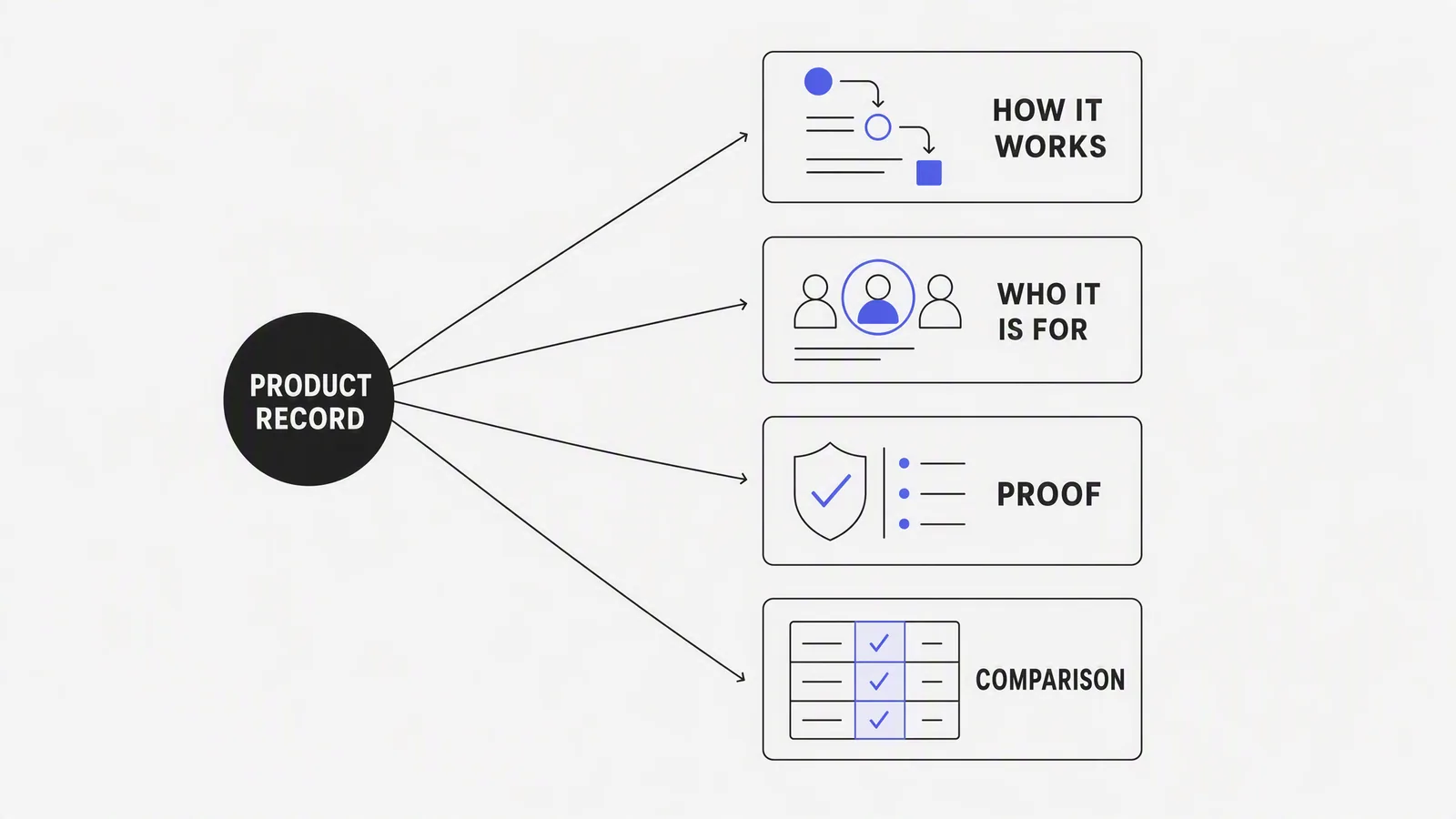
Build the product truth record
|
Field |
Example |
Why it matters |
|---|---|---|
|
Product job |
Carry a laptop and a one-day travel setup without a second bag |
Anchors content in a real use case |
|
Verified specifications |
Dimensions, capacity, materials and compatible device size |
Prevents invented detail |
|
Approved claims |
Exact wording and evidence source |
Keeps ads and editorial consistent |
|
Visual sources |
Front, side, interior, on-body and detail images |
Supports accurate creative variation |
|
Objections |
Will it fit under a seat? Is the strap comfortable? |
Creates useful decision content |
|
Constraints |
No waterproof claim; colour may vary by screen |
Stops polish from becoming misinformation |
Shopify describes product-content management as the work of organizing and maintaining product information across ecommerce experiences. That source discipline is the foundation of scalable brand intelligence and campaign creative.
Turn one product into five story angles
- Problem: the frustration the product is designed to reduce.
- Mechanism: how a feature creates the useful outcome.
- Proof: demonstration, specification, qualified review or comparison.
- Use case: a concrete situation in which the product earns its place.
- Choice: who should buy it, and who should choose something else.
For an illustrative 22-litre travel backpack, those could become: packing for a one-night work trip; how the clamshell opening changes access; a measured laptop-compartment demonstration; airport-to-meeting use; and a comparison with a larger carry-on. These are proposed angles, not claims about a named product. The product stays the same. The reader job changes.
Worked campaign: one product record, four formats
- Search article: "How to pack for a one-night work trip" answers an enduring planning question and uses the product where relevant.
- Carousel: five frames show the packing sequence and capacity, with measurements visible.
- Static ad: one clear moment, laptop, change of clothes and charger in one bag, leads to the product page.
- Short video: an eight-shot demonstration shows the pack, access and transition from airport to meeting.
The campaign is coherent because every asset derives from the same use case and verified facts. It is not repetitive because each format does a different communication job. This is the same discipline behind a well-run product ads campaign blueprint: one source can drive a static ad, a carousel and a video concept without drifting from the facts. Tools built for AI image ads and an AI carousel generator can adapt one verified brief across formats instead of rewriting the product story from scratch each time.
Plan by funnel job, not posting quota
|
Funnel job |
Useful content |
Evidence needed |
|---|---|---|
|
Discover |
Problem education, category guide or inspiration |
Audience and category insight |
|
Understand |
Mechanism, tutorial or demonstration |
Product source and accurate visual proof |
|
Compare |
Alternatives, use-case fit or buying guide |
Fair criteria and dated competitor evidence |
|
Trust |
Customer story, process or qualified result |
Permission and substantiation |
|
Act |
Offer, product page or campaign ad |
Current price, conditions and relevant CTA |
Mapping content to funnel jobs keeps the plan tied to what a reader actually needs at each stage, and it is a useful companion to a broader set of social media content ideas when a channel needs more variety within the same funnel job.
What AI should and should not do
AI can help cluster questions, explore story angles, adapt an approved direction and create candidate assets. Google advises that scaled or AI-assisted content must still be helpful, reliable and people-first. For ecommerce, that means the product details, comparison and proof cannot be invented to complete a template. An AI marketing agent is useful for drafting and adapting once the source record is settled, not for inventing the record itself.
Where Advibly fits
Advibly can begin with a store, website, product image, screenshot or brand asset; preserve product and brand context; and produce image ads, carousels, social posts and finished videos for review. It can connect approved work to a calendar and publishing workflow through the social media scheduler. The store remains the authority for product data, the marketer owns the story, and channel platforms own measured performance. See the full pricing for how generation is scoped.
A clean monthly loop
- Select two product or customer questions worth answering.
- Verify the source record and available proof.
- Create one deep source asset for each question.
- Adapt each into formats that genuinely suit the channel.
- Publish and measure in the appropriate systems.
- Update the product record or next brief with what was learned.
Turn verified product context into a campaign with Advibly.
Sources
- Shopify Help: Content marketing, accessed 4 August 2026.
- Shopify: Product content management in ecommerce, accessed 4 August 2026.
- Shopify: Ecommerce content marketing, accessed 4 August 2026.
- Google Search: People-first content, accessed 4 August 2026.
- Advibly product surface, checked 4 August 2026.