

An AI design assistant helps you explore and revise creative while you direct the choices. Start from a product photo, screenshot, reference or brief; compare different visual ideas; then ask for a specific change to the strongest one. The value is the back-and-forth: you can change the direction without rebuilding the product brief each time.
Treat the assistant as a collaborator at the image level, not a black box that decides the whole campaign. A useful request says what to change, what to preserve and what the next version needs to communicate. That gives you a better way to judge the result than asking for something vaguely more premium or engaging.
This page owns interactive creative exploration. For delegating a complete image set, see AI design agents for campaign creative. For choosing a platform, compare the requirements in the AI creative suite guide.
Key Takeaways
- An AI design assistant earns its place by preserving product truth and reusable context across requests, not by producing a single fast image.
- The workflow has six jobs: source intake, briefing, exploration, production, review and distribution, and humans still own the decision at every one of them.
- Test a tool on source fidelity, format continuity and review control, not on a single polished demo output.
- Generation credits and every output should stay visible for human review before anything publishes.
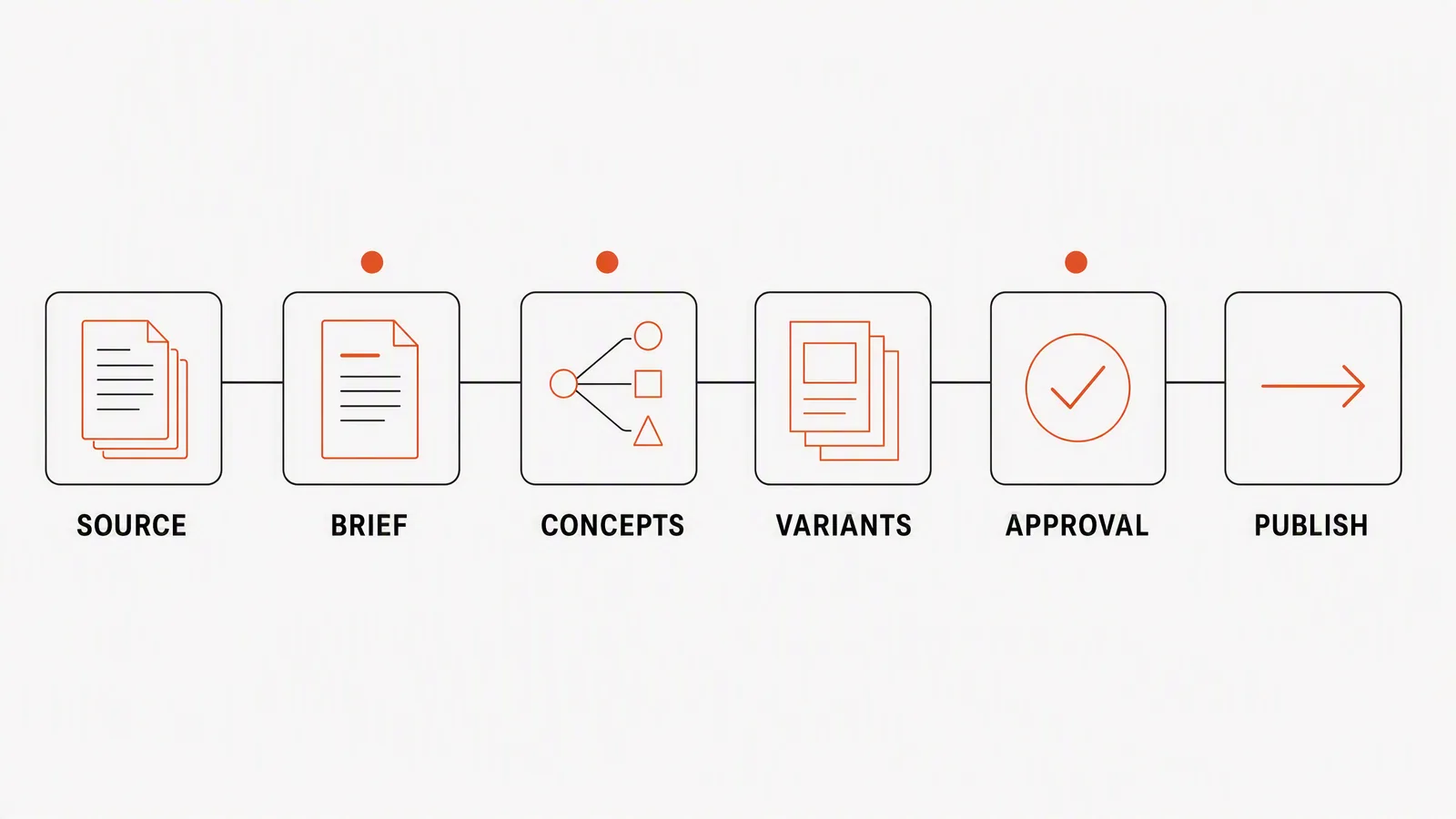
Where your feedback changes the creative
|
Job |
What the assistant should preserve |
Human decision |
|---|---|---|
|
Source intake |
Product name, visual identity, approved claims and reference assets |
Which source is authoritative |
|
Briefing |
Audience, objective, offer, channel and constraints |
What the campaign must achieve |
|
Exploration |
Several genuinely different concepts |
Which direction deserves refinement |
|
Production |
Consistent product and message across formats |
What is accurate and usable |
|
Review |
Traceable alternatives and visible generation cost |
Approve, revise or reject |
|
Distribution |
Correct files, copy and schedule |
Where and when to publish |
Google's Asset Studio is a useful example of assisted creation: its documentation describes image editing, asset management and shareable previews inside Google Ads. Its generated-image guidance says you choose which images enter the campaign. The principle here is narrower than full campaign automation: inspect an output, decide what needs changing and direct the next version.
Worked example: explore, choose and revise a product image
Imagine a hydration brand launching a citrus flavour. Supply the real bottle photo, product page, logo and approved ingredient language. Ask for a close product-and-condensation scene, a bottle beside a gym bag, and a clean launch graphic. These are illustrative concepts, not a completed test. None should imply a medical benefit or change the packaging.
- Lock product truth. Preserve the bottle shape, cap, label, flavour name and approved language.
- Explore three concepts. A locker-room recovery moment; a close product-and-condensation composition; and a clean comparison between the afternoon slump and the post-workout reset.
- Select on message, not decoration. Choose the concept that makes the product and moment understandable at feed size.
- Produce a small campaign set. One square static ad, one four-frame carousel and one short product-video treatment share the same offer and visual direction.
- Review every format. Check label fidelity, implied claims, copy hierarchy, safe crops and whether the video adds information rather than animating the poster.
Give the assistant a defect and a boundary
Suppose the bottle-by-the-gym-bag concept is the strongest, but the label is too small. Instead of asking for a better image, ask: “Make the product the focal point and increase the label's readable area. Keep the bottle shape, cap, label wording, approved headline and chosen setting unchanged.” Supply the original product photo again as the accuracy reference if needed.
Then compare the revision with both the source and the previous version. If the label becomes readable but the cap changes, the revision has not passed. Request that correction or finish the exact product detail in an editor; do not accept a new defect simply because the composition improved.
Once the image works, adapt it to a second placement. Ask for a new layout that protects the message hierarchy, not a blind resize. For video, review movement and timing separately: a still-image approval cannot establish that the moving product remains accurate.
The assistant earns its place if the second and third formats do not require the team to restate the product from scratch. That is the practical value of reusable context.
What should remain human
The assistant should not decide that a product claim is substantiated, that a generated customer scene represents a real user, or that a visually polished asset is ready to spend money behind. Google explicitly tells advertisers to review generated assets for accuracy, misleading content and policy compliance before publishing. The same principle should govern any creative system.
- Humans own the campaign objective and approved claim.
- Humans decide whether a concept is distinctive enough to pursue.
- Humans verify product, legal and platform accuracy.
- Humans interpret performance data and decide the next test.
Explore and revise directly in Advibly
Advibly can start from a website, app listing, store, screenshot, product image, logo, brand asset, reference or prompt. Product and brand context can remain available across requests. From there, a team can create static ads, product visuals, carousels, social posts and several video formats using different available models, then review the result before publishing. Generation credits are shown before the run.
You can use Advibly's portal directly without setting up an agent connection. Begin with a brief, reference, guided template, Ideas or the Ad Library, then generate and revise through the available tools. Those starting points help you find a direction; they do not establish that a reference ad performed well or that you may copy its protected artwork.
Check whether the revision solved the actual problem
|
Criterion |
Question to test |
Failure signal |
|---|---|---|
|
Source fidelity |
Can it preserve the product details that cannot change? |
Every good-looking output needs manual reconstruction |
|
Reusable context |
Does the next task remember approved product and brand inputs? |
The team rewrites the same brief repeatedly |
|
Exploration quality |
Does it offer meaningfully different concepts? |
Variations are merely colour changes |
|
Format continuity |
Can one direction become several channel assets? |
Each format becomes a disconnected project |
|
Cost visibility |
Can the operator see likely usage before generating? |
Experimentation has an invisible cost |
|
Review control |
Can a human compare, revise and reject before publishing? |
Automation outruns accountability |
Keep the selected version beside the source photo while reviewing. Reusable context supports consistency; it does not guarantee that the model will preserve every detail. Stop revising when the actual defect is fixed, the original constraints still hold and the asset works at the destination's display size.
The practical verdict
Use an AI design assistant when you want to compare visual directions and steer revisions yourself. Use a design editor or specialist when you need exact layer-level control, precise geometry or a new visual identity. If the direction is settled and you want to delegate the whole asset set, move to an agent-executed workflow instead.
Explore the brief-to-campaign workflow in Advibly.
Sources
- Google Ads: About Asset Studio, accessed 4 August 2026.
- Google Ads: About generated images, accessed 4 August 2026.
- Advibly product surface, checked 4 August 2026.