

Synthesia's public U.S.-dollar pricing FAQ lists Starter at $29 monthly and Creator at $89 monthly, checked September 12, 2026. The annual commitments are $264 and $804 respectively. Basic is free; Enterprise is quoted separately. These are reference prices, not a quote for your country or account. Synthesia pricing.
The decision is not simply whether ten or thirty minutes sounds sufficient. A minute of approved training content can require more than a minute of chargeable production, while some revisions do not consume additional credits. This guide separates plan access, chargeable work and the cost of the videos your team actually finishes.
Current Synthesia plans: monthly and annual
The table uses the USD figures in Synthesia's public FAQ. In our public browser, the same page's plan selector localized to Indian rupees, despite the country parameter in the URL. Its FAQ still displayed the USD prices. We did not inspect an authenticated checkout, buy a plan or test generation. Check the currency, tax, offer and renewal terms shown to your account before payment.
|
Plan |
Price and buying consideration |
|---|---|
|
Basic |
$0. Use it to evaluate the workflow; don't assume it includes paid export and branding entitlements. |
|
Starter |
$29 monthly or $264 annually, equivalent to $22/month. The public plan includes downloads and logo removal. |
|
Creator |
$89 monthly or $804 annually, equivalent to $67/month. Consider it when the required capabilities exceed Starter. |
|
Enterprise |
Custom quote. Get the actual editor count, security, learning-system requirements and service terms in writing. |
Pricing source: Synthesia's current plan page and FAQ. Annual figures describe the annual commitment; confirm whether your offer collects it upfront or uses instalments, along with cancellation terms. The selector may display a different regional promotion from the USD FAQ; this table deliberately uses the FAQ figures.
Before choosing an allowance, identify whether the result is an avatar-led lesson or an illustrated product story. The Coffeeverse source-to-explainer example below shows the second job: source imagery, designed scenes and narration rather than simply a presenter reading the script.
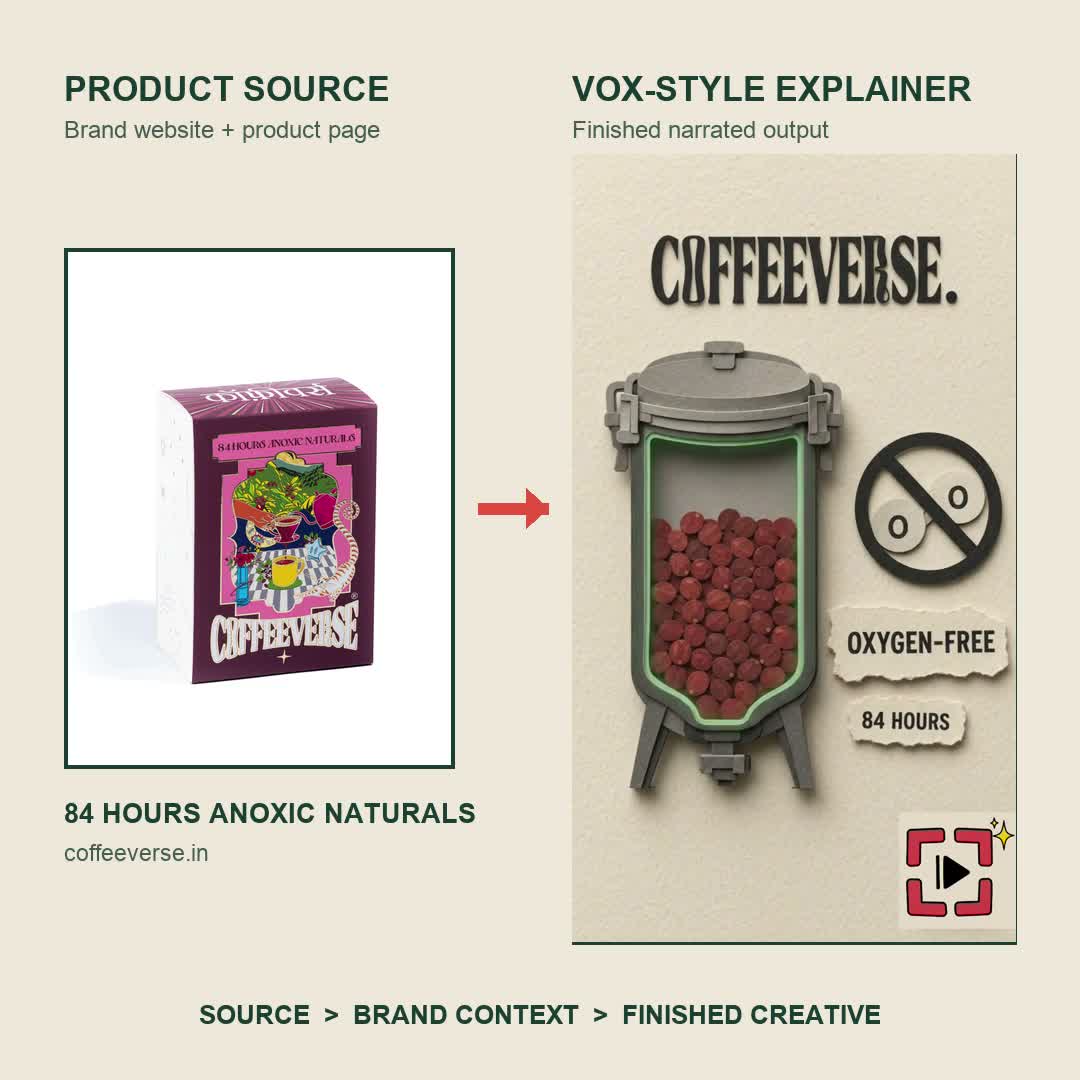
Existing Advibly paper-collage demo, shown as a still preview—not a Synthesia output, a customer endorsement or a training-system test. The product reference is real; the process scene is illustrative. It establishes a different production format, not a cheaper equivalent minute.
A feature requirement can decide the plan before volume does
If your production depends on generating videos through an integration, Synthesia's API access guide restricts access to Creator and Enterprise. Having enough nominal minutes on a smaller plan does not solve that access requirement. Equally, don't buy API access merely because automation might be useful someday: specify the integration, owner and expected monthly workload first.
For learning-system delivery, verify the required export and tracking with the destination LMS. The pricing page positions SCORM and SSO with Enterprise, not every self-serve subscription. A downloadable video and a tracked learning package are different deliverables.
Minutes and credits: use the rate for the operation
Synthesia's self-serve credit reference lists 1,200 monthly credits for Basic and Starter, and 3,600 for Creator. Annual Starter and Creator balances are 14,500 and 44,000 credits. For editor video generation, the reference gives 2 credits per generated second. API generation, dubbing and generated assets use their own rates.
At that editor-video rate, a 60-second first pass uses 60 × 2 = 120 credits. A 1,200-credit allocation therefore supports 600 chargeable seconds before other consumption. This is capacity arithmetic, not a guarantee of ten finished one-minute videos.
Annual credit arithmetic is not permission to exceed an advertised limit
The public annual selector advertises 120 video minutes for Starter and 360 for Creator. Dividing the documented balances by 120 credits per minute produces approximately 120.83 and 366.67 minutes. Those two descriptions are not identical. Do not promise the extra fractional capacity based solely on division; confirm the usable account limit and operation before planning against it. Annual plan selector; credit balances.
For conservative annual planning, use the advertised 120 or 360 minutes, then subtract expected chargeable revisions and other demands. The annual subscription allocation is consequently $2.20 per advertised minute for Starter (264 ÷ 120) and approximately $2.23 for Creator (804 ÷ 360). Neither figure includes production labor or idle allowance.
Which revisions consume more credits?
Not every correction is a paid regeneration. Synthesia's credit reference distinguishes the following editor operations:
|
Change |
Budget treatment described in the reference |
|---|---|
|
Add or replace script words |
Newly generated word duration is chargeable. |
|
Remove or reorder existing words; change punctuation |
No additional credit consumption for those edits. |
|
Add or replace an avatar |
Its visible duration is chargeable; don't assume only the changed word duration matters. |
Source: Synthesia's operation-specific credit guide. Use the account's generation estimate and actual usage record for the final budget; a task can contain several changes.
This changes how you review a script. Suppose a reviewer removes an unnecessary sentence and fixes a comma. Recording the entire revised video's length as additional consumption would overstate the cost. If the reviewer replaces a section of narration or changes the presenter across the whole scene, recording zero would understate it. Label the operation in your production log rather than writing only “revision.”
Separate editorial approval from cosmetic finishing. Settle the product claim, number, name and required disclaimer before generating. Then review pronunciation and presentation. This does not eliminate revisions, but it prevents an avoidable late factual change from becoming a repeated generation cycle. It also makes your own measured revision rate more informative than another team's generic cost estimate.
Worked example: eight approved one-minute videos
Consider an illustrative Starter monthly workload. Every finished video needs a 60-second first pass and 15 additional chargeable seconds, such as newly generated replacement narration. Assume no other credit use, no refunded charges and no additional avatar-related consumption.
The calculation is:
8 × (60 + 15) × 2 = 1,200 credits
That consumes the full allocation. Subscription cost per approved video is $29 ÷ 8 = $3.625, rounded to $3.63. These are hypothetical production inputs, not results from a Synthesia test or a promise that fifteen seconds is a normal revision allowance.
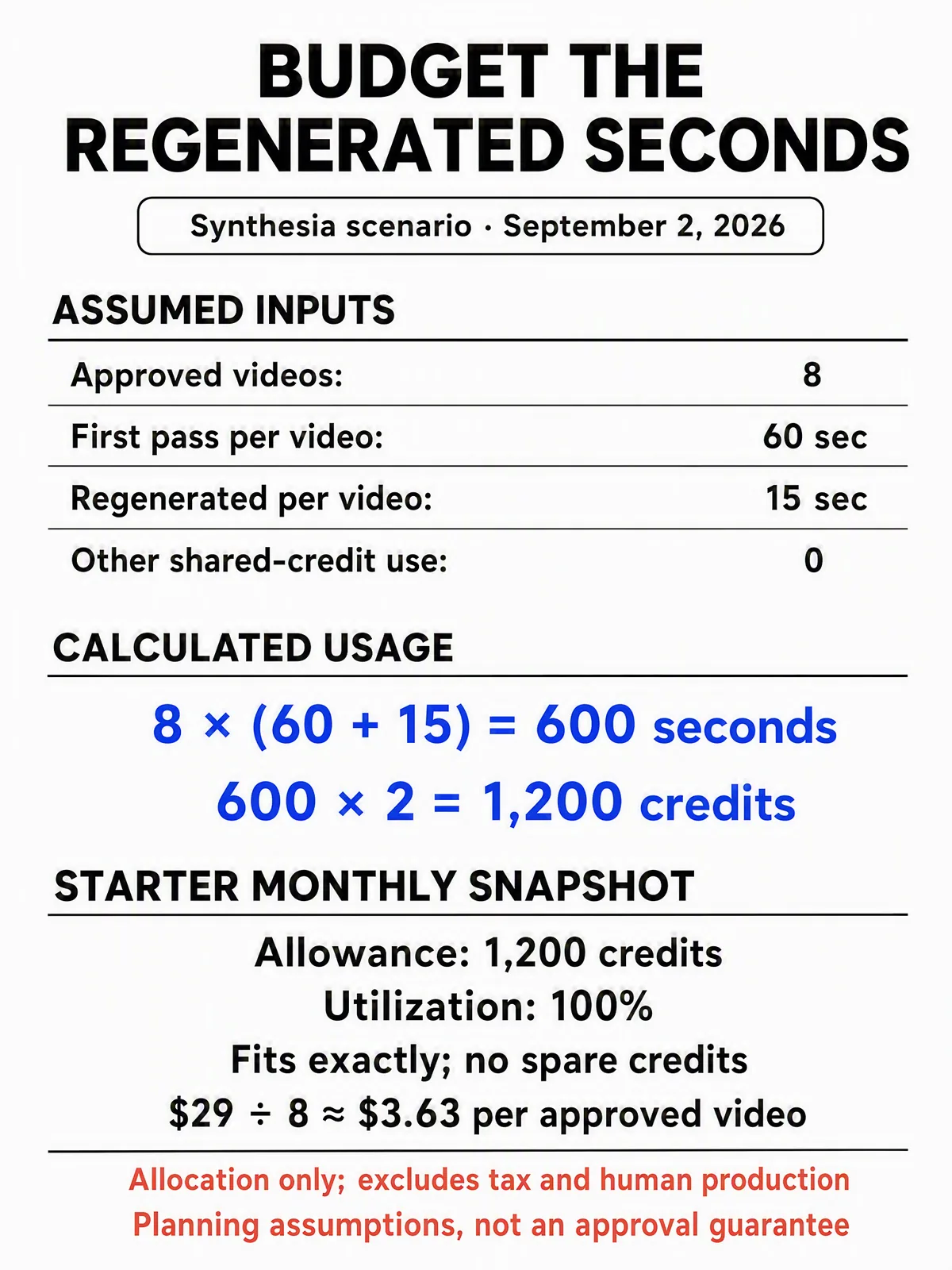
Preserved planning calculator, not a product screenshot. Its fifteen regenerated seconds must be chargeable seconds under the operation's rules. The $3.63 allocation assumes all eight videos are approved and the full $29 plan serves only this workload.
Compare three workloads, not three imaginary approval guarantees
|
Hypothetical workload |
Editor-video credit demand and implication |
|---|---|
|
Ten 60-second videos, no charged revisions |
1,200 credits. Exactly fills the Starter monthly allowance; no spare capacity. |
|
Eight 60-second videos plus 15 charged seconds each |
1,200 credits. Eight approvals cost $3.63 each in subscription allocation. |
|
Five 120-second videos plus 20 charged seconds each |
1,400 credits. The workload exceeds 1,200 by 200 credits before other consumption. |
For the last row, compare reducing the workload, a top-up, an upgrade or a later production date. Don't assume the only option is the next plan, and don't remove a necessary correction merely to make the budget fit.
As a planning exercise, reserving 20% of a 1,200-credit allowance leaves 960 for scheduled production. At 150 credits per approval in the middle scenario, that funds six whole outputs and leaves 60 credits within the scheduled portion. The 20% reserve is a chosen contingency, not a Synthesia policy. Replace it with a buffer justified by your own pilot and deadline risk.
Real cost rises when you leave capacity unused
Now suppose the same team finishes only four videos in the month. Each still consumes 150 credits, but the $29 subscription is unchanged. Realized subscription cost becomes $7.25 per approved video, not $3.63. The other 600 credits are unused in this example; they are not a second invoice to add on top of the subscription.
Add a hypothetical five hours of scripting, subject-matter review, caption checks and delivery at an internal cost of $30/hour. Add $12 for separately licensed supporting material. Then:
($29 subscription + $150 labor + $12 external cost) ÷ 4 approvals = $47.75 per finished video
The hourly rate, workload and external expense are illustrative. This is an internal production-cost model, not Synthesia's price per video. It helps a buyer see why optimizing a two-dollar difference in subscription allocation can matter less than improving a repeated review bottleneck.
If the subscription also serves another team, assign its cost consistently across teams rather than charging the full $29 to both. If zero videos are approved, report the spend and zero output separately; don't divide by zero or label failed attempts “finished videos.” For an annual purchase, keep the annual commitment and the actual payment schedule visible alongside any monthly accounting allocation.
Budget for localization as a complete deliverable
A translated voice track is not necessarily a finished localized lesson. Synthesia's dubbing instructions distinguish spoken-audio translation from text already embedded in the source video: on-screen text is not automatically translated by dubbing. The same guide limits transcript editing to Enterprise.
For example, a two-minute onboarding film might include a presenter, a screen recording and English labels burned into that recording. Budget the localized narration, then separately assign the screen-label replacement, terminology review and final caption check. A reviewer who understands the target language should check names, numbers and instructions, not just whether the audio plays.
Use the current estimate for the selected dubbing mode and plan rather than multiplying all localization by the editor's two-credit-per-second rate. Do not assume a transcript correction option is available in every account. This is where a cheap nominal minute can become an incomplete deliverable if the brief excludes the on-screen work.
Top-ups, renewal and cancellation need their own check
Synthesia's current billing guide describes buying credits and optional automated top-ups. It also says upgrades apply immediately with proration, while downgrades take effect at the next billing period. Compare the actual account offers before spending; this article does not quote a universal top-up price or recommend enabling automatic purchases.
The same guide says cancellation leaves access until the end of the billing period, after which access to videos is lost. Export the material you need before that date. Keep the source script, approved terminology, supporting files and delivery record outside a single subscription account so that a billing change does not leave the next editor without a handoff.
Unused credits reset on the billing cycle rather than accumulating, according to the credit reference. A quiet month therefore changes your realized cost even if the nominal rate remains the same.
Price the illustrated story separately from the presenter lesson
In the example above, the useful source is Coffeeverse's product page and pack image. Its page describes an approximately 84-hour oxygen-free fermentation process. An explainer can make that idea visible through paper-collage scenes; those scenes do not prove the process occurred or establish taste outcomes.
Read the product source behind the demonstration.
For an Advibly version of this workflow, save the product source and cleared photo, approve the claim and beat map, create the illustrative scenes, then add motion, narration and the final edit. Verify product recognition, every factual caption and the full audio track. Use the current generation estimates and retain revisions; the reused example does not supply an original cost or retry log.
Review the explainer skill and existing output before testing your own brief.
If the actual requirement is a reusable presenter, translated lesson or tracked learning package, keep evaluating Synthesia's eligible plan. The explainer demonstrates an adjacent marketing job, not parity with Synthesia's avatar, localization or enterprise learning features.
When Synthesia fits, and when the job is a campaign
For an avatar-led learning module, internal presenter update or localized instruction, evaluate Synthesia against the actual delivery requirement. Check voice and terminology, the needed integration, learner tracking and the review process. Don't treat Enterprise learning capabilities as features of every entry plan.
For a product launch across several channels, the deliverable can be a different collection of work. A fictional app launch, for example, might need a real-screen walkthrough, a presenter-led introduction, a Whiteboard Doodle explainer, a LinkedIn carousel and platform-specific thumbnails. A single presenter video's nominal minute price does not price that whole campaign.
In Advibly, start that campaign from the app listing, approved screenshots and existing brand assets. Use Brand Intelligence and the research brief to keep positioning and source material together. Reuse real interface captures for factual product steps; use an illustration or generated scene for explanation without presenting it as the app's actual UI. Produce the required video and still formats from that brief, then review each against its job rather than generating variations without an acceptance rule.
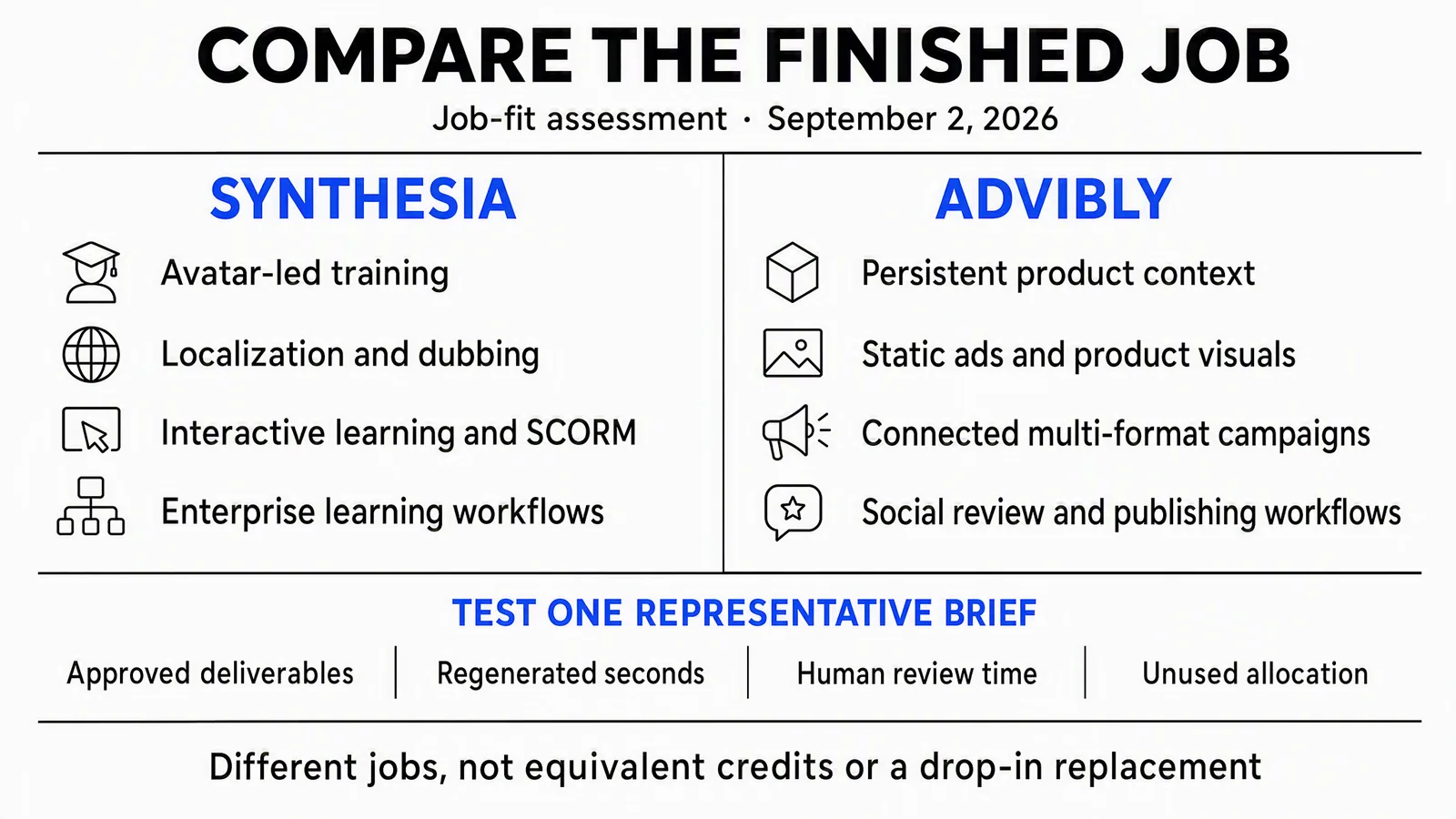
Illustrative job-fit card, not a claim that either product has only one use. Synthesia's SCORM and governance access is plan-specific. Review means checking the deliverable, not a claim of identical native approval roles across tools.
Advibly's campaign workflow continues through supported-channel publishing, post status and analytics. For the app example, publish the walkthrough and channel-specific supporting posts, then examine their outcomes against the chosen objective. If an Instagram post promises a guide by keyword, create the guide first and configure the keyword-to-DM flow for that promise; an automation setup is not proof a recipient received it.
These are different buying units, not interchangeable credits. Compare a specified, accepted job, including human finishing and distribution work. Choose a conventional editor for parts that require precise manual control, or combine tools where the handoff is clearer than forcing every task into one subscription.
Before you commit: run a bounded pilot
Use one representative script and define approval before generation. A useful pilot record contains the plan and currency, operation, initial estimate, net charged credits, reason for each revision, minutes of human work and final accepted deliverable. Record the actual rate rather than copying the illustrative fifteen-second revision assumption above.
Then answer three questions: does the plan include the required delivery features, does the realistic workload fit with a reserve, and is the resulting cost per approved output acceptable? If the brief is a multi-format launch rather than an avatar-led lesson, build the campaign from your product and brand context in Advibly and compare the complete handoff on the same basis.