

An AI agent can create your brand’s social content, schedule it and retrieve publication results through Advibly. The useful workflow starts with saved product context and ends with a verified post—not a caption you still have to copy into another tool. This guide covers social media for AI agents operating your existing brand accounts, rather than a social network for agents themselves.
The agent prepares the creative and coordinates the tool calls. You authorize the exact asset, caption, account and time that may become public. That division lets the agent finish the production and publishing work without treating a general campaign brief as permission to post anything.
Start with one image post on one connected account. The example below shows the current tools, the evidence each step should return and where platform limits still apply. Then use the destination-specific checklist to expand the workflow.
One product image, from brief to scheduled post
This is an illustrative workflow using native tools inspected on September 11, 2026, not a newly run campaign or a measured result. Prerequisites are an authorized MCP connection, a saved brand, generation credits, a publishing entitlement and a supported connected social account.
- Resolve the inputs. Use advibly_get_brand to read the selected brand and advibly_social_list_accounts to obtain the destination’s profile_id. For an app-launch graphic, supply the actual screenshot and an approved feature claim. Do not let the agent invent an interface or promise.
- Create the image. Call advibly_generate_image with the selected brand_id, the creative prompt and any reference_image_urls. It spends credits. Keep the returned generation_id; if the result is pending, use advibly_get_generation only when the completed output is needed. Inspect the finished image and exact caption before approving them.
- Schedule only the approved destination. Call advibly_social_create_post with brand_id, caption, generation_ids containing that completed image, profile_ids containing the selected account, target_platforms containing linkedin, and scheduled_at containing the approved future ISO 8601 time with an offset. Set draft=false and queue=false for this explicitly timed, authorized submission. Add the organization_id in platform_configurations.linkedin if the destination is a LinkedIn company page. Each tool call also requires context describing the operation, including brand retrieval, account lookup and generation.
- Read the post back. Save the returned post ID, then call advibly_social_get_post with that ID and context. Confirm the requested time and target before reporting it scheduled. After the publishing time, inspect the per-platform status, permalink and any error; scheduled or processing is not published.
Two defaults deserve attention: the post tool targets all connected accounts if the destinations are omitted, and it posts immediately if no draft, queue or scheduled time is supplied. Never rely on either default in an approval-gated workflow. Saving with draft=true is a draft operation, not proof of a native reviewer-role system.
There is narrower operational proof behind the publishing claim: a September 11 readback of an existing scheduled Advibly post returned posted, a YouTube result of published, and the published video link. That verifies one scheduled YouTube publication and its status retrieval, not every platform, automatic recovery or the image-post example above. The public agent reference also names advibly_social_create_post for scheduling.
Key Takeaways
- Build one approved, destination-specific publish packet for every account and platform, not one generic campaign payload.
- Bind approval to the exact copy, media, destination, account, and time that can become public.
- Treat publication verification as a separate state and stop automatic retries when the result is uncertain.
The operating map: from brief to verified post
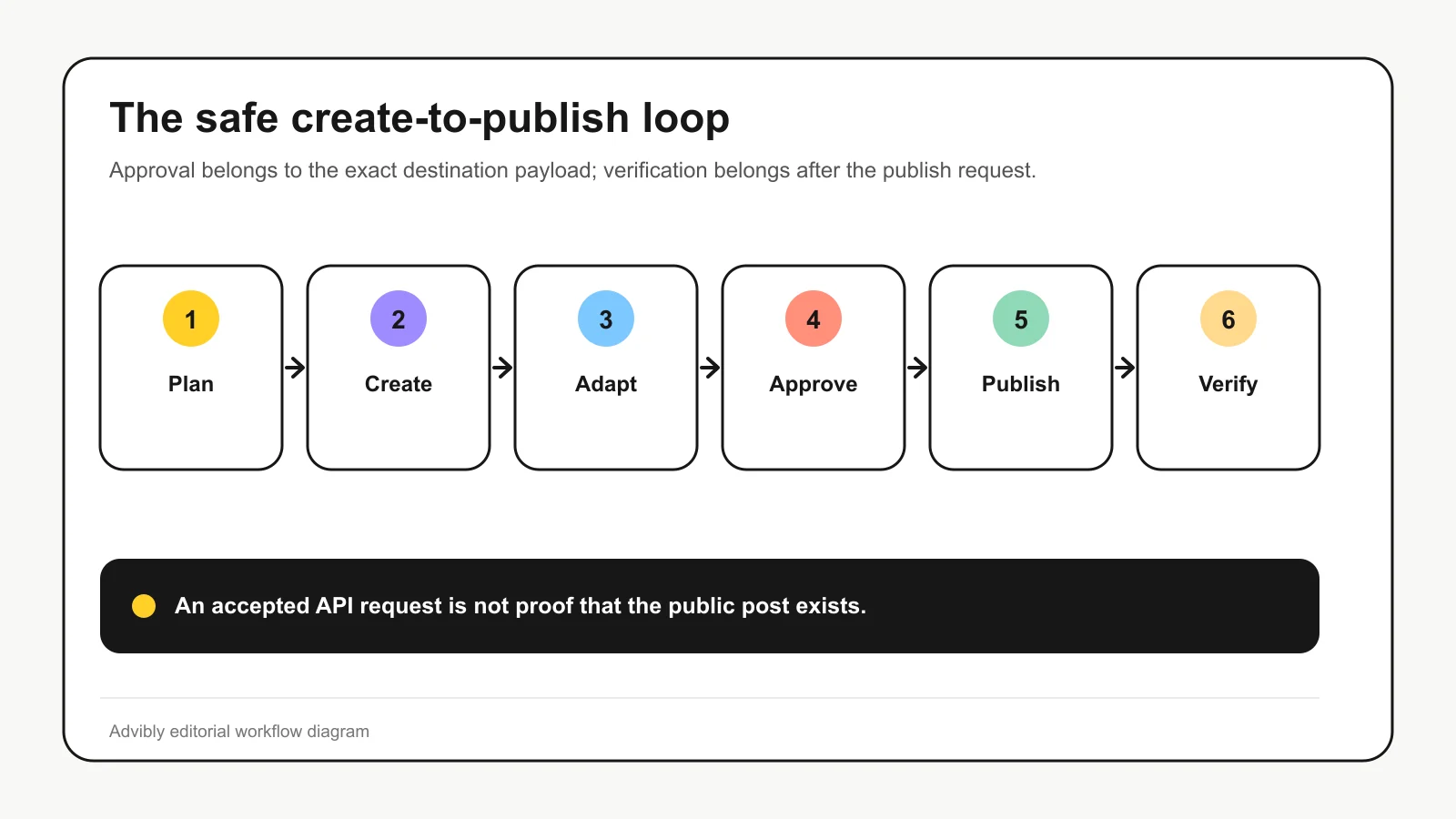
A practical agent-run workflow has five stages. The output of each stage becomes the controlled input to the next.
|
Stage |
What the agent does |
Required artifact |
Do not advance when |
|---|---|---|---|
|
Plan |
Turns the objective and source material into a content contract |
Approved brief with audience, claims, offer, destinations, formats, dates, exclusions, and success event |
The goal, source, or prohibited claims are unclear |
|
Create |
Develops one concept, then adapts copy and media for each destination |
Destination-specific draft packets with claim provenance |
A claim lacks a source or the media does not fit the destination |
|
Review |
Runs deterministic checks and presents the exact payload to a human |
Approval bound to copy, media, account, destination, and time |
Approval covers only the general concept |
|
Publish |
Sends only approved packets to a connected scheduler or platform adapter |
Scheduler or platform job ID tied to your intended action; use provider idempotency only where supported |
Permissions, token state, or schedule validation fails |
|
Verify |
Reads back the resulting object and records its state |
Platform post ID, URL, final state, and any error |
The API accepted the request but publication is still processing or unknown |
A useful state model is:
draft → ready for review → approved → scheduled → published
Keep rejected, failed, and cancelled as explicit branches. Never turn “the request returned successfully” into “the post is live” without checking the final state.
Start with a content contract, not a one-off instruction
A one-off instruction tells the agent what to do. A content contract defines what the workflow is allowed to produce.
At minimum, give the agent:
- the campaign objective and intended audience;
- the product page, announcement, research, or other factual source;
- the offer and call to action;
- the approved social accounts and destinations;
- the required formats and publishing window;
- claims, topics, or language it must not use;
- disclosure requirements that need review;
- the event that will measure the post’s business job.
This prevents a familiar failure: the agent writes plausible copy from thin context, then repeats that copy across every channel. The result may be grammatically tidy and operationally useless.
Reusable brand context improves the starting point. It can keep product details, audience, tone, colors, fonts, screenshots, offers, and creative references available across campaigns. It does not remove the need to cite the source behind a factual claim or review the final payload.
Create one concept, then build a packet for each destination
The campaign concept is the shared idea. The publish packet is the executable unit.
Suppose a SaaS launch has five approved concepts for LinkedIn, Instagram, and Threads:
5 concepts × 3 destinations = 15 destination-specific payloads
This is not an estimate of time saved or likely performance. It exposes the control problem. Five concept approvals do not cover 15 payloads that may differ in copy, crop, media object, link behavior, disclosure, account identity, and timing.
Each payload should contain:
- campaign and concept ID;
- destination and connected account ID;
- exact copy and media reference;
- source for each consequential factual claim;
- disclosure or AI-label decision where relevant;
- requested publish time and timezone;
- reviewer and approval timestamp;
- a stable action key for duplicate checks, plus provider idempotency where supported;
- scheduler or platform job ID after submission;
- final state, post ID, canonical URL, and error details.
The destination-specific step is not administrative fussiness. Official publishing workflows differ materially. LinkedIn uses distinct permissions and media-upload requirements for member and organization posts (LinkedIn Posts API). Instagram publishing uses media containers, processing checks, and a separate publish step for professional accounts (Meta’s Instagram publishing documentation). A generic “post everywhere” object hides exactly the differences the workflow must control.
Put the approval gate after adaptation
A human should review the exact object that can become public, not a topic, outline, or master caption that will change later.
That means approval binds these fields together:
- copy;
- media;
- destination;
- connected account;
- scheduled time;
- relevant disclosure decision.
If any bound field changes, the payload returns to review. A revised image under old approval is a new payload wearing borrowed paperwork.
This boundary also fits the trust model around agent tools. The Model Context Protocol defines tools as model-controlled, while its guidance says users should be able to deny tool invocations and see clear confirmation steps (MCP tools specification). The protocol makes tools callable; it does not supply your campaign policy, approval model, or publication state machine.
Use permissions in proportion to consequence:
- Low consequence: research, idea generation, draft creation, resizing, and validation can usually run without per-step approval.
- Public consequence: scheduling and publishing should require approval of the exact payload.
- High consequence: deleting posts, changing accounts, altering access, or spending money should use a stricter confirmation path and narrow credentials.
Treat the scheduler as an execution adapter
The scheduler’s job is to translate an approved packet into destination-specific API operations and report state. It should not silently rewrite the strategy or flatten every post into one generic caption.
Before submission, validate:
- the connected account and required permissions;
- token validity;
- media type, dimensions, duration, and availability;
- copy and link requirements;
- schedule window and timezone;
- destination-specific disclosures;
- uniqueness of the intended action and any supported idempotency key.
An idempotency key is a stable identifier for one intended publish action. If a network request times out and the workflow retries, the scheduler can recognize that it has already handled the same action instead of creating a duplicate post.
Not every scheduler documents idempotent publishing, so do not assume the feature exists. Where it does not, build duplicate checks around your own campaign ID, destination, account, and scheduled time, and route uncertain outcomes to a human instead of retrying blindly.
Verify publication separately from performance
A successful request may mean “accepted,” “scheduled,” “processing,” or “uploaded privately.” It does not always mean “publicly visible.” Instagram separates container creation, status checks, and publication. YouTube warns that uploads from certain unverified API projects are restricted to private viewing until the project passes an audit (YouTube Videos: insert).
After submission, read the object back and store:
- the scheduler job ID;
- the platform post ID;
- the canonical public URL;
- the current state and timestamp;
- any processing or platform error;
- the payload version that produced it.
Then keep two questions separate:
- Did the workflow publish the intended post correctly?
- Did the post produce the intended business outcome?
The first is an execution result. The second requires its own measurement design: destination metrics, site analytics, attribution limits, and the success event from the content contract. A publication receipt is not an engagement report, and engagement is not automatically business impact.
Where Advibly fits, and where it does not
Advibly fits when the job combines brand-aware creative production with agent-operated scheduling. Saved product context, image and video generation, asset retrieval, format-specific skills and social publishing can sit in one connected workflow. Your assistant still supplies the plan and checks the output; Advibly is not a replacement for the agent environment.
The current native MCP tools expose social post creation, scheduling and publication readback. The shorter catalogue on the setup page is not a complete account of that surface. What has not been established is native reviewer-role enforcement, automatic recovery or idempotent submission. Keep those controls in your operating process unless the product explicitly provides them.
The supported division of work is:
- The assistant selects the saved brand and prepares a source-grounded creative brief.
- Advibly generates the asset and returns its generation ID and completed output.
- The human authorizes the exact destination-specific content and publishing time.
- The assistant submits the approved generation through advibly_social_create_post with explicit account targeting and scheduling options.
- The assistant retrieves the post through advibly_social_get_post and checks the destination’s returned status and permalink.
Advibly supports connected Instagram, TikTok, LinkedIn, X, YouTube, Facebook and Threads accounts. That is not a promise of identical format support: Facebook needs a supported Page, LinkedIn company publishing needs the correct organization destination, and platform permissions and media limits still apply. YouTube custom thumbnails are not supported through the post tool for Shorts; a supplied cover is not proof that it was applied.
When Buffer or Predis.ai is the better choice
Advibly is not the automatic answer for every operating model.
Choose Buffer when your creative pipeline already works and the main requirement is scheduling with documented team access controls. Its MCP supports drafting, scheduling and inspecting upcoming content; its Team plan documents approval workflows. Advibly now has agent publishing tools too, so API access alone is no longer a reason to send its users to a separate scheduler.
Choose Predis.ai when you prefer a dashboard combining creative generation and social operations. Its public material covers brand setup, creation, scheduling and approvals. As checked on September 11, 2026, Predis pricing lists auto-posting on Rise but not Core. Its reviewed developer introduction describes generated creative returned through a webhook; that alone does not establish an agent-operated approval-to-publication loop.
Choose Advibly when the agent needs to produce the images or videos as well as distribute them. Its useful combination is reusable product context, creative models and skills, completed generation IDs, scheduling and per-platform readback. Keep human authorization and uncertain-outcome handling explicit rather than assuming the tool supplies them.
The choice is therefore not “which tool has AI.” It is where you need the strongest operating layer:
- Existing creative pipeline plus documented team approval controls: evaluate Buffer.
- Dashboard-led creative and social management: evaluate Predis.ai.
- Brand-context-aware creation and agent-operated publishing in the same workflow: evaluate Advibly.
The minimum safe workflow
Before letting an agent run a social campaign, confirm that the system can do all of the following:
- ground the campaign in approved product and brand sources;
- create a separate payload for every destination;
- preserve claim provenance;
- validate media, links, permissions, account, and schedule;
- show a human the exact publishable object;
- bind approval to copy, media, destination, account, and time;
- prevent or detect duplicate retries;
- read back scheduled and published states;
- route failures and uncertain states to an exception queue;
- distinguish publication success from content performance.
If a required control is missing, stop at the last reliable stage and name the missing evidence. To try the supported path, connect Advibly to your assistant, select one brand and prepare one destination-specific image post. Approve it before scheduling, then check the returned post rather than trusting the assistant’s completion message.