

Runway offers a free plan, with individual paid plans starting at $15 per month or $12 per month equivalent under annual billing. The useful purchasing decision is whether the plan covers your required models and the shots you expect to accept, after retries and the rest of production are counted.
A five-second generation is not a finished commercial. A credit shortfall is not necessarily the amount you can purchase. And the cheapest nominal credit can become expensive if most of the subscription goes unused.
Runway AI pricing: current plans
The following USD reference uses Runway's public pricing, live billing selector and linked help pages checked September 12, 2026. It excludes tax and region-specific checkout adjustments. No subscription was purchased for this guide.
|
Plan |
Billing and included credits |
|---|---|
|
Free |
$0; 125 one-time credits. |
|
Standard |
$15 monthly, or $12/month equivalent billed annually; 625 credits/month. |
|
Pro |
$35 monthly, or $28/month equivalent billed annually; 2,250 credits/month. |
|
Max |
$95 monthly, or $76/month equivalent billed annually; 9,500 credits/month. |
|
Team |
$69/seat monthly, or $55/seat/month equivalent billed annually; 6,900 credits per seat/month, pooled. Public selector: 2–9 members. |
|
Enterprise |
Custom pricing and credit terms. |
The annual individual totals are $144 Standard, $336 Pro and $912 Max, before adjustments. An annual subscription does not mean the whole year's credits are available immediately: the credit guide describes a monthly refresh under both billing terms.
At the public two-seat Team minimum, monthly billing is 2 × $69 = $138, with 2 × 6,900 = 13,800 monthly pooled credits. The annual equivalent is $110/month, or $1,320 for the year. That is a workspace quote, not two individual Standard subscriptions.
The current plan guide requires Team or higher for collaborators. Don't reuse the older rule that every additional editor increases the bill without adding included credits: Team explicitly allocates credits per seat into a shared pool.
Separate the scene, its motion and the finished advertisement
The following existing Advibly demo makes the production units concrete: a fictional peach-can scene and a second holiday direction. A related ten-second motion output is linked below. These are not Runway generations and their original billed-attempt history is not supplied, so none of the Runway rate calculations in this guide prices these files.

Two existing Advibly-generated demo scenes, assembled into an editorial comparison. The can and settings are synthetic; neither is a real customer product shoot. The comparison shows a creative-direction change, not measured fidelity, campaign performance or a vendor ranking.
Open the existing ten-second motion example (silent MP4).
Use three budget rows for this type of brief: the scene image, attempts to animate it, and finishing the accepted motion into an advertisement. A second visual angle adds another production decision; it is not free because the can concept already exists. The silent motion sample is a component, not a claim that narration, captions and a final campaign have all been delivered.
In Advibly, start from the product and source assets, generate and approve a scene, then animate that chosen reference and inspect the product through the clip. For direct Runway, test the chosen Runway model with the equivalent source and motion requirement. Include the editor or assembly handoff either route needs. Keep model eligibility, actual net credits and rejected attempts in the log; a finished MP4 cannot reveal those costs by itself.
Explore Advibly's creative workflows for a broader campaign brief.
Verify the model, not just the plan name
There is a public-source inconsistency worth checking before buying. The pricing page describes broad model access on Standard, while the plan guide points to Pro and higher for all the latest models. Use the exact model and settings available in your intended account to resolve that difference. A credit calculation cannot grant access to a feature.
If you already use legacy Unlimited, read the transition notice. The current plan guide names November 30, 2026 for the move to Max, while older cached transition documentation gives an earlier date. Confirm your account notice and payment terms rather than relying on an old indexed deadline. Unlimited is not a current new-customer choice, and Max does not retain Explore Mode.
What an individual generation costs in credits
Runway's Creative App rate card lists these base rates. Multiply by the billed duration, using the precise model and configuration you intend to run.
|
Model |
Base rate and example attempt |
|---|---|
|
Gen-4.5 |
12 credits/second: 60 for 5 seconds; 120 for 10. |
|
Gen-4 Video Turbo |
5 credits/second: 25 for 5 seconds; 50 for 10. |
|
Act-Two |
5 credits/second: 25 for 5 seconds; 50 for 10. The rate card specifies a 3-second minimum. |
|
Aleph 2.0 |
28 credits/second: 140 for 5 seconds; 280 for 10. |
Turbo has another source mismatch: the Standard and Pro pricing-card duration examples imply roughly six credits per second, while the Academy explicitly lists five. The calculations here use the Academy's five-credit rate; verify the generation estimate rather than treating the headline duration examples as a second rate card.
These are attempt costs, not accepted-shot costs. Image preparation, video edits, audio, upscale or assembly operations can have their own charges. The Academy also lists older Gen-4 Aleph separately, so don't substitute its rate for Aleph 2.0.
The developer API pricing is a separate budget. API credits cost $0.01 each, but web-app and API balances are documented as separate; buying an app subscription does not replenish a developer balance. Check API model IDs, minimums and output-format surcharges in that documentation rather than assuming every app configuration has the same invoice.
Credits used are not cash paid
Runway's rollover guidance prices purchased credits at $0.01 each, starting at $10. The credit guide specifies a 1,000-credit minimum purchase and excludes Free accounts from top-ups.
Monthly Standard and Pro credits expire at renewal. Max and Team can carry up to one month's unused allocation forward; purchased credits do not expire. Monthly plan credits are used first; confirm the ordering of any rollover and purchased balances in the current account guidance. The one-time Free deposit does not expire.
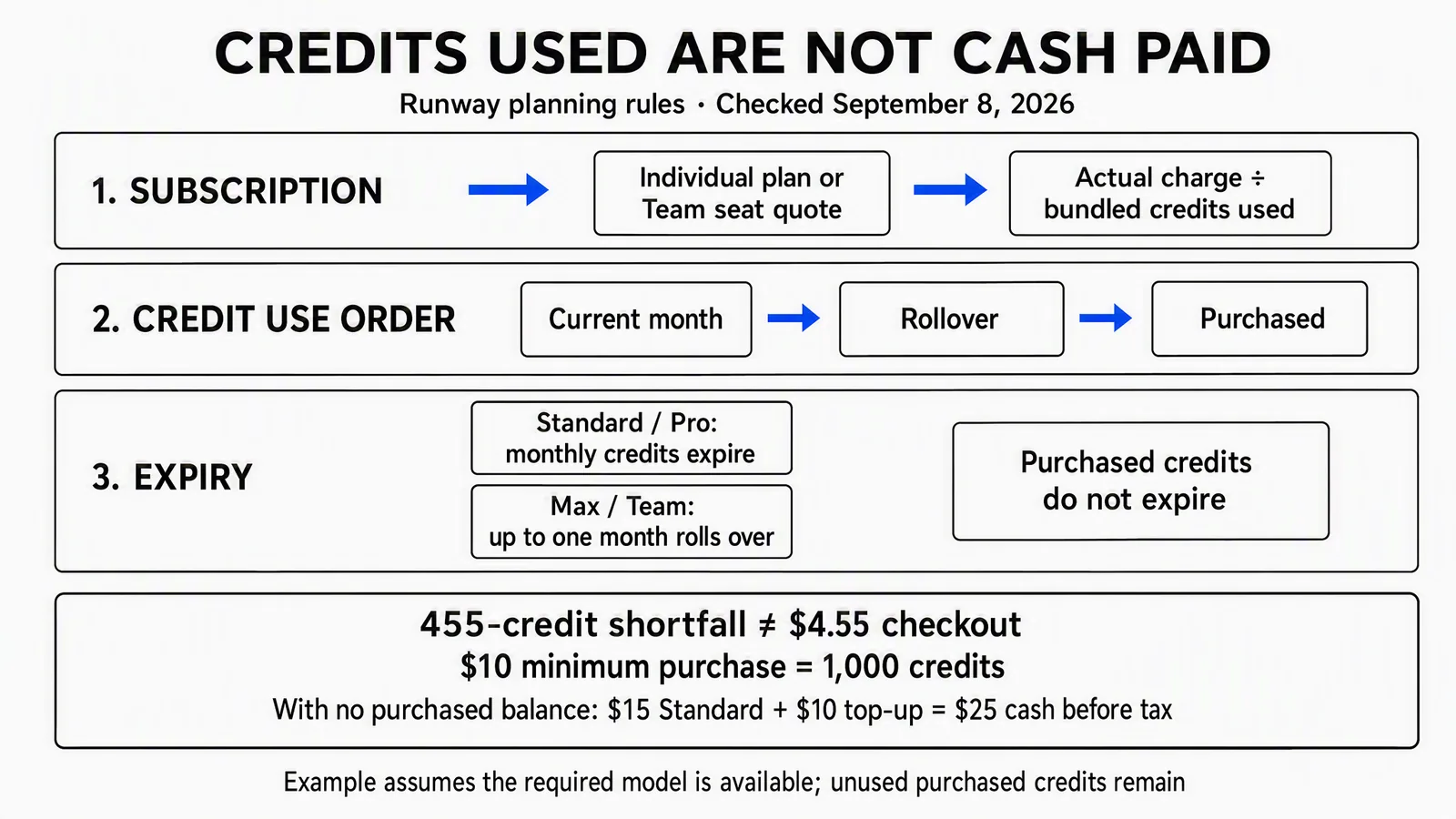
This September 8 editorial diagram is a calculation aid, not an official checkout screenshot. The minimum-purchase and expiry rules were corroborated for this guide, but the diagram’s full rollover-versus-purchased spending order was not independently confirmed. Only monthly-plan-credits-first was corroborated; current account guidance governs the remaining order. The example assumes access to the required model.
Suppose you need 455 credits after exhausting Standard and have no purchased balance. Those credits have $4.55 of consumption value, but the minimum top-up costs $10. You pay $25 including the monthly subscription, use 455 purchased credits and retain 545 purchased credits, worth $5.45 at their purchase rate.
For larger shortfalls, use the quantity actually offered at checkout. Don't assume every possible quantity or increment is purchasable. If you already own enough purchased credits, the same workload can require no new top-up payment while still consuming previously paid value.
Allocate the subscription without hiding unused capacity
At full monthly utilization, bundled-credit allocation is 2.40 cents on Standard, about 1.56 cents on Pro and 1.00 cent on Max. Those figures are subscription price divided by included credits, not marginal prices at which you can buy an individual credit.
If Standard supplies only 200 credits of useful work during an otherwise idle month, its subscription allocation is $15 ÷ 200 = $0.075 per used credit. Dividing by the unused 625-credit entitlement would understate what that month's work actually cost.
For multiple jobs, choose and document an allocation method, then distribute the subscription once. For example, allocate the monthly charge in proportion to each job's credits used. Record idle capacity explicitly; don't charge the entire subscription to every job and then add it again as overhead.
Calculate the workload from shots
Use one row per model and operation:
Row credits = accepted shots required × charged attempts per accepted shot × billed seconds per attempt × credits per second.
Add separately priced operations to get the total. For already completed work, use the actual charges, including discarded attempts, instead of forcing them into an average retry assumption. A requested duration and a selected final-cut duration need not be identical.
These three independent scenarios are planning examples, not observed approval rates:
|
Scenario |
Calculation and plan implication |
|---|---|
|
Eight concept attempts |
8 × 5-second Turbo attempts × 5 credits = 200 credits. Standard has 425 left before other work. These are attempts, not eight promised approved shots. |
|
Six-shot sequence |
6 accepted 5-second Gen-4.5 shots × 3 charged attempts × 12 credits/second = 1,080 credits. Standard is 455 short; Pro has 1,170 left. |
|
Four video edits |
4 accepted 5-second Aleph 2.0 edits × 2 charged attempts × 28 credits/second = 1,120 credits. Standard is 495 short; Pro has 1,130 left. |
The second scenario costs $25 in first-month Standard subscription and minimum-top-up cash, starting with no purchased balance. Pro costs $35 and needs no top-up for that workload. That does not automatically make either plan the right choice: model eligibility, other jobs and useful plan features still matter.
Don't add the scenarios together unless all three actually belong in your month. If they do, the total is 200 + 1,080 + 1,120 = 2,400 credits, so even Pro has a 150-credit shortfall before any other operations.
Test the assumption that moves the budget
For the same six five-second Gen-4.5 shots, one charged attempt per accepted shot uses 360 credits; three uses 1,080; five uses 1,800. These are sensitivity cases, not claims that any of those approval rates is typical.
The difference between the low and high case is 1,440 credits. Before committing to a year, try a small, representative production job within a defined spending cap and record the actual rejected shots, revisions and final handoff. A beautiful first result cannot tell you the cost of the revisions the client will request.
Worked example: cost per finished video
Assume the six-shot scenario produces one accepted 30-second video. This is the only production job charged to the month's subscription. Assume the required model is available, no other paid Runway operations are used, and existing source assets are already cleared.
The illustrative production budget is:
- Standard subscription: $15, fully allocated to this job.
- Purchased credits consumed: 455 × $0.01 = $4.55.
- Editing, review, captions and final export: 2 hours × $40 = $80.
- A separate licensed audio allowance: $10.
The consumption-based production estimate is $109.55 for the finished video. If the labor and audio are paid as budgeted and you start without purchased credits, first-month cash is $115: $15 subscription, $10 minimum top-up, $80 labor and $10 audio. The $5.45 difference remains as purchased-credit value, not a refund or a saving already realized.
On Pro, allocating the entire $35 subscription to this same sole job gives $125 including the same $90 production costs. Its unused 1,170 monthly credits do not make this one deliverable cheaper unless they support other real work. If further jobs use the pool, allocate the subscription across them and recalculate.
Neither example is a Runway quote, a measured labor requirement or a quality guarantee. Change the assumptions to match the brief. If only four of the six shots are usable, the 30-second deliverable is not complete just because the budget was spent.
Copy this plan-fit worksheet
This is a manual worksheet, not an interactive calculator. Copy the fields into your own sheet and keep the source date alongside the rates.
|
Field |
What to enter |
|---|---|
|
Finished job |
Required films, cuts, formats and what counts as accepted. |
|
Account |
Individual plan or actual Team seat quote; monthly or annual billing. |
|
Shot rows |
Model, accepted shots, charged attempts, billed duration and rate. |
|
Other work |
Explicit image, audio, edit, upscale and assembly operations. |
|
Available credits |
Unused current-month pool, eligible rollover and purchased balance, separately. |
|
Shortfall |
Workload minus usable included credits, floored at zero. |
|
New purchase |
Shortfall minus existing purchased balance, floored at zero; then apply actual purchase minimum and checkout options. |
|
Production cost |
Subscription allocation, purchased value consumed, labor, source assets and outside tools, without double counting. |
|
Cash timing |
Actual subscription and top-up payments, including annual upfront cost and adjustments. |
When a workload spans renewal dates, calculate each billing cycle separately. A monthly total alone can conceal credits expiring before the job starts or a new allowance arriving after the deadline.
Choose the plan for the work you will use
Free is for a limited evaluation using its one-time balance, not a recurring monthly production allowance. Standard can suit light individual use when the exact model is eligible and occasional top-ups are acceptable.
Pro merits consideration when its allowance and additional features will be used, not simply because it carries a larger number. Max is for sufficiently sustained individual volume or a useful rollover pattern. Buying capacity because its nominal unit price is lower can still increase total spending.
For shared production, price Team using actual members and pooled usage. For contract-specific requirements, obtain an Enterprise quote. Check plan changes before making them: the help guide describes immediate prorated upgrades and different next-cycle treatment for downgrades. Don't assume switching mid-job leaves the same balance and payment schedule intact.
Runway or Advibly: compare the complete workflow
Use Runway directly when the job centers on its models and production environment. It also offers agentic workflows, brand kits and MCP on eligible plans; this is not a comparison between an isolated generator and the only platform with reusable context.
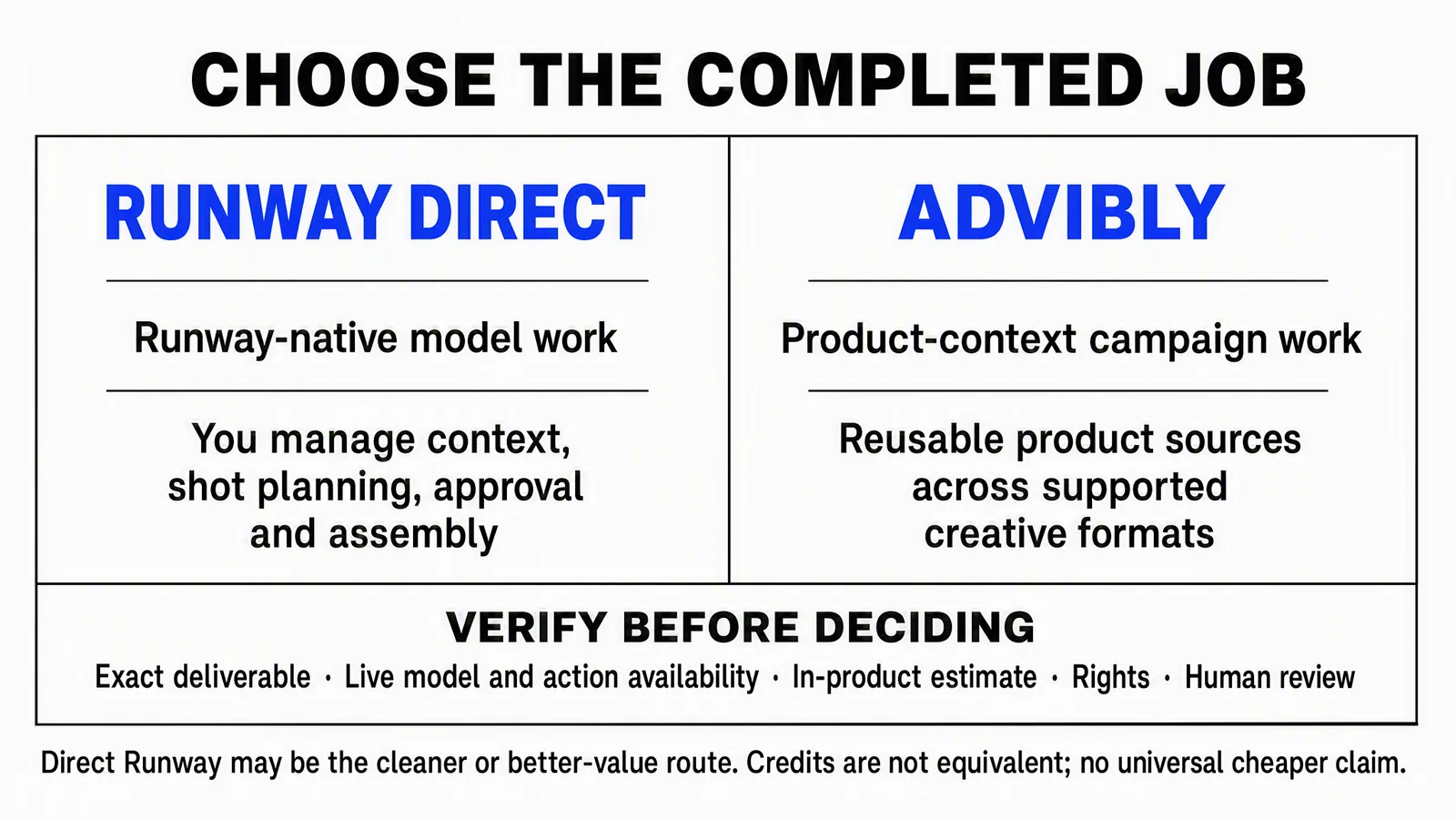
The matrix is a job-fit aid, not a feature-absence claim. Both routes still need accurate context and review; Runway has its own brand and agent capabilities. Compare the actual workflow rather than assuming its column means all assembly must be external.
Advibly is worth evaluating when the brief begins with a product page, storefront or app listing and needs a coordinated set of campaign outputs. For a fictional desk-lamp launch, save the actual product photos, dimensions, logo and approved claims in the brand context. Reuse them for a product scene, a clearly illustrative 3D Papercraft explainer, a feature carousel and a matching thumbnail.
Carry the approved set into captions, supported channel versions and scheduled social publishing. Check the publication status, then use post-publishing analytics to inform the next creative brief. For a real operation or fit claim, keep the actual product capture distinct from the generated explainer.
You can coordinate those creative workflows in the portal or through a compatible MCP client. Price the complete deliverable and the needed access on each route. A Runway credit and an Advibly credit are not interchangeable units, and this guide does not establish that either workflow is universally cheaper.