

Kling's paid monthly plans currently show first-month offers of $6.99 to $127.99, followed by renewals of $8.80 to $159.99. Basic is free. Those are USD figures checked on Kling's public membership page on September 11, 2026, not a tax-inclusive checkout quote.
For production, you need three different numbers: the plan charge, the credits spent on each attempt, and the total cost of the clips you approve. A cheap-looking render rate can still lead to a larger bill if you need extra attempts or run out of monthly credits.
Kling AI pricing: monthly plans and renewals
The official membership page distinguishes the initial offer from the next monthly charge. Its current figures also appear in Kling's credit-cost guide.
|
Plan |
USD monthly charge and included credits |
|---|---|
|
Basic |
$0; no monthly credit allocation listed. |
|
Standard |
$6.99 first month, then $8.80; 660 credits/month. |
|
Pro |
$25.99 first month, then $32.56; 3,000 credits/month. |
|
Premier |
$64.99 first month, then $80.96; 8,000 credits/month. |
|
Ultra |
$127.99 first month, then $159.99; 26,000 credits/month. |
Checked September 11, 2026, on the logged-out USD surface. The crossed-out reference prices are not the renewal charges above. First-purchase eligibility, currency conversion, taxes, payment fees, and later promotions can change what your checkout shows.
Choose a plan for the work you can realistically finish during its credit window. The largest pool is not automatically the cheapest purchase for a small project.
A clip budget and a campaign budget buy different things
Here is a concrete production brief to keep beside the price table: one peach-can scene, motion from the selected still, and a second seasonal direction. The images below are existing Advibly-generated demo assets. Both scenes are synthetic; the starting can scene is not a photograph of a real customer's product.
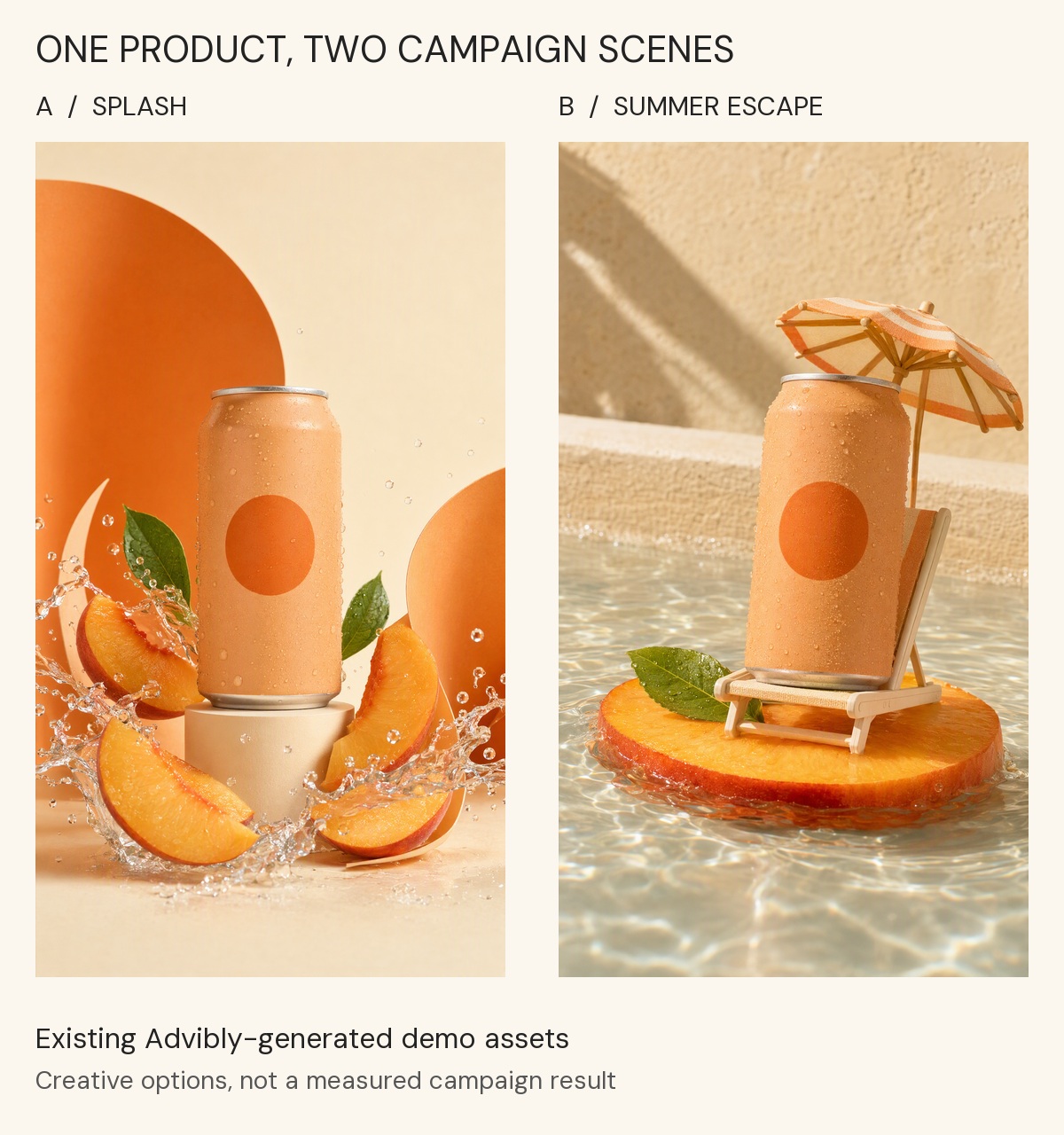
Existing Advibly demo outputs: the same fictional peach-can concept in a splash setting and a miniature holiday setting. This is a comparison of creative directions, not direct Kling outputs, product performance or a claim of pixel-perfect identity preservation.
View the existing ten-second peach-can motion example (silent MP4).
The motion example makes the budgeting boundary visible. Animating the selected scene is one operation; creating the alternative setting is another. Neither the two images nor the final clip reveals how many billed attempts were discarded. No matched direct-Kling generation or cost test was performed for this example, so the Kling rates below must not be read as its production receipt.
To try the same kind of brief in Advibly, supply your cleared product image, save the product and brand context, generate one approved scene, then use that scene as the reference for motion. Brief the seasonal variation separately. Inspect the product shape, label, opening and final frame before accepting either output. Record the displayed estimate and actual credits for each operation; compare direct Kling only at the same model settings and required deliverables.
Explore creative workflows when the job extends beyond a single clip.
Annual subscriptions, short passes, and top-ups
Annual billing changes the payment commitment; it doesn't mean that all annual credits arrive at once. Kling's Credits Policy says regular subscription credits are distributed monthly. Compare the full yearly charge, delivery schedule, and renewal terms before treating an annual price as a monthly expense.
The membership page also exposes One-Time and Purchase Credits options. Check the selected option's duration, included credits, validity, and benefits. Don't treat a short pass as a recurring monthly plan or assume that an earlier promotional pack is still available.
The policy's standard purchased-credit rate is $1 for 66 credits, with promotions governed by the current purchase interface. That's a planning basis, not a promise that every possible credit quantity is sold as an exact-size pack.
What does a Kling VIDEO 3.0 attempt cost?
The VIDEO 3.0 model guide publishes separate rates for resolution and native audio. Multiply the chosen rate by the generated duration.
|
VIDEO 3.0 setting |
Credit charge |
|---|---|
|
720p, no native audio |
6/second: 30 for 5 seconds; 60 for 10 seconds. |
|
720p, native audio |
9/second: 45 for 5 seconds; 90 for 10 seconds. |
|
1080p, no native audio |
8/second: 40 for 5 seconds; 80 for 10 seconds. |
|
1080p, native audio |
12/second: 60 for 5 seconds; 120 for 10 seconds. |
|
Voice Control |
An additional 2/second when enabled with supported native-audio generation. |
For example, ten seconds at 1080p with native audio requires 120 credits before any Voice Control add-on. At the policy purchase basis of $1/66 credits, that is $1.82 of credit value. It is not a standalone $1.82 checkout offer and does not include membership access or production labour.
At Standard's renewal rate, allocating its full 660-credit pool gives an average cost of $8.80/660 per credit. The same 120-credit attempt then represents $1.60 of the subscription charge. You still pay $8.80 for the plan, and the pool is finite.
Keep Omni, Motion Control, and 4K on separate lines
For VIDEO 3.0 Omni, the input path changes the rate. Without video input, the guide lists the same 720p/1080p audio-on and audio-off rates shown above. With video input, its audio-off rates are 12 credits/second at 720p and 16 at 1080p; native audio with video input is listed as unsupported in that guide.
VIDEO 3.0 Motion Control has its own Standard and Professional modes at 9 and 12 credits/second. Those are generation modes, not a reference to Standard and Pro subscription memberships. Its examples round duration to the nearest whole second: 3.4 seconds becomes 3, while 3.6 becomes 4.
Kling's credit-cost guide lists native 4K at 30 credits/second as a planning reference. Don't add or subtract audio rates to invent a combined 4K price; confirm the exact current generation-panel estimate.
These distinctions are why a single “Kling costs X per video” figure is usually incomplete. Even two clips of the same length can use different input paths and billing rules.
Unused credits change your effective cost
If you pay for a pool and use only half before expiry, each used credit carries twice as much of that plan's cost. This is an allocation calculation, not a change to Kling's generation rate.
Effective cost per used credit = plan charge ÷ credits actually used.
Count billed rejected attempts as used credits here. Utilization measures how much of the purchased pool you consumed; approval yield measures how much usable work that consumption produced. Removing rejected attempts from utilization and then charging for them again would double-count the same loss.
At the renewal figures above, the calculation gives:
|
Plan |
Cents per used credit: full / 75% / 50% use |
|---|---|
|
Standard |
1.33¢ / 1.78¢ / 2.67¢ |
|
Pro |
1.09¢ / 1.45¢ / 2.17¢ |
|
Premier |
1.01¢ / 1.35¢ / 2.02¢ |
|
Ultra |
0.62¢ / 0.82¢ / 1.23¢ |
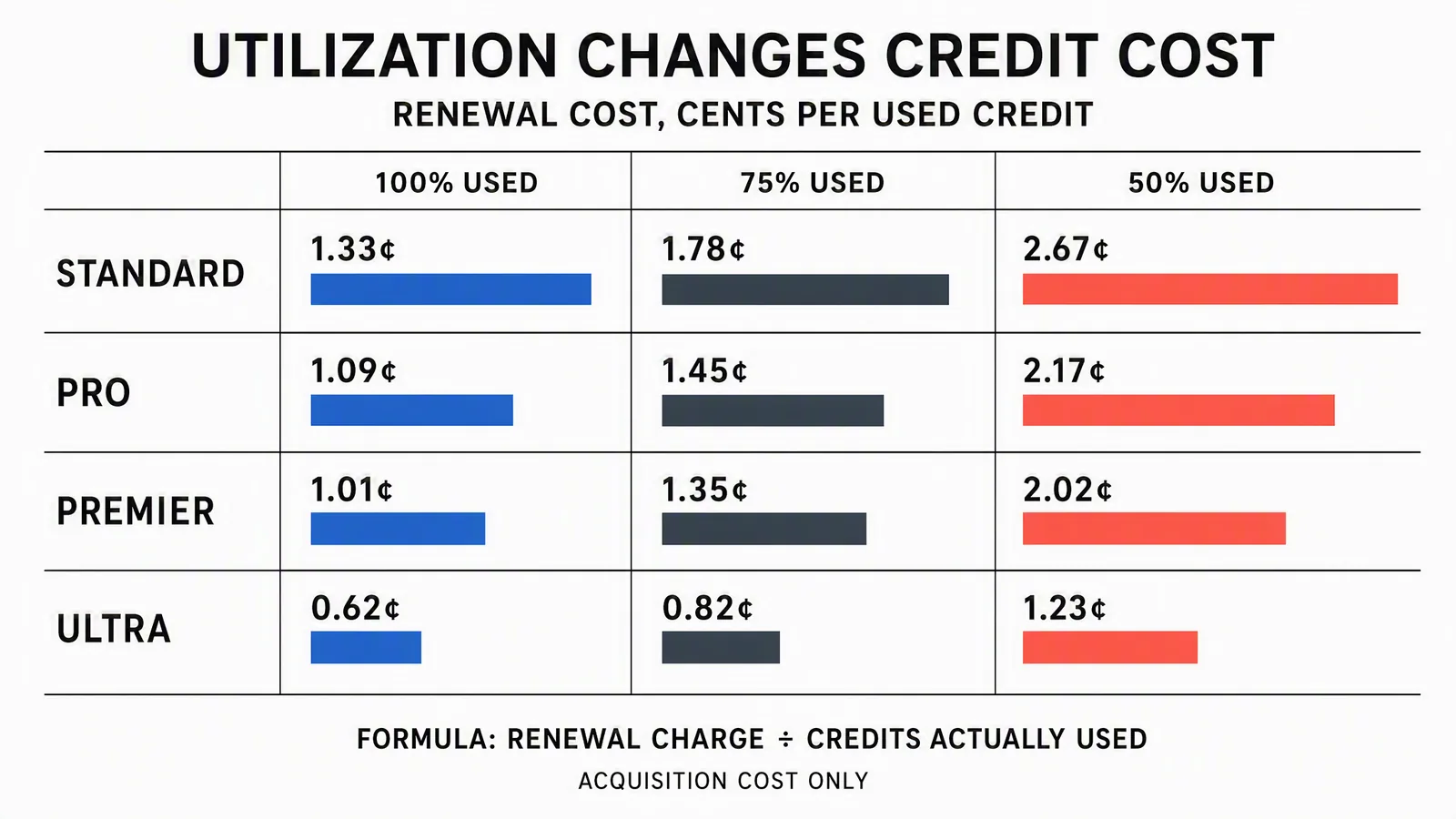
Reference values calculated from the September 11 monthly renewal snapshot. Read the printed numbers and table, not the decorative bar lengths; the bars are not a common-scale quantitative chart. This compares credit acquisition only, not plan benefits.
For a concrete comparison, Pro at 50% use costs about 2.17 cents per consumed credit, above the policy purchase basis of about 1.52 cents. That doesn't mean cancel the membership: the output may require paid-only features. It means you should consider a smaller eligible plan plus a top-up, using current checkout quotes.
Kling's policy gives regular subscription credits a one-month validity and purchased credits two years. It uses shorter-validity credits first. Read the actual expiry in your account; don't plan a project around unused subscription credits surviving into the next month.
Calculate the cost of an approved clip
An approved clip meets your brief. It isn't simply a generation that finished successfully. You might reject a technically completed output because the product changes shape, the action is wrong, or the delivery doesn't fit the campaign.
For attempts billed at the same setting:
Credits per approved clip = credits per attempt × billed attempts per approval.
Then multiply by the applicable cost per used credit to allocate generation expense. If attempts use different models, durations, or rates, total their actual billed credits instead of forcing them into one average setting.
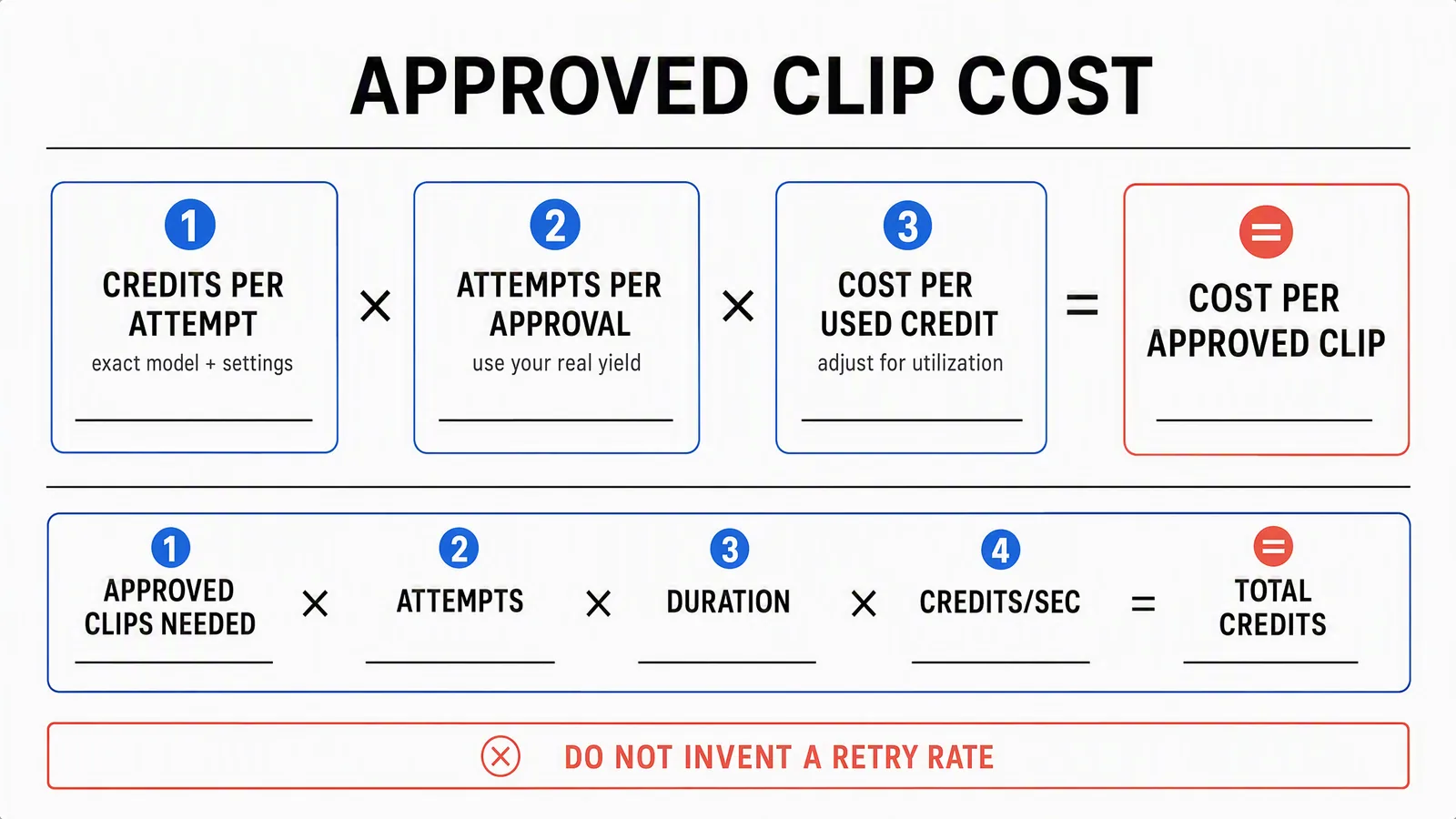
Budget worksheet, not an interactive calculator. Use billed attempts after confirmed refunds, and keep differently priced settings on separate lines. The formula estimates allocated cost; check plan capacity and purchase amounts separately.
Kling's Credits Policy says failed generations are refunded. A completed output you dislike is not automatically the same as a failed job. Use confirmed billing and refund records when measuring yield; don't count a refunded failure as paid consumption or assume an editorial rejection earns a refund.
If you have no production history, write several scenarios rather than one confident retry rate. For twelve ten-second 1080p native-audio clips, one billed attempt per approval needs 1,440 credits; three need 4,320; five need 7,200. These are hypothetical planning scenarios, not measured Kling approval rates.
Worked budget: twelve approved clips in one month
Suppose the brief requires twelve ten-second 1080p clips with native audio. You plan for three billed attempts per approval. There is no existing credit balance, and you want all clips within one billing window.
12 clips × 3 attempts × 10 seconds × 12 credits/second = 4,320 credits.
Pro's 3,000-credit allocation is 1,320 credits short. Multiplying all 4,320 by Pro's average rate gives $46.89, but that is not a feasible one-month purchase budget: the subscription doesn't provide the additional credits at that rate.
Instead, compare actual acquisition routes:
- Pro plus a top-up: $32.56 renewal plus the current quote for at least 1,320 extra credits. At the policy basis of $1/66, exactly 1,320 would be $20, giving a planning total of $52.56, or $4.38 per approved clip. This assumes an available pack or combination at that rate; inspect the purchase selector before treating it as a payable offer.
- Premier: the listed renewal is $80.96 for 8,000 credits. The batch uses 4,320, leaving 3,680 for other eligible work before expiry. If this is your only work in the window, allocate the entire $80.96 to the batch: about $6.75 per approved clip.
Under those assumptions, Pro plus the modeled top-up has lower cash cost. Premier could fit a larger month of work or a different current offer. Neither is a universal recommendation, and these totals exclude taxes, payment fees, editing, labour, and separately priced finishing steps.
The lesson is to check capacity before comparing unit rates. A fraction of a large subscription can look inexpensive on a spreadsheet while the full purchase is more than your project needs.
Copy this budget checklist
- Deliverable: approved clip count, duration, resolution, audio, input path, and required controls.
- Consumption: billed attempts per approval, or separate scenario estimates when yield is unknown.
- Available credits: usable starting balance, expiry dates, and the subscription credits delivered inside the production window.
- Shortfall: required credits minus credits available for this job, after other committed work.
- Purchase quote: eligible plan charge plus actual top-up packs, taxes, and fees. Don't assume fractional subscriptions or arbitrary pack sizes.
- Finished-work costs: review, editing, voiceover, captions, music rights, and assembly not already included in the chosen output.
- Approval standard: the product, motion, sound, text, and destination checks a clip must pass.
Record unused credits too. Purchased leftovers with a long validity and expiring subscription leftovers have different implications for the next project.
Direct Kling or a broader Advibly workflow?
Choose based on what the job includes. If you need a specific Kling mode and the work ends with exported Kling clips, direct access gives you a clear model-specific purchase to evaluate. Compare eligible plans and top-ups against your own production volume.
If the assignment is a launch campaign, the video may be only one item. You may also need product images, an explainer, a carousel, captions, and scheduled posts. Advibly supports that connected creative workflow, including Kling 3 among its listed models.
Consider a Shopify launch. Start with the product page and approved photos, save the brand context, create static directions, animate a selected image, and build related video and carousel variations. Use Brand Intelligence when you need a sourced brief with market context, competitor information, and customer language before choosing the angle.
For an app launch, start from the listing and real screenshots. The output set could include feature creatives, a screen-led explainer, a whiteboard-doodle explanation of the workflow, and social posts. These are different deliverables with different production costs, not interchangeable ten-second clips.
You can coordinate supported steps in the portal or through an AI assistant using MCP. Reuse saved assets and context, review the campaign set, then use the calendar and publishing workflow for connected accounts. Post-publication status and analytics help inform what you make next.
That is the scope to price against. Advibly credits and direct Kling credits are different units, and a model family name does not establish identical settings or costs. Request estimates for the same video configuration, then price the other assets and workflow you actually need. Don't claim a savings figure by comparing a bare render with a finished campaign.
Before buying: access, rights, and renewal
Check feature eligibility as well as the credit balance. Kling's policy identifies functions such as watermark removal, fast-track generation, and 1080p output as premium-only. Buying credits does not itself activate membership benefits.
Kling's guide describes Basic outputs as not for commercial use. Its paid-service terms permit commercial use for members subject to the agreement, including a restriction on developing or offering competing Kling products or services. This isn't a guarantee that every uploaded reference, likeness, soundtrack, or resulting advertisement is cleared for your use.
For subscriptions, inspect the renewal amount and cancellation terms before paying. For a one-off job, compare the full purchase needed to finish it, not merely an advertised per-credit figure. For recurring production, keep a record of credits used and clips approved so next month's plan choice is based on your work rather than a promotional headline.