

For client video ads, shortlist Creatify when the starting point is a product URL, Arcads when the deliverable centers on an AI actor, HeyGen when a consistent presenter or translation matters, and Advibly when one client brief needs video ads plus static images, carousels and social posts. Keep Canva or a video editor when the client needs precise layout or timeline revisions.
The best content creation tools for social media depend on the deliverables you sell. A weekly social package, a set of creator-style ads and a localized presenter video are different purchases. Choose the production tool first; add publishing or reporting software only where it solves a remaining job.
This is a use-case comparison based on official product documentation checked on 11 September 2026, not a hands-on quality ranking or a claim that one tool produces better ad results. Advibly publishes this guide. “Best fit” means the documented workflow matches the stated job; plan access and client requirements still need checking.
AI video-ad tools: choose by the client deliverable
|
Tool |
Best fit and starting input |
Decision to test before client delivery |
|---|---|---|
|
Creatify |
Product-page-to-video ads: start from a product URL and supplied product assets. |
Does the extracted product information survive script, avatar and final video review? |
|
Arcads |
Actor-led creative: start with the script, actor direction and product references. |
Does the selected actor deliver the client’s tone, and can the required product scene be produced accurately? |
|
HeyGen |
Recurring presenter or localized video: start with an authorized presenter, script or source video. |
Check pronunciation, translation, likeness consent and the exact export needed. |
|
Advibly |
Multi-format client campaign: start from a website, app listing, storefront or brand files. |
Check that saved brand context carries into each video, static and carousel; inspect actual product fidelity. |
Where each video tool earns its place
Creatify’s URL-to-video workflow extracts product information and assets from a link and supports an avatar-based video creation path. It is a practical shortlist candidate for an operator selling product-led video-ad variants. Try the exact client page: an incomplete or outdated listing still needs a corrected brief.
Arcads emphasizes AI actors, UGC Studio, product showcases and tools for captions, translation and video refinement. Shortlist it when actor delivery and creator-style concepts dominate the client order. It also offers other image/video tools; actor-led production is our selection reason, not its entire capability set. A synthetic actor must not be passed off as a customer recounting a genuine experience.
HeyGen centers on avatars, script-driven video and translation. Shortlist it for a client who needs a consistent presenter across explainers or language versions. Review each language with someone qualified to approve it, and secure permission for any real person’s likeness and voice. Presenter consistency is a workflow requirement here, not a tested claim that HeyGen is more realistic than every alternative.
Advibly turns product and brand sources into reusable context for images, video ads, carousels and social content. It supports creator-style videos, product demos, animated explainers and multi-scene workflows with voice, captions and assembly. Choose it when the recurring client job spans several formats and you want to reuse the brief rather than recreate it for each output.
You can work directly in the Advibly portal or let a compatible AI assistant operate it through MCP. The assistant coordinates the brief and supported tools; Advibly performs the creative operations. Keep each client’s brand context separate within plan limits, review the actual exports, and use supported connected accounts for approved social publishing. This is not a claim of native client sign-off roles, automated paid-ad buying or guaranteed performance.
Worked buying scenario: two clients, different production needs
Suppose an operator needs a product video, two static ads and a carousel for a skincare client, plus a presenter-led feature explanation in two languages for an app client. This is an illustrative order, not a customer result. For the skincare package, compare Advibly’s shared-context workflow with Creatify for video plus Canva for the other assets. For the app presenter, compare HeyGen with Arcads using the same authorized script and real app screens.
- Give each shortlisted stack the same approved source assets, deliverables, dimensions and revision request. Do not compare one tool’s best demo with another’s first attempt.
- Ask for one consequential revision: change the offer without altering the pack, or correct a product term without rebuilding the whole sequence. Record whether it can be done reliably.
- Record subscriptions attributable to the job, generation credits including rejected attempts, editing time and review time. Divide total production cost by accepted deliverables—not all generated files.
- Check commercial-use terms, music and likeness rights, client-data handling, export resolution, watermarks, brand/seat limits and supported accounts before promising delivery.
- Choose the smallest stack that completes the job and its revision. Keep an existing editor or scheduler if replacing it adds repair work rather than removing it.
There is no matched output-cost or quality benchmark here. Exact prices, allowances and approval features vary by plan. Get current quotes for your client count and expected retries before committing to a recurring package.
Keep the useful design, editing and publishing layers
Quick comparison by primary job
|
Tool |
Best fit |
Where it stops |
|---|---|---|
|
ChatGPT |
Ideas, outlines, copy alternatives and image iteration |
Calendar, channel publishing and product-governed production need a wider system |
|
Canva |
Editable design, templates and social assembly; Canva Grow adds an AI-ad workflow |
Verify the workflow and plan: Canva now also documents AI ad creation and paid-media tools through Canva Grow. |
|
CapCut |
Hands-on short-video editing, captions and pacing |
Product context and campaign planning must be supplied |
|
Adobe Firefly |
Image, video and audio generation in an Adobe creative workflow |
Choose the Adobe product combination and entitlements for editing, publishing and campaign operations. |
|
Buffer |
Simple multi-channel planning and publishing |
Deep asset generation is not the main job |
|
Hootsuite |
Social management, planning and broader operational oversight |
Creative production may require other tools |
|
Meta Business Suite |
Publishing and management across Facebook and Instagram |
Primarily Meta-specific |
|
Advibly |
Product-to-creative production across image, carousel, social and video formats |
Not a replacement for channel analytics, final editing judgment or original shoots |
Pricing: compare the stack, not the cheapest plan
|
Cost question |
Why it matters |
What to record |
|---|---|---|
|
Seat or workspace cost |
Team access can dominate the subscription total |
Required users and brands |
|
AI usage |
Generation allowances differ by model and plan |
Credits, rate limits and likely retries |
|
Publishing channels |
Plans can scale by connected accounts |
Channels and approval needs |
|
Migration time |
Copying context and files between tools is labour |
Handoffs per campaign |
|
Human repair |
A cheap output can be expensive to make usable |
Editing and review time |
Official pricing details change. Check current pricing for the exact team size, channels and AI usage before buying. The relevant unit is the cost of an approved week or campaign, not the headline monthly price.
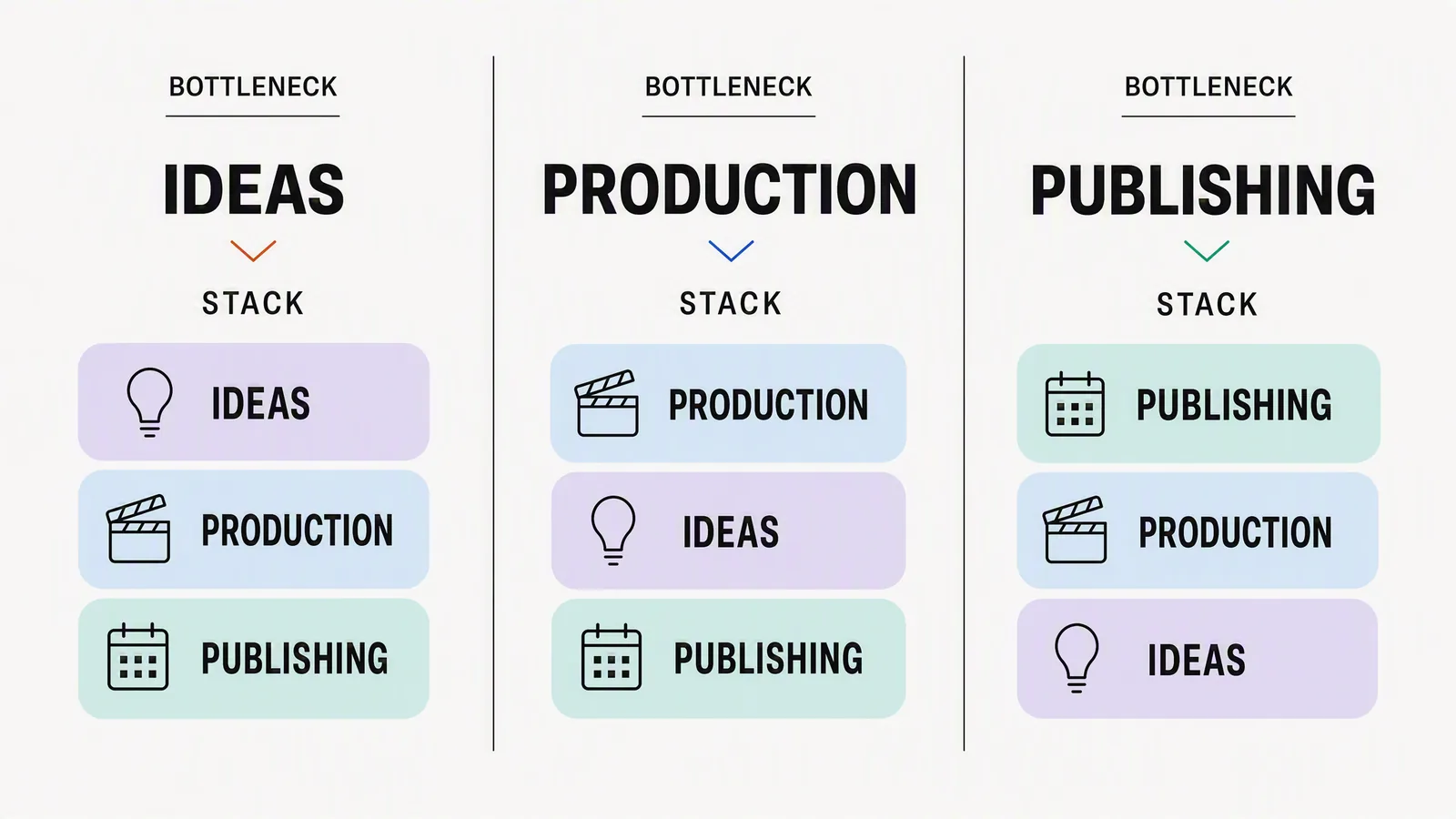
Choose by bottleneck
"We do not know what to say"
Start with research and a reasoning or writing tool. A production platform will scale a weak message as efficiently as a strong one.
"Everything looks inconsistent"
Use a design system, templates and reusable brand inputs. Canva can be strong for direct layout control; Adobe is compelling for established creative teams; Advibly is relevant when product and brand context need to move across several generated formats.
"Video editing takes too long"
CapCut is a natural short-video editing choice when the team already has footage or generated shots and needs direct control over cuts, captions and timing. Advibly also supports generation and assembly workflows for product-led video generation. Use an external editor when direct timeline control makes the requested revision easier, not because every Advibly video requires separate assembly. Check CapCut availability in your location before choosing it for client work.
"We create assets but fail to publish consistently"
Buffer, Hootsuite and Meta Business Suite solve different degrees of planning and distribution. Choose according to channel breadth, approval complexity and analytics needs.
"Every campaign starts from zero"
This is a context problem. Advibly can keep product and brand sources available, offer multiple models and skills, and carry an approved direction into static ads, carousels, posts and finished video workflows, then schedule approved social content to supported connected accounts.
Three lean example stacks
- Solo creator: ChatGPT for thinking, Canva or CapCut for assembly, Buffer for scheduling.
- Ecommerce team: Advibly for product-led campaign production, CapCut for final video control, native platform tools for measurement.
- Agency: research and writing layer, Adobe or Canva for controlled design, specialist editor, and Hootsuite or another client-management layer.
These are operating examples, not mandatory bundles. Remove any tool whose output is recreated downstream.
Evaluation test
- Choose one real campaign due this week.
- Measure how many times the product and brief must be re-entered.
- Create one static, one carousel and one short video.
- Record failed attempts, approval time and missing channel requirements.
- Keep the stack that produces the clearest approved set with the fewest destructive handoffs.
Explore product-led social content production in Advibly.
Sources
- OpenAI image-generation guidance, accessed 4 August 2026.
- Creation sources: Canva social media features, CapCut online video editor, and Adobe Firefly; accessed 4 August 2026.
- Publishing and management sources: Buffer Publish, Hootsuite content-creation guide, and Meta Business Suite; accessed 4 August 2026.
- Advibly product surface, checked 4 August 2026.
Additional product sources checked 11 September 2026: Creatify URL to Video; Arcads; HeyGen; Adobe Firefly; Canva Grow announcement. Canva describes a broader create, launch and reporting workflow; verify current account access rather than treating it only as a template editor.