

Your AI agent can turn a content plan into generated assets and scheduled posts through Advibly. The missing link is usually not another list of ideas: it is a clear record of what to create, which account may receive it and which exact version has permission to go live.
A content calendar gives the agent that record. It combines the publishing schedule with each slot’s brief, asset references, approval decision and delivery evidence. Advibly supplies supported creative and social-post operations; the assistant translates eligible calendar slots into those calls.
This guide gives you a vendor-neutral schema, a worked record and a supported creation-to-scheduling example. The schema is your coordination layer, not a native Advibly calendar-import format or a promise of built-in reviewer roles.
Key Takeaways
- A calendar row that says "Ready" is a planning artifact. An agent needs a slot that separately records what was produced, who approved which exact version, and what the destination returned.
- Keep production, approval and delivery in three status fields. Approval binds to a slot version and specific artifact IDs, so a material edit after approval must increment the version and reset approval to pending.
- Count states, not rows. A full calendar with blocked slots is not throughput, and
scheduledis notpublisheduntil a receipt or public URL exists.
A date grid plans content. An execution contract controls it.
A conventional content calendar usually records a topic, owner, channel, format, date, assets, and status. Mature project tools add assignments, dependencies, centralized assets, rescheduling, and approvals; Asana's social media calendar is a strong example of that human-first model.
Those fields remain useful. The problem is that an agent needs to know not only what the row says, but whether the row is eligible to advance.
Consider this familiar entry:
|
Topic |
Channel |
Publish date |
Owner |
Status |
|---|---|---|---|---|
|
Brand memory |
|
August 11 |
Social lead |
Ready |
"Ready" could mean the brief is ready, the copy is ready, every asset is ready, the founder approved the final version, or the post is already scheduled. A person can ask. An agent may choose the wrong interpretation and continue.
The executable version must answer five separate questions:
- What is the approved job? The slot links to strategy and defines the reader, objective, message, evidence, and next action.
- What must exist? Required copy, visuals, source material, account details, and acceptance checks are explicit.
- What is the current production state? Briefing and asset creation have their own status.
- Who may authorize delivery? Approval names the authority and binds it to exact versions.
- What proves delivery? Scheduling and publishing remain separate until a receipt or public URL confirms the result.
That last distinction matters. A full calendar is not the same thing as a shipping system.
The minimum agent-readable content calendar schema
Use one stable record for the calendar and one stable record for each publishing job. Keep the strategic plan outside the calendar, then reference it. This avoids copying old strategy into every row while preserving the reason each slot exists.
Calendar-level fields
|
Field |
Required |
What it controls |
|---|---|---|
|
|
Yes |
Controlled migration when the contract changes |
|
|
Yes |
Identity across tools and views |
|
|
Yes |
Material revisions to the plan |
|
|
Yes |
One interpretation of dates and times |
|
|
Yes |
Link to the approved strategy source |
|
|
Yes |
The destination-specific publishing jobs |
Slot-level fields
|
Field |
Required |
What it controls |
|---|---|---|
|
|
Yes |
Stable identity across edits, retries, and receipts |
|
|
Yes |
The exact revision being produced or approved |
|
|
Yes |
Connection to a campaign or strategic idea |
|
|
Yes |
The progress this asset should help someone make |
|
|
Yes |
The business or communication job |
|
|
Yes |
Destination-specific requirements |
|
|
Yes |
The artifact contract |
|
|
Yes |
Message, evidence, constraints, and next action |
|
|
Yes |
Versioned copy, visual, or video outputs |
|
|
Yes, may be empty |
Missing inputs that block progress |
|
|
Yes |
Brief and asset progression |
|
|
Yes |
Authority and approved versions |
|
|
Yes |
Schedule, publish, and receipt state |
|
|
Yes |
The accountable human or team |
|
|
Yes |
Freshness and conflict checks |
Stable identity is not clerical fussiness. The iCalendar standard uses a persistent UID to correlate one calendar component across modifications and a SEQUENCE value for significant revisions. A content workflow needs a richer record, but the same design principle applies: changing Tuesday to Wednesday should revise the existing slot, not create a second publishing job. See RFC 5545 for the underlying calendar concepts.
Plain JSON is not enough
Putting a loose calendar into JSON makes it machine-readable, not execution-safe. In JSON Schema, properties are optional unless they appear in required, and undeclared properties are allowed unless the schema constrains them. The JSON Schema object reference documents both defaults.
At the execution boundary, use three kinds of constraint:
- Required fields: Core identity, brief, state, approval, and delivery fields cannot be omitted.
- Controlled fields: Reject unknown execution fields rather than quietly accepting both
publish_dateandscheduled_at. - Conditional fields: Require evidence appropriate to the state. JSON Schema supports dependent and conditional validation for this purpose; see its conditional validation reference.
For example:
- If approval is required,
approver_idmust exist. - If approval is
approved, the record must includeapproved_by,approved_at, the approved slot version, and approved artifact IDs. - If delivery is scheduled, record the time, timezone, destination account, approved artifact version, returned post ID and readback confirming the schedule.
- If delivery is
published, the record must include a publication time and a verifiable receipt or public URL.
These are workflow recommendations, not a universal industry standard. Their purpose is practical: an agent should be able to reject an incomplete action instead of guessing its way through it.
Use three states, not one overloaded status
Separate the work into production, approval, and delivery. Each state answers a different operational question.
|
State group |
Example values |
Question answered |
|---|---|---|
|
|
|
Do the required artifacts exist and pass their checks? |
|
|
|
Has the correct authority approved these exact versions? |
|
|
|
What happened at the destination? |
The transition rules matter more than the labels:
- A slot becomes
brief_readyonly when its reader job, message, evidence, next action, and asset requirements validate. - It becomes
assets_readyonly when every required artifact exists and passes its acceptance checks. - Approval binds to the current slot version and specific artifact versions.
- A material edit after approval increments the slot version and resets approval to
pending. - Delivery becomes scheduled only after approval, submission and readback confirm the intended account and time.
- A retry preserves the slot identity and checks the prior delivery result; reuse a provider idempotency key only where the provider supports one.
- Delivery becomes
publishedonly after readback produces a receipt, URL, or equivalent proof.
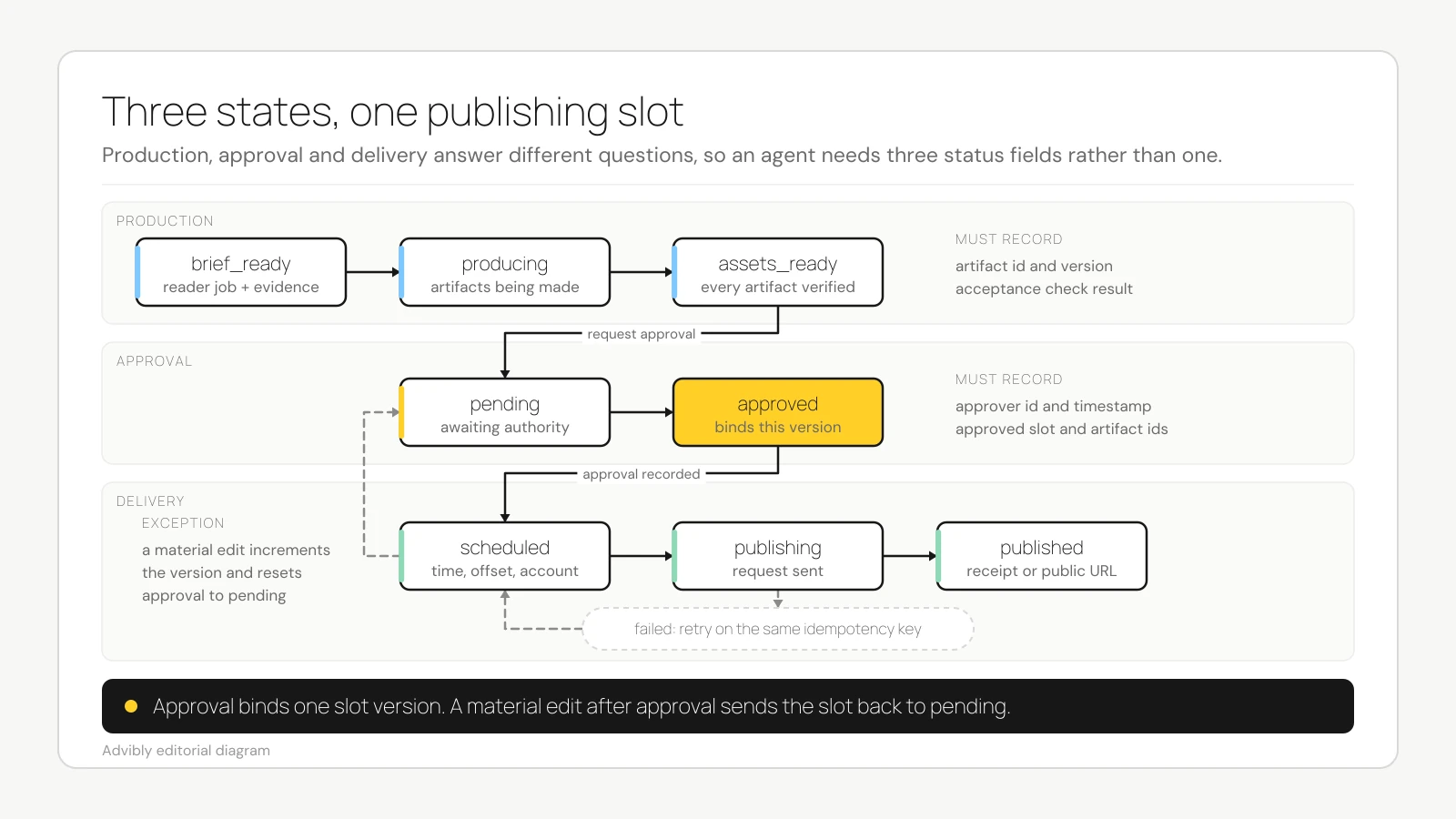
This is a vendor-neutral state diagram. Its retry branch assumes provider idempotency where supported; Advibly’s post tool does not establish that guarantee. Otherwise reconcile the existing post ID before any retry.
The Model Context Protocol tools specification uses JSON Schema for tool inputs and recommends human control over tool invocations. It does not define a content calendar or grant publishing permission. Your calendar still needs to state who can approve what.
A worked content calendar example
Suppose a SaaS founder wants to explain how reusable brand context reduces repeated setup. The slot below is a hypothetical August campaign record, not a real publication or an Advibly import payload. Every identifier and recorded check in this example is illustrative.
{ "schema_version": "1.0", "calendar_id": "august-launch", "calendar_version": 3, "timezone": "Europe/London", "strategy_ref": "august-launch-v2", "slots": [ { "slot_id": "aug-launch-001", "version": 2, "theme": "Reusable brand context", "reader_job": "Understand what must be saved before repeat creative generation", "objective": "educate", "channel": "linkedin", "format": "carousel", "scheduled_at": "2026-08-11T10:30:00+01:00", "brief": { "message": "A reusable source of brand truth should precede repeated generation.", "hook": "Map the inputs a founder should stop entering repeatedly.", "evidence_refs": [ "current-product-context" ], "allowed_claims": [ "The product builds reusable brand context from supported brand and product sources." ], "prohibited_claims": [ "Perfect brand adherence", "Guaranteed production-time reduction" ], "cta": "Review the brand-context workflow", "brand_ref": "current-brand-record", "asset_requirements": [ "Five-slide carousel", "Authentic interface proof for brand inputs" ], "acceptance_checks": [ "Every product claim has an owned source", "No invented performance result" ] }, "artifacts": [ { "artifact_id": "copy-001-v2", "type": "carousel_copy", "status": "verified" }, { "artifact_id": "visual-001-v1", "type": "carousel_images", "status": "verified" } ], "dependencies": [], "production_status": "assets_ready", "approval": { "required": true, "approver_id": "founder", "status": "approved", "approved_by": "founder", "approved_at": "2026-08-09T14:12:00Z", "approved_slot_version": 2, "approved_artifact_ids": [ "copy-001-v2", "visual-001-v1" ] }, "delivery": { "status": "scheduled", "destination_account_id": "linkedin-brand-account", "action_key": "aug-launch-001-v2-linkedin", "post_id": "hypothetical-scheduler-post-001", "schedule_readback": { "checked_at": "2026-08-09T14:15:00Z", "status": "scheduled", "scheduled_at": "2026-08-11T10:30:00+01:00", "destination_account_id": "linkedin-brand-account" }, "publication_receipt": null }, "owner_id": "social-lead", "updated_at": "2026-08-09T14:15:00Z" } ]}
This record makes the hidden decisions inspectable:
- The theme cannot enter production until it becomes a specific message for a specific reader.
- Claims are separated into allowed and prohibited sets, so positioning does not quietly become a performance promise.
- Approval covers
copy-001-v2andvisual-001-v1, not every future edit. - The hypothetical post_id and schedule_readback establish scheduling in this example; publication_receipt stays empty until delivery is verified. action_key is local duplicate-check identity, not a claimed Advibly idempotency argument.
Now imagine the social lead changes the carousel's central claim after approval. The safe response is not to update the copy and leave the green approval badge in place. Increment the slot to version 3, save the revised copy as a new artifact, reset approval to pending, and block scheduling until version 3 is approved.
That is the hardest part of an agent-run calendar: not generating the next asset, but preserving authority as the asset changes.
Measure executable throughput, not calendar fullness
A calendar can look busy while most of its rows are blocked. Count states separately.
For a simple planning example:
- 3 themes × 2 channel-specific assets per theme = 6 planned slots.
- If one slot lacks required product proof, the current throughput is 5 ready slots and 1 blocked slot.
- It is not "6 pieces created," and it says nothing about engagement or conversion.
Track at least:
- planned slots;
- brief-ready slots;
- blocked slots, grouped by dependency;
- assets ready for approval;
- approved slots;
- scheduled slots;
- published slots with delivery evidence;
- failed deliveries awaiting a controlled retry.
This exposes the actual constraint. If briefs are ready but approvals stall, more generation will only make the approval queue taller.
When a project calendar and scheduler are the better choice
Not every team needs a strict agent-readable layer.
A human-first project calendar is stronger when the main problem is cross-functional coordination: comments, flexible exceptions, shifting assignments, rich review conversations, and work that changes shape often. A social scheduler is stronger when the plan is already settled and the main job is drafting, approval, scheduling, and rescheduling.
Choose a validated execution contract when the same plan must reliably drive repeated briefs, generation, checks, approvals, and delivery across tools. For many teams, the best architecture is hybrid:
- a friendly project view for humans;
- a validated structured record underneath;
- a publishing tool for destination-specific delivery.
The structured record should be the execution authority. The visual board should not become a second, conflicting source of truth.
Where Advibly fits, and where it does not
Once a slot defines its brand source, message, required creative, channel, approval and time, Advibly can generate the asset and schedule the supported social post. Its native tools accept completed generation IDs, explicit connected-account targets and a scheduled time, then expose per-platform publication results through post readback.
Advibly MCP supports brand access, image and video generation, asset retrieval, social post creation and scheduling, and publication-status retrieval. That does not make this guide’s JSON an Advibly import schema. No native calendar-import contract, reviewer-role enforcement or automatic recovery is established by those calls. Your agent maps the validated record to the supported tool arguments.
The useful division is straightforward: your calendar holds the plan and approval evidence; the assistant turns an eligible slot into a creative brief and an authorized tool call; Advibly generates and schedules the content. Keep one authority for the slot, and write returned IDs and results back into that same record. Set up the MCP connection before trying one approved slot.
Map one calendar slot to Advibly’s tools
This example uses tool schemas inspected on September 11, 2026. It is an illustrative mapping, not a test run or a ready-to-import payload. Start with a saved brand, an authorized MCP connection, available generation credits, the required publishing plan and a supported connected account.
- Plan. Give a LinkedIn image slot an approved feature claim, a real screenshot reference, a caption brief, a future ISO 8601 publishing time with an offset and a named approving person. Use advibly_get_brand to read the brand context and advibly_social_list_accounts to resolve the actual profile_id.
- Create. Translate the slot’s brief into advibly_generate_image arguments: brand_id, prompt and any reference_image_urls. Save its generation_id in the artifact record. If pending, retrieve the completed output with advibly_get_generation when needed. Mark assets_ready only after inspecting the image and final caption; generation spends credits.
- Approve. Bind the decision to that generation, caption, account and time. This is your workflow’s approval record, not a native reviewer role inferred from the API. A material edit resets the approval.
- Schedule. After authorization, call advibly_social_create_post with brand_id, caption, generation_ids, the selected profile_ids, linkedin in target_platforms and the slot’s scheduled_at. For this explicitly timed submission, set draft=false and queue=false. A LinkedIn company page also needs organization_id in platform_configurations.linkedin. Include each tool’s required context. Never omit the targets or timing: the defaults can target all connected accounts and publish immediately.
- Verify. Store the returned post ID in delivery, then call advibly_social_get_post. Read back the schedule and destination before recording scheduled. After the publishing time, inspect each result’s status, permalink and error. Record published only with the actual result; reconcile an uncertain response before any resubmission.
For a real, narrower example of delivery evidence, a September 11 readback of an existing scheduled Advibly post returned posted and a published YouTube result with this permalink. That proves one publication/readback path, not the illustrative LinkedIn slot or support for every platform feature. The public agent reference also names the scheduling call.
A preflight check for every publishing slot
Before an agent advances a slot, verify:
- The slot has a stable ID and current version.
- It references the approved strategy.
- The reader job, message, evidence, next action, and format are explicit.
- Required source material and authentic product proof exist.
- Every artifact has its own ID, version, and acceptance result.
- Dependencies are empty or visibly blocking.
- Approval names the authority and exact approved versions.
- Any material post-approval edit resets approval.
- Schedule time includes an offset and the calendar defines a timezone.
- The destination account is explicit.
- Retries preserve slot identity, reconcile prior results and use provider idempotency only where supported.
- Published status requires verifiable delivery evidence.
If a slot cannot pass this check, do not let the agent improvise. Keep it blocked, name the missing input, and preserve the last valid state.