

Claude video generation works through connected tools, not a native video-output mode. Claude can write the script, prepare prompts or code, coordinate a renderer, and retrieve its output when the chosen environment provides those actions. The video model or rendering engine creates the media file.
That distinction determines what to buy, connect and check. A useful script needs no video service. A finished ad needs generated or recorded footage, assembly, audio decisions and a reviewed export. Asking for “a video” without naming that deliverable leaves too much undefined.
Here is the distinction in an actual finished clip
The frames below come from an existing Advibly-generated peach-can animation. Water and paper move around the synthetic can, then the scene settles into a clean hold. That is a media output you can play, not a script Claude still needs someone to produce.
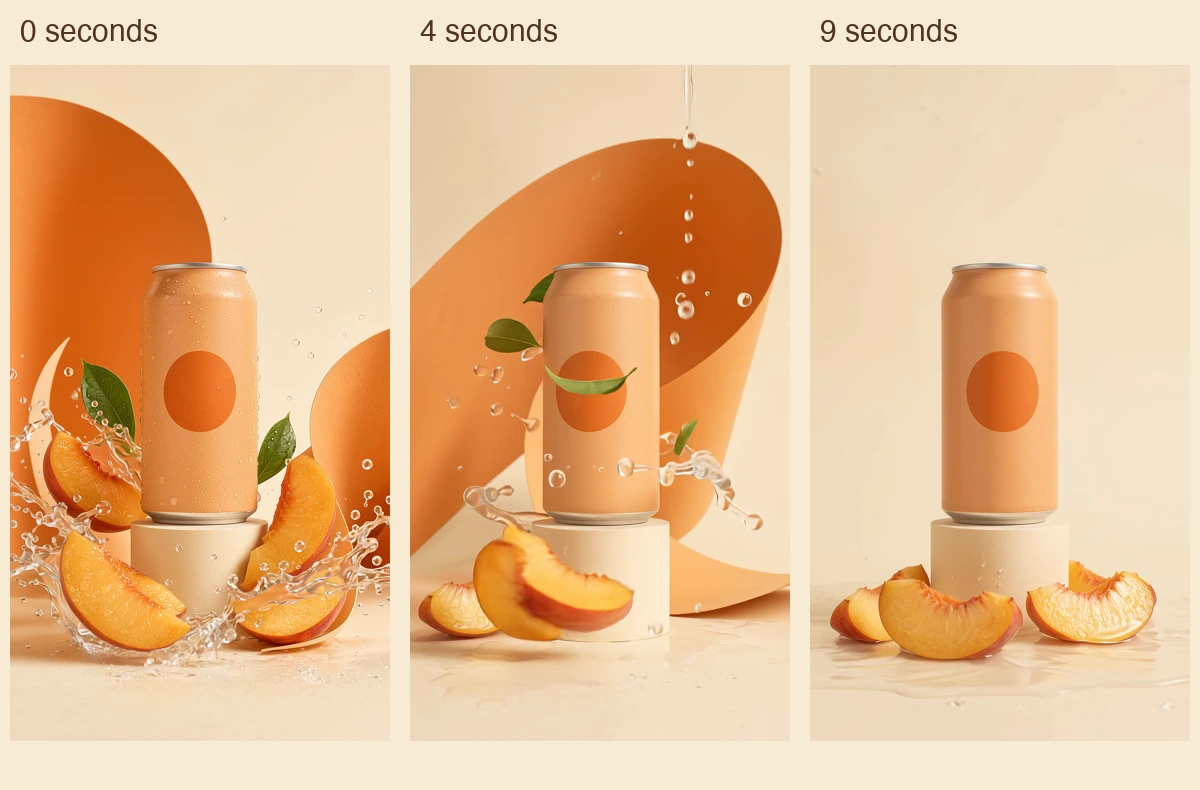
Actual frames from the existing 1080 × 1920 animation at 0, 4 and 9 seconds. Picture unchanged; audio removed for this example. No TikTok interface or campaign-performance result is shown.
Watch the 10-second peach-can animation (silent MP4)
It is unbranded concept creative, not a real beverage demonstration, customer campaign or proof that Claude initiated the generation. The displayed MP4 retains the original picture and removes audio. A renderer made the frames; this article does not assign that work to Claude's native model.
Can Claude generate videos natively?
Not according to Anthropic's current model overview, checked September 12, 2026. It lists text and image input with text output for current Claude models. Video output is not listed as a native modality.
Claude can nevertheless participate in a video-production system. Text output can contain a script, a structured request for a connected generator, or source code for a composition. The tool then performs the media operation. A chat interface showing a finished video does not establish that Claude itself rendered its frames.
This also explains why uploading a skill is insufficient. The instructions may tell Claude how to plan scenes, but the environment still needs the necessary tools, permissions and assets. For Claude.ai's remote-MCP route, Anthropic documents custom connectors. Claude Code and API integrations have their own setup; don't assume one installation configures every surface.
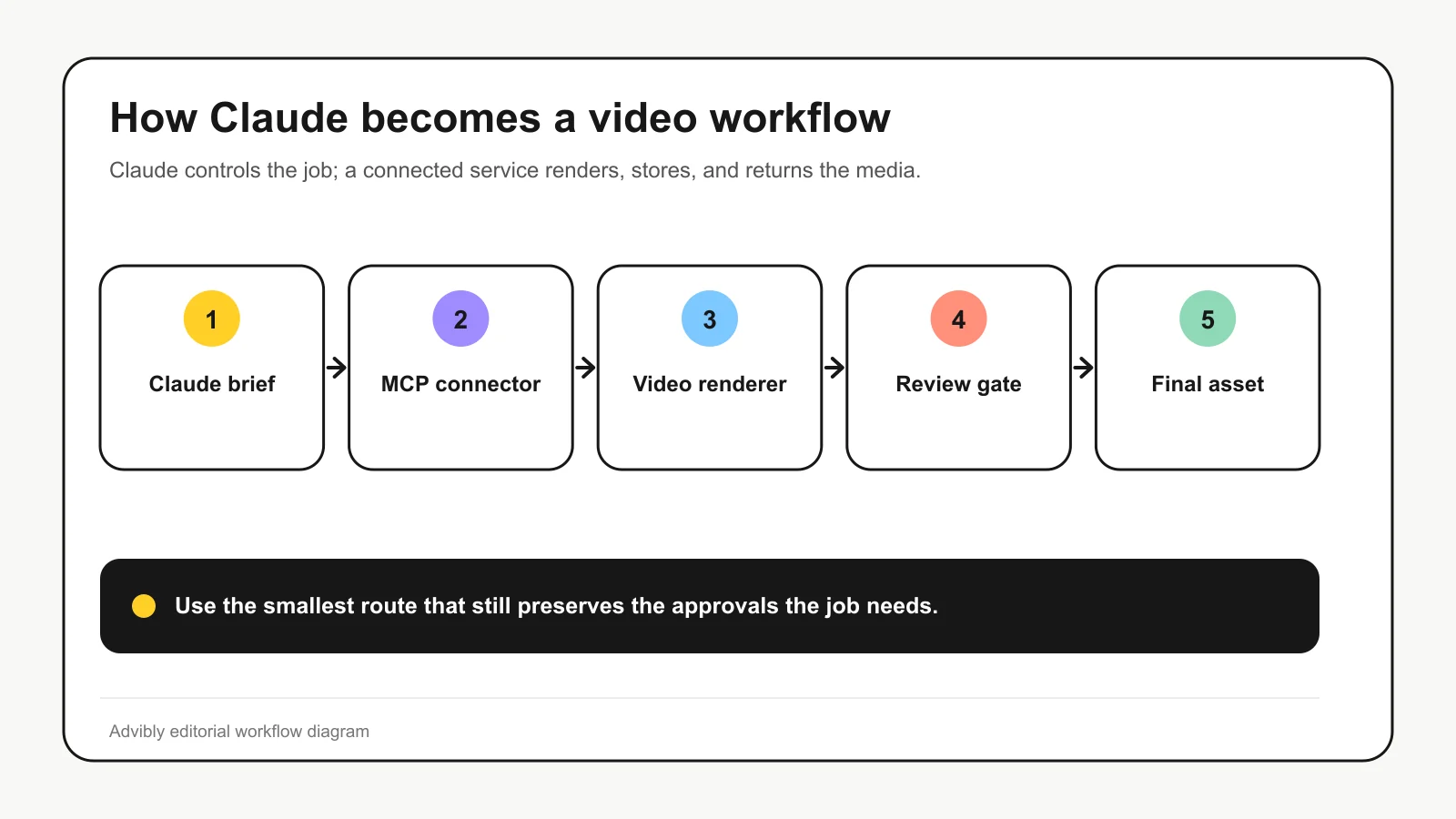
A simplified connected-MCP route. A manual handoff or code-rendering workflow can use different connections; MCP is not mandatory for every way of making a video with Claude's help.
Choose the route by the file you need
Start with the acceptance test, then choose the tools. These four jobs have different stopping points.
|
Deliverable |
Claude's useful role |
What finishes the job |
|---|---|---|
|
Script or storyboard |
Structure the argument and shot instructions |
Approved text a producer can use |
|
One generated clip |
Prepare the prompt and coordinate a supported generator |
Retrieved, playable clip that meets the brief |
|
Multi-shot ad or explainer |
Manage scene plans, reviews and assembly |
Complete cut with checked timing, audio and export |
|
Code-rendered motion |
Author and revise a composition |
Rendered file plus the source needed to reproduce it |
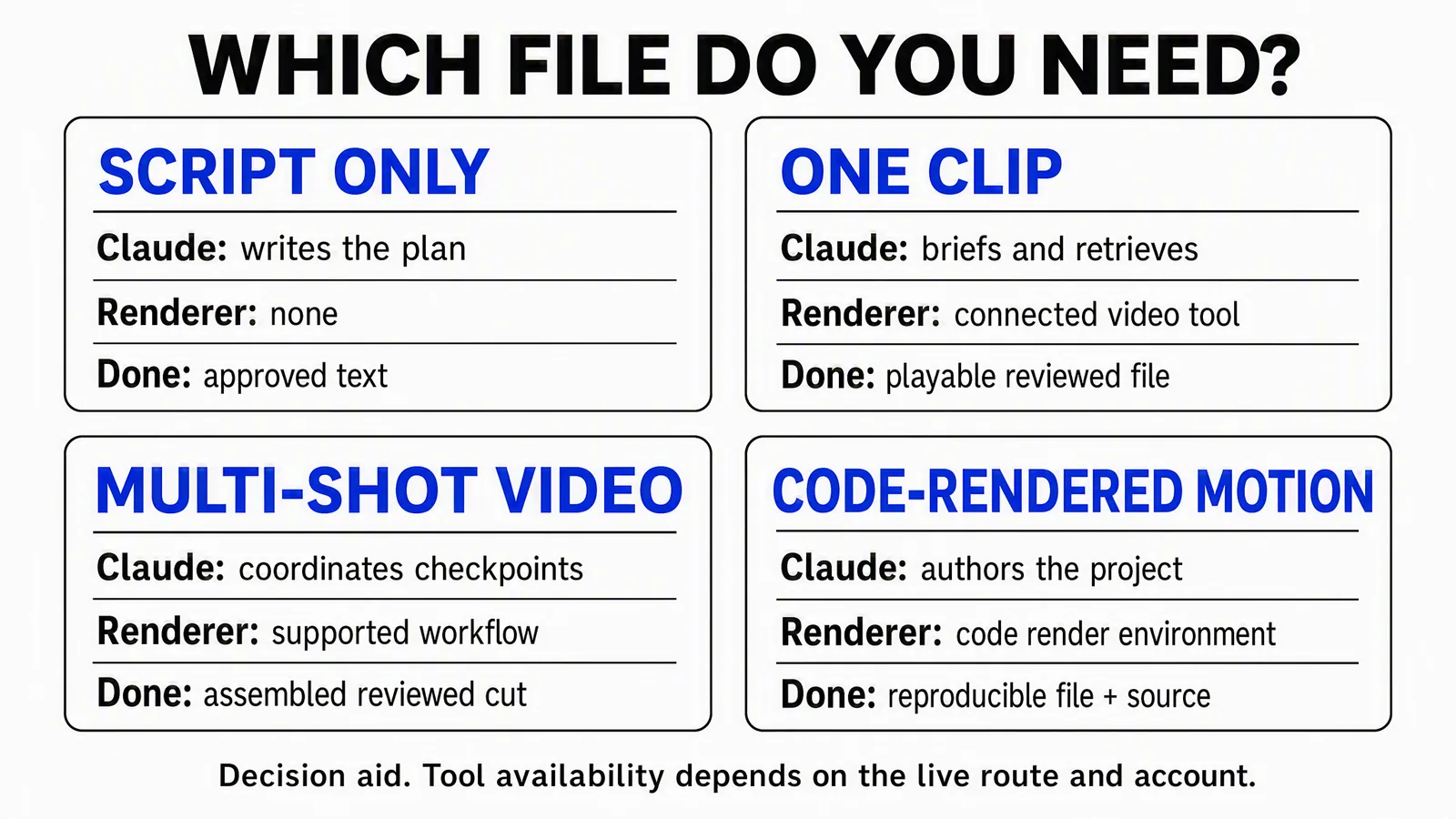
A route selector, not a promise that every account exposes every action. Use the table above as the text version.
Use a connected production workflow for brand video
Advibly combines saved brand context, reusable assets, creative generation and assembly. Its creative-skills catalog includes creator-style ads, explainers and existing-video restyling. That is useful when the task needs a repeatable production procedure around the generator, not just a different prompt box.
Start by finding a suitable approved asset in the brand library. Reuse a product packshot or existing scene if it does the job. Generate a missing shot deliberately; don't redraw an exact product interface merely because image generation is available. The Claude MCP setup route handles the connection, while the selected skill supplies the creative method.
Use code rendering for exact motion and layout
For a chart animation, timed typography or a precisely positioned product walkthrough, a code-based composition may be easier to control than a generative clip. Remotion's AI-skills documentation describes authoring compositions with coding assistants, previewing them and rendering video.
The trade-off is a real project to maintain: source files, fonts, assets, dependencies and a rendering environment. Code makes an exact label easier to revise; it does not independently verify that the label is true. Keep the source with the export if reproducibility matters.
Inspect a real code-rendered example
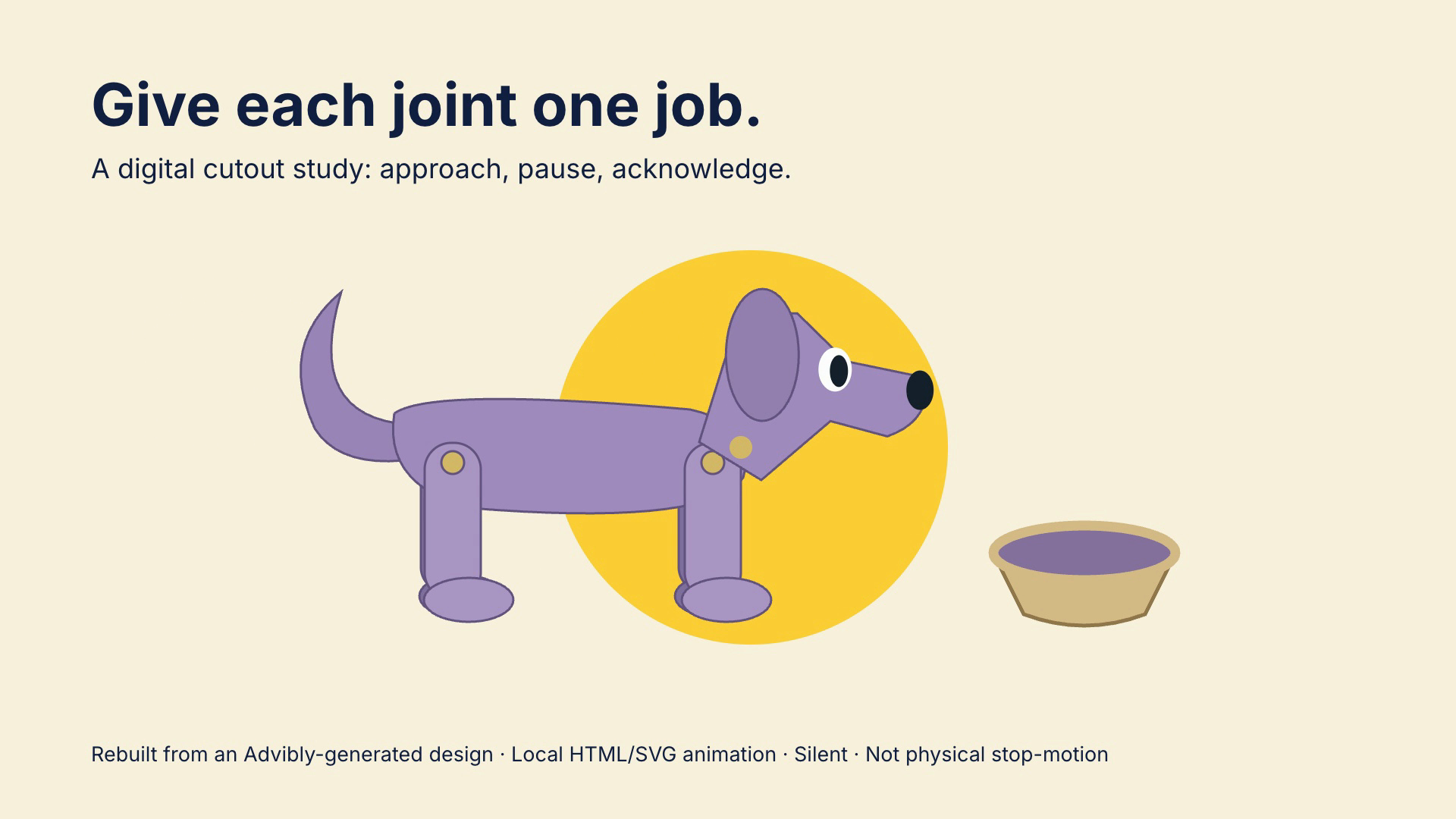
Play the seven-second silent HTML/SVG render · Download the source and reproduction instructions.
Separate SVG limbs pivot while the dog approaches a bowl, pauses and acknowledges it. The source uses GSAP 3.14.2 and was rendered locally with HyperFrames 0.8.35. This is an actual code-rendered file, not a generated code screenshot or proof that Claude authored it. The README specifies Node22+, FFmpeg and network requirements. Edit the timing or a limb pivot, run the pinned check and render commands, then play the result. It is a digital study rebuilt from an Advibly-generated design, not physical stop-motion or proof of product use.
Use broader model access when experimentation is the job
Higgsfield's current integration page presents image and video generation and points Claude Code users toward its CLI. Its prominent ChatGPT-plugin instructions are not a Claude.ai setup guide. Follow the route for the client you actually use.
Choose on the required output and available controls, not a universal “best model” label. A convincing scene, faithful packaging, exact text and a long continuous action are different tests. Run a small approved trial before committing to a large set of variants.
Follow the real image-to-video relationship
This existing campaign image supplied the visual direction for the motion request. Compare the can, pedestal and peach arrangement with the opening frame above.

Existing 1152 × 2048 Advibly campaign image. The unbranded can, orange circle, peach slices and paper arcs are generated concept art, not a photographed product.
The archived video prompt begins “Animate exact apricot can campaign image” and asks for a continuous shot: water and leaves move, paper unfurls, a splash frames the can, then the scene resolves into a quiet hero hold. It specifically says no labels, logos, captions or invented claims.
To request a comparable job through a connected Claude workflow, retrieve the approved image first. Use Advibly's supported image-to-video input, start_image_url, choose an available model and specify the intended ratio and duration. Ask for the cost before generation, retain the returned job reference, and open the final file. This is reproducible workflow guidance, not the original client's execution transcript.
The request and result still need comparison
The actual file is approximately ten seconds, 1080 × 1920 at 24 fps. It contains stylized, physically implausible water and floating fruit; that is suitable for a surreal concept, not evidence of product performance. The original request also said no speech, but the generated audio included speech. The linked copy removes audio without changing the video stream.
This is why the completion check must include sound, not just a thumbnail. If your brief requires dialogue or sound design, a silent copy does not complete that brief. Fix the audio and review the assembled result.
When the next request is a complete film
A single ten-second shot can be the full deliverable. If you need an opening, narration, multiple scenes and a closing CTA, those are additional production steps. Define the final runtime and assets before paying for more clips. Reuse this kind of approved shot where it fits rather than generating new footage to fill every beat.
For example, ask Claude to propose the opening copy, shot order and closing destination before assembly. Mark that proposal as planned until a final file exists. A set of clips and a timeline are useful ingredients, but they are not an assembled film.
A complete narrated editorial-collage specimen
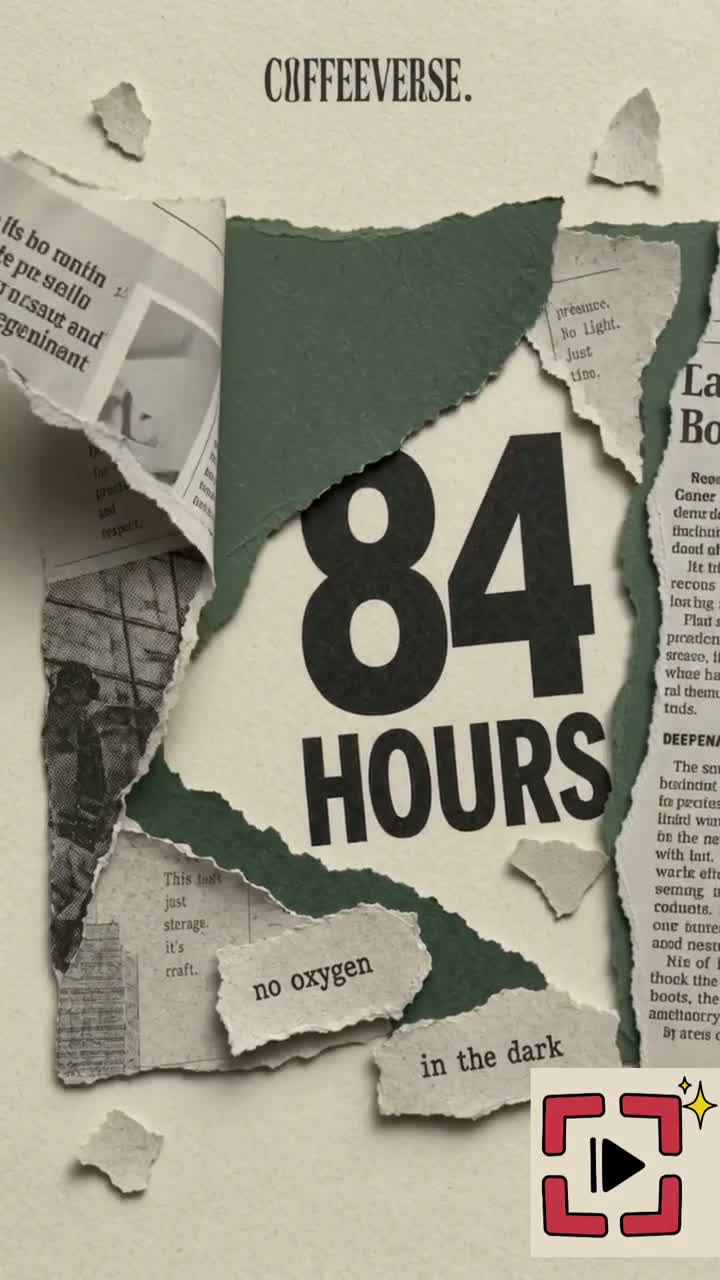
Watch the complete existing narrated-coffee film (MP4 with narration)
This existing approximately 35-second Coffeeverse film moves through six scenes: headline, clock and bags, illustrated tank, torn-paper product reveal, flavour collage and website ending. Timed narration gives the sequence a causal argument; it is a complete assembled explainer rather than a still or a creator wrapper. This is generated/spec work, not physical fermentation footage or a customer case study. The narration’s supermarket comparison, sourcing, taste and shipping statements are demonstration copy, not facts substantiated by this article. Do not reuse those claims without evidence. An editor mark is visible. Reproduce the structure with sourced claims, a scene per explanatory step, timed narration, then full picture-and-audio review. This demonstrates output, not a recorded Claude execution.
Keep the four production layers separate
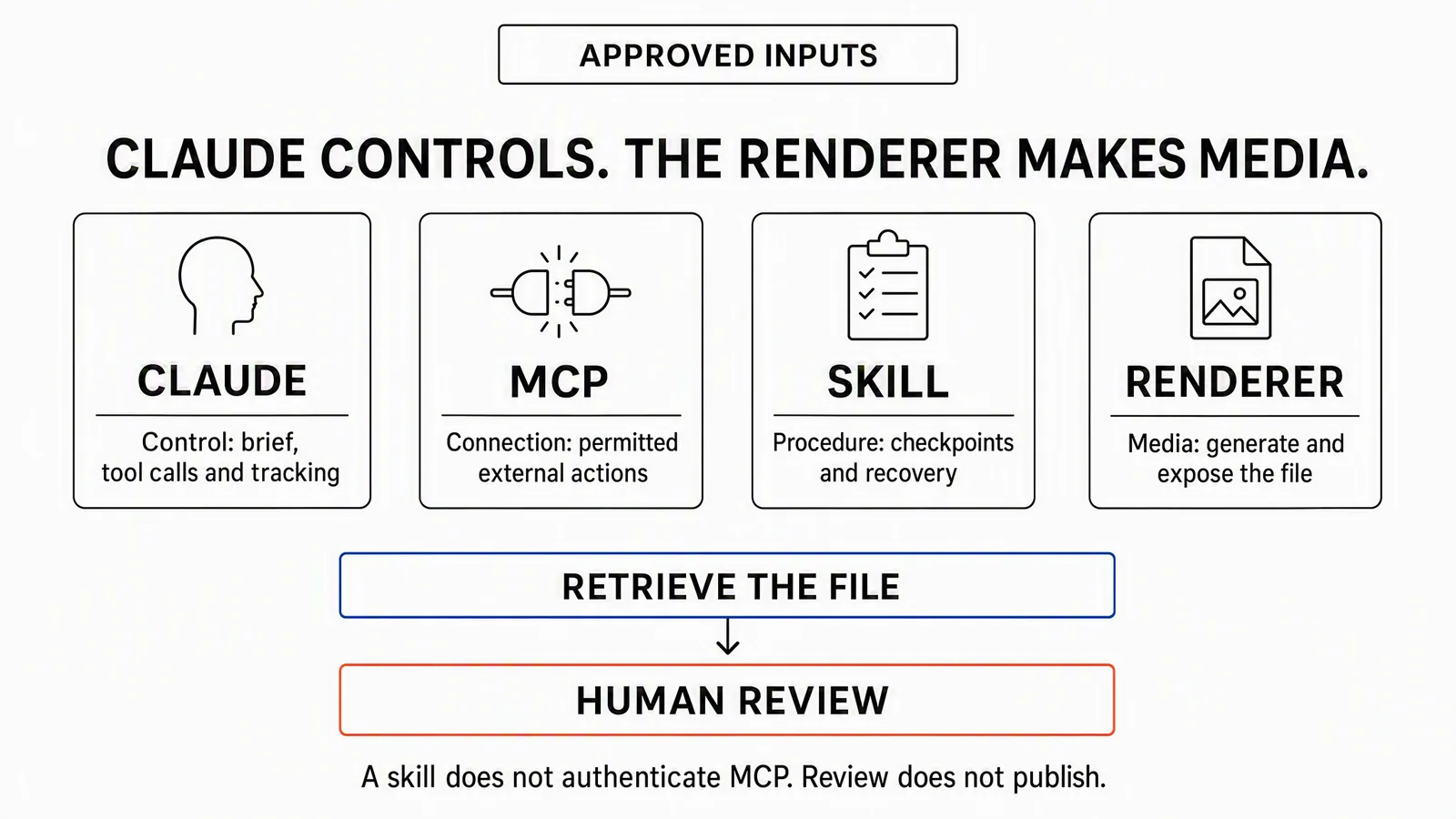
Claude coordinates; MCP connects permitted actions; a skill supplies the procedure; the renderer makes media. File retrieval and review still follow.
Anthropic's Skills explanation describes reusable instructions and resources. That procedure might require a script review, approved keyframes and selective retries. It should not be mistaken for an account connection or a renderer.
For an actual job, record the chosen client, reviewed skill version, project, input asset IDs and requested operations. Give the production request a clear spending limit. Credentials belong in the supported connection setup, never in a public prompt, article or shared source packet.
A compact handoff record can be more useful than a long chat transcript:
- Inputs: approved brief, source assets and claim references.
- Execution: renderer, model, job IDs and cost against the ceiling.
- Output: final URL, duration, dimensions and relevant editable sources.
- Review: who checked it, unresolved issues and release permission.
Before execution, mark output and review fields as pending. Don't fill them with plausible-looking success values.
Check completion and recover from failures
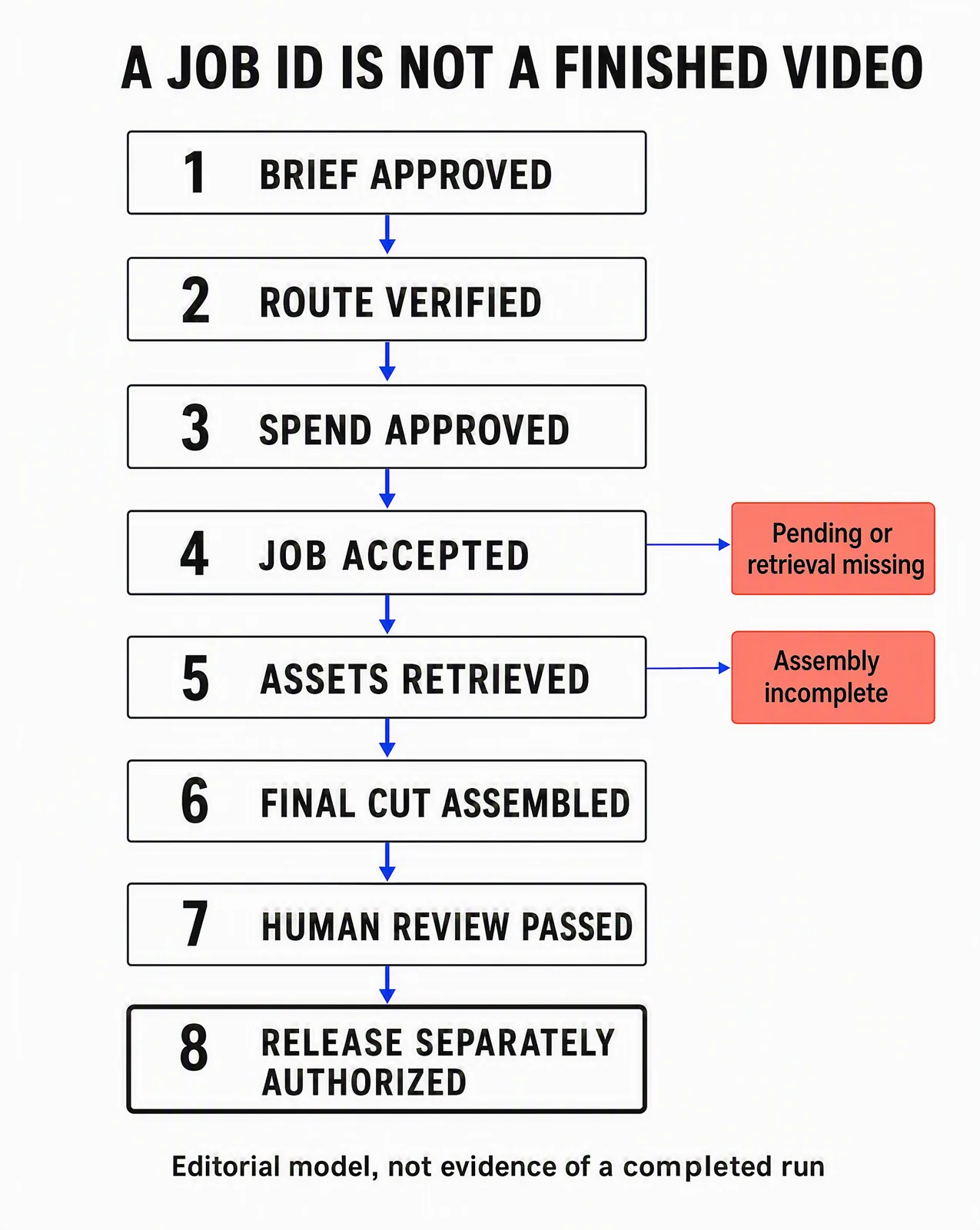
An editorial state model, not a completed-run receipt. For a one-clip job, final assembly may be unnecessary; retrieval and review are still required.
A request can be accepted while the asset is still processing. An asset can be ready while its download fails. Several clips can be complete while the final film does not exist. Those states need different responses.
|
Problem |
Next action |
|---|---|
|
Job is still pending |
Check the existing job before submitting another paid request |
|
Finished asset cannot be retrieved |
Repair access or retrieval; don't regenerate a good asset by default |
|
One shot is wrong |
Replace that shot and rebuild any dependent edit, captions or audio timing |
|
Product claim changes |
Find every affected script, visual and caption before approving the revision |
|
Final export fails |
Preserve accepted source clips; diagnose assembly or export separately |
Watch the entire retrieved film. Check opening and closing frames, product continuity, text, cuts, dimensions and duration. Listen when audio is intended; confirm deliberate silence otherwise. A thumbnail or successful job status cannot reveal a broken ending, clipped narration or incorrect caption.
Keep the final file in durable project storage with its source references. If the delivery depends on a temporary URL, record that limitation and obtain the supported durable copy before handing it off as finished.
Can Claude publish the finished video too?
With a connected service that exposes publishing actions and the necessary authorization, it can coordinate that next step. Advibly supports publishing, scheduling, post-status tracking and analytics. Creative approval and release approval should still be distinct: an approved film is not permission to post to every connected account.
Prepare the correct account, platform-specific caption, destination and schedule. After an authorized release, keep the returned post reference and check status before treating it as published. Use analytics to evaluate the actual post; the quality of a generated sample does not predict its performance.
Frequently asked questions
Is a Claude video generator a separate Claude model?
Usually the phrase describes Claude connected to a video service. Check which model or rendering engine actually produces the file, which account pays for it and where the result is stored.
Can I make a video without MCP?
Yes. Claude can prepare text for a manual handoff, or help author a composition that you render in an appropriate environment. MCP is one connection method, not a requirement for every workflow.
Is a Claude subscription enough to cover generation?
Do not assume so. A connected provider can have separate access and credit requirements. Confirm the actual operations, including image preparation, clip retries, audio and assembly, before approving spend.
What should I try first?
Choose one small deliverable with a clear finish line. Reuse an approved asset where possible, review the brief before paid work, and require the final playable file. Expand to a multi-shot campaign only after that route works reliably for your needs.
Generate your first creatives for free. Start with your own product source and starter credits; output quantity depends on the model and settings. Generation and social publication are separate decisions.