
A useful before and after ad makes the change inspectable. These six D2C examples show actual selected product images beside the advertisements generated from them in Advibly. The transformation is creative production, not a physical product improvement.
The product references below come from the linked public product pages. The advertisements are newly generated Advibly editorial concepts, not the brands’ campaigns, endorsements or customer results. Props, settings and illustrative offers do not establish product performance or what is included in an order.
Skincare: a bottle becomes a daily-care visual
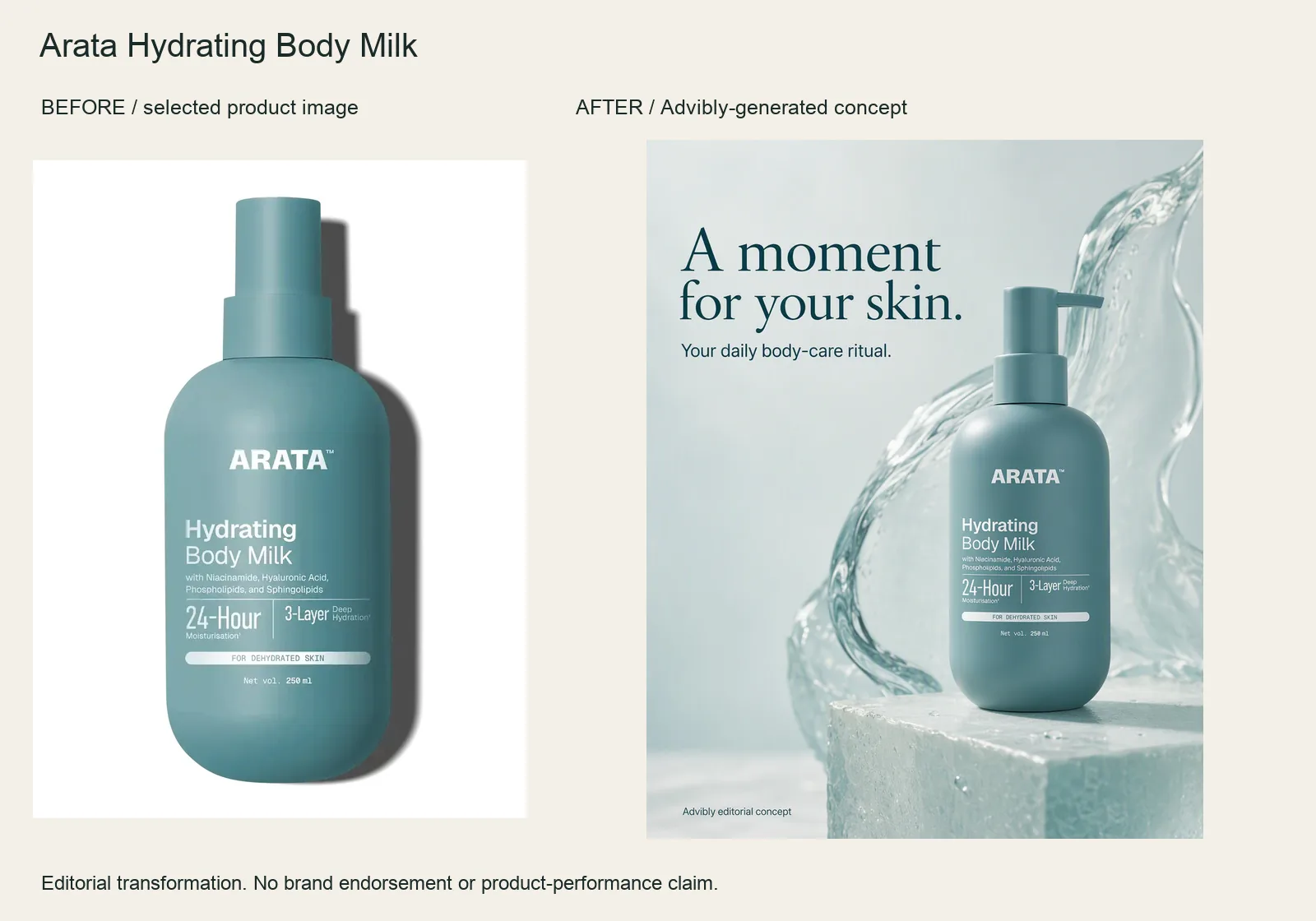
The input is the selected ARATA body-milk packshot. The result adds a translucent water sculpture, a plinth and a quiet headline while keeping the recognizable bottle and pump.
Use the product image as the reference; ask for a tactile studio composition and protect the label, pump and bottle shape. The water is artistic styling, not ingredient evidence. This before-and-after is about the advertisement—not anyone’s skin.
Arata Hydrating Body Milk product source · Open the finished editorial image
Coffee: make the occasion visible
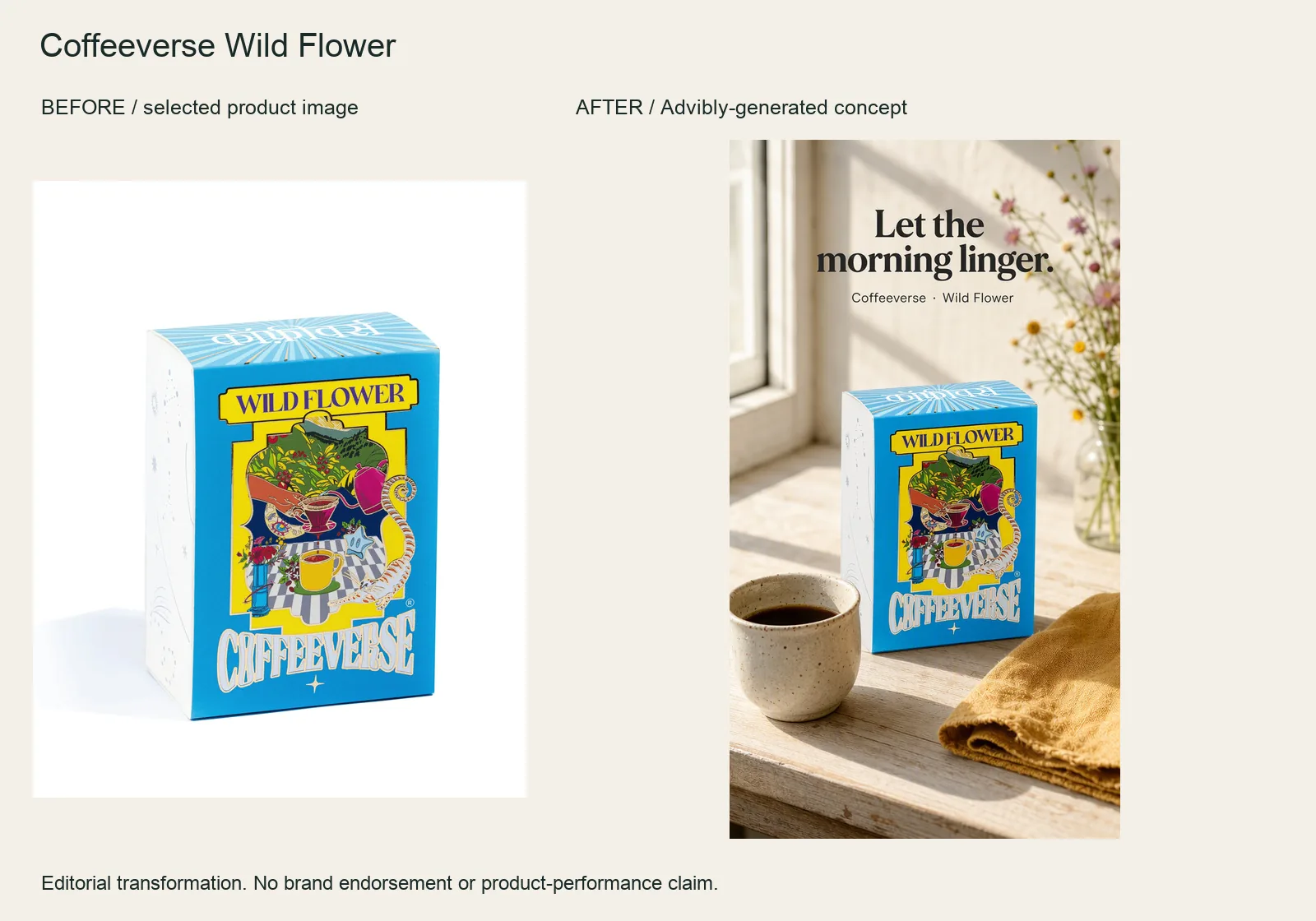
The Wild Flower box starts as an isolated product reference. The finished vertical ad places it beside a cup and morning light, with “Let the morning linger” carrying the occasion.
Supply the box reference, name the morning setting and reserve space for one short line. Check the actual label against the input. The generated cup and flowers are props, not a taste test or a verified description of the coffee.
Coffeeverse Wild Flower product source · Open the finished editorial image
Home fragrance: turn a product into a gifting idea
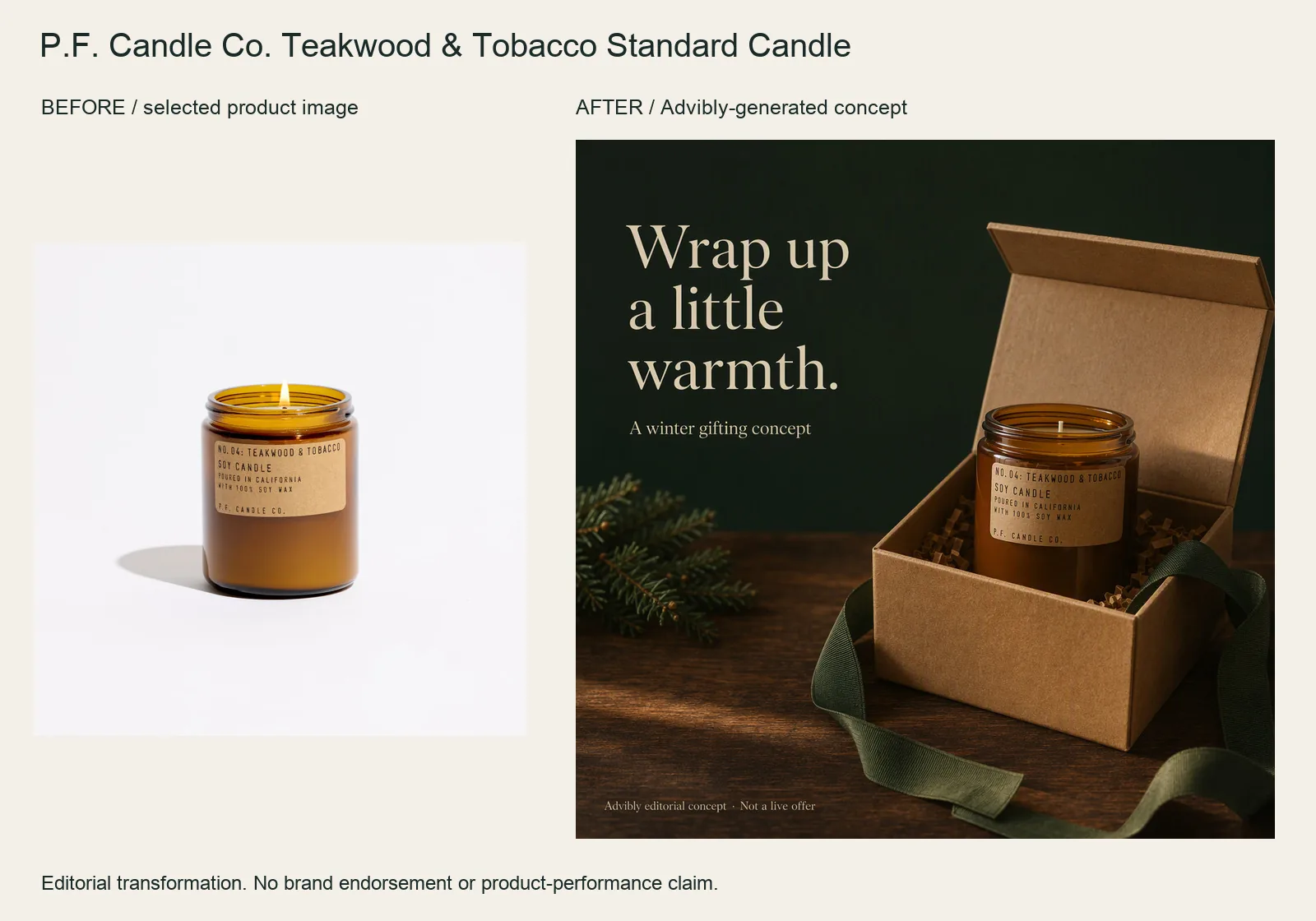
The selected amber candle jar becomes a winter-gifting composition with an open kraft box, green ribbon and an unlit wick. The change is the campaign occasion rather than a new candle.
Protect the jar and label in the reference-led brief. Ask for gifting props without presenting them as supplied packaging. This is a styling concept, not a current gift bundle, discount, burn-time claim or sleep benefit.
P.F. Candle Co. Teakwood & Tobacco Standard Candle product source · Open the finished editorial image
Accessories: give the product a visual job
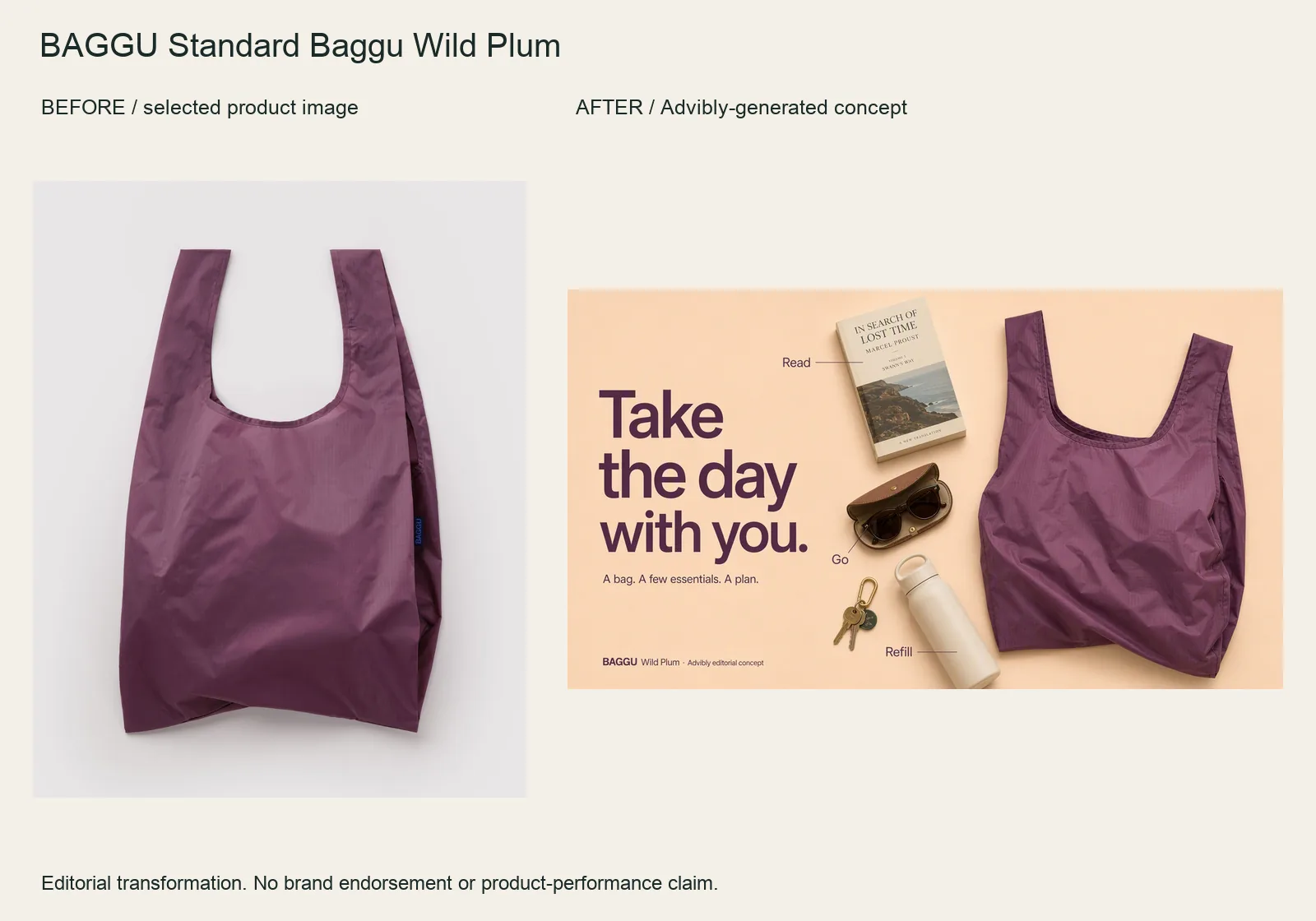
The Wild Plum bag becomes a wide flatlay with a book, bottle, sunglasses and keys. The “Read / Refill / Go” labels organize the idea rather than filling the frame with generic benefits.
Bring the bag image into Advibly and specify the objects, hierarchy and wide layout. Keep the handles, silhouette and fabric color stable. Items are arranged around the bag; this does not prove they fit inside or establish carrying capacity.
BAGGU Standard Baggu Wild Plum product source · Open the finished editorial image
Apparel: one tee, three styling directions
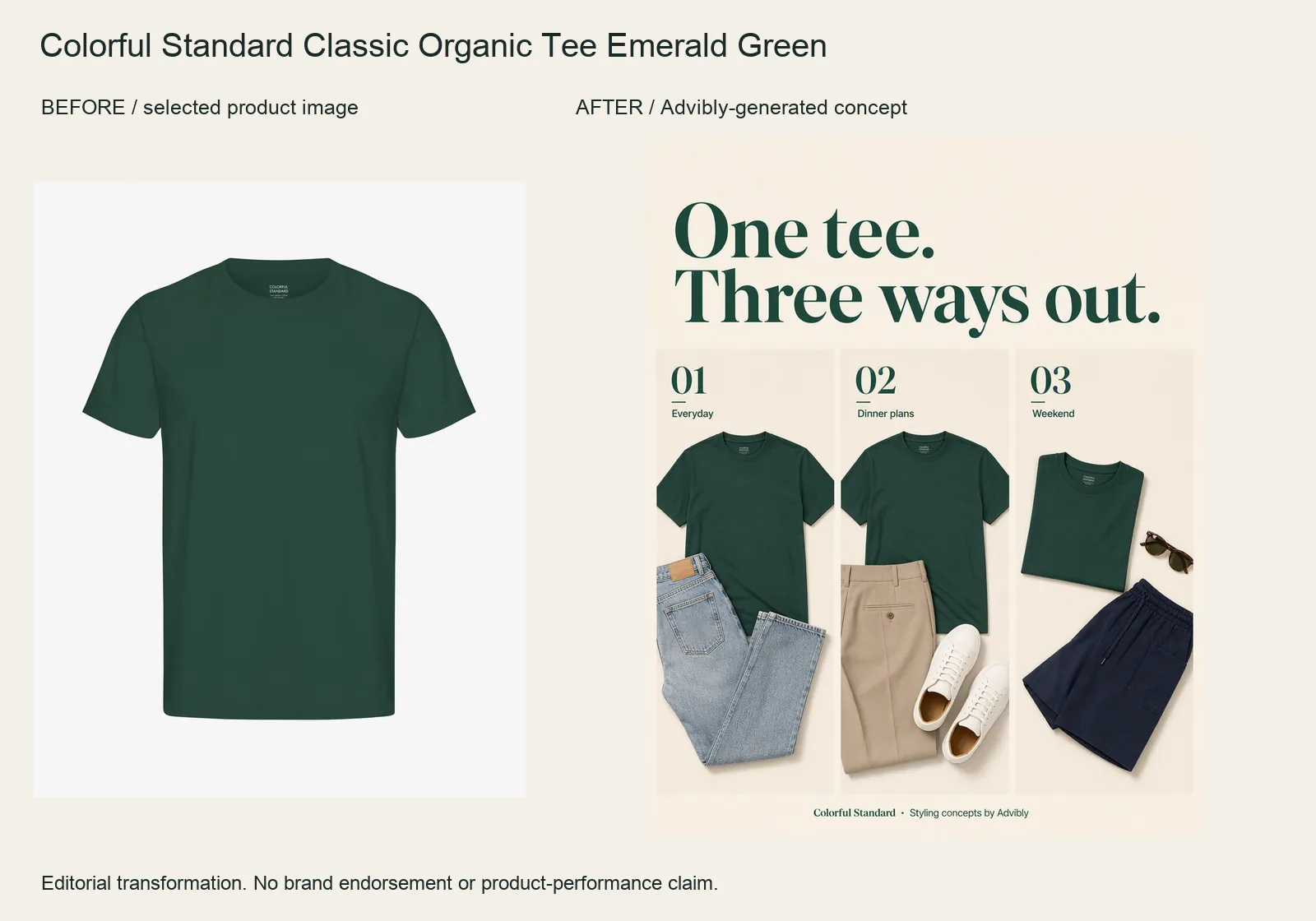
The Emerald Green tee becomes a three-panel styling collage. Jeans, tailored trousers and shorts create three different outfit ideas around the same plain crewneck.
Keep the reference tee’s color, cut and lack of print fixed. Request distinct styling panels rather than inventing three new SKUs. Other clothes are styling props, not an offered bundle; the generated arrangements do not prove physical fit.
Colorful Standard Classic Organic Tee Emerald Green product source · Open the finished editorial image
Pet products: turn an isolated bowl into a packing reminder
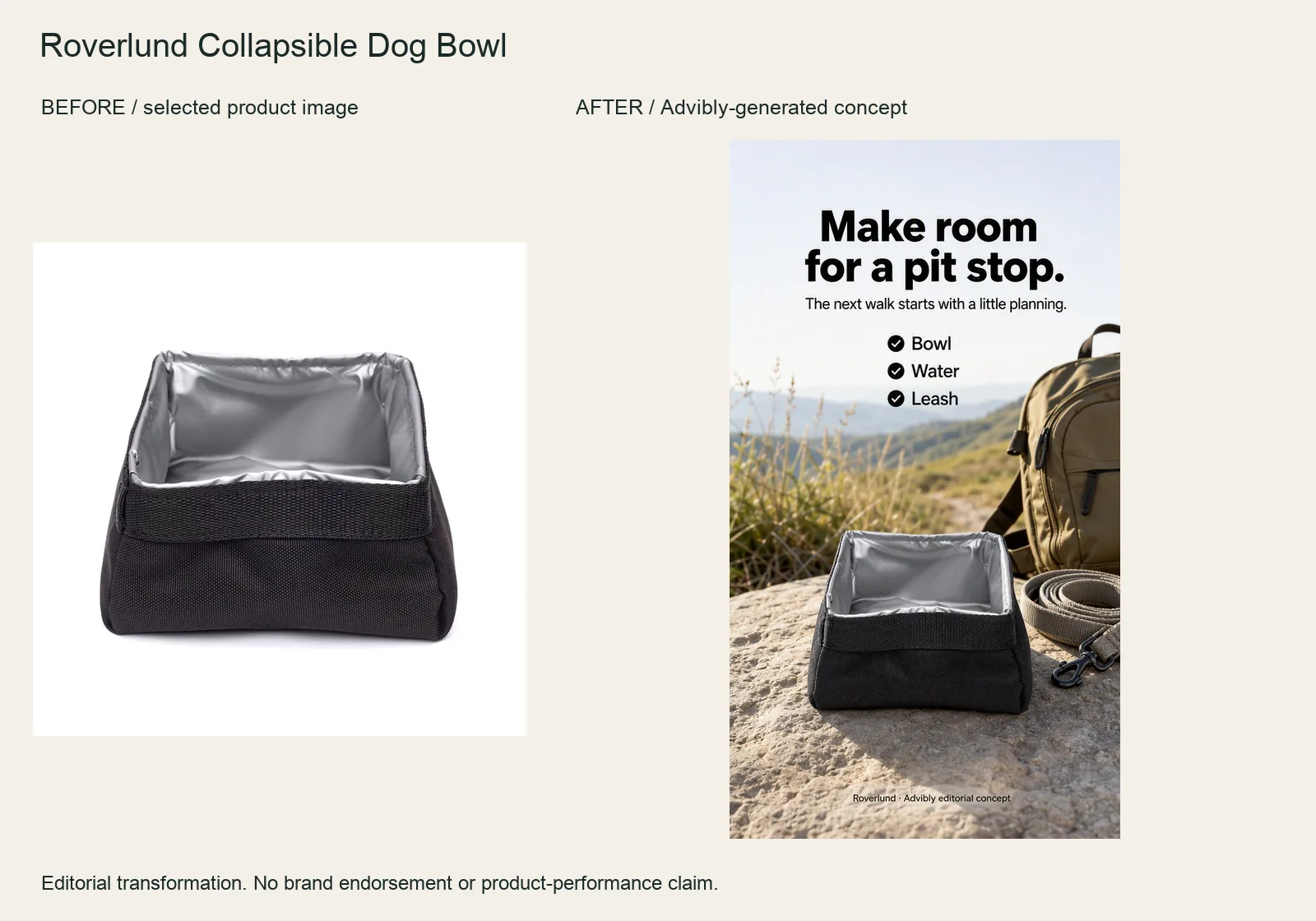
The rectangular Roverlund bowl moves from its product image into an outdoor scene with a short “Bowl / Water / Leash” checklist. The product is still the visual anchor.
Use the actual bowl reference and explicitly preserve the square rim and dark sides. Ask for a packing context, not a dog performing a behavior. An empty generated bowl is not a capacity, safety or durability test.
Roverlund Collapsible Dog Bowl product source · Open the finished editorial image
To repeat the workflow, attach your own cleared product image in Advibly image creation, name the visual change and protect the product details. Inspect the returned original before adapting it for a placement. Generate your first creatives for free; output quantity depends on the model and settings.
From a separate pouch component to a finished collage
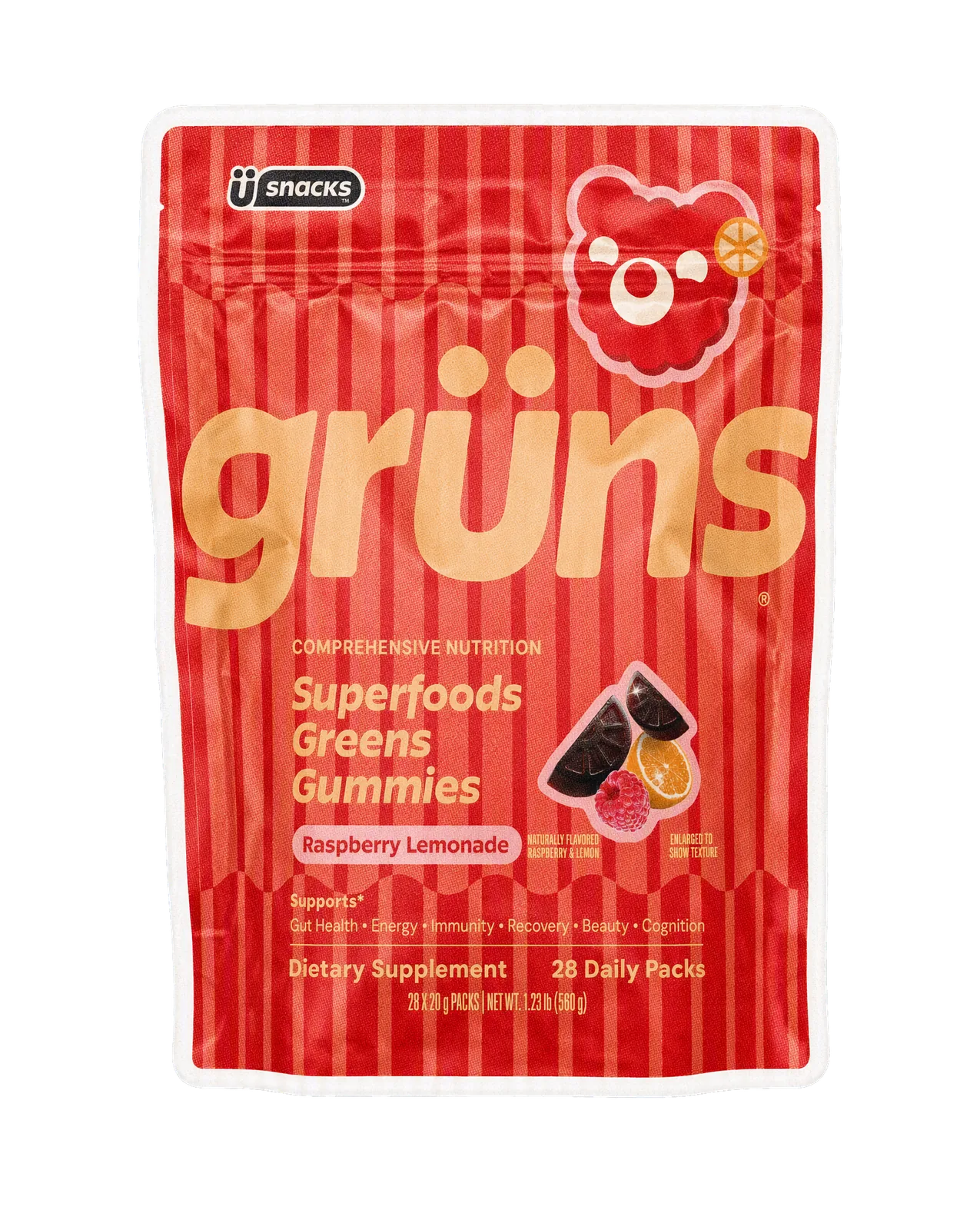
Input component: the generated, isolated pouch used in an existing Grüns-inspired spec project. It is not an untouched packshot or evidence of a client relationship.
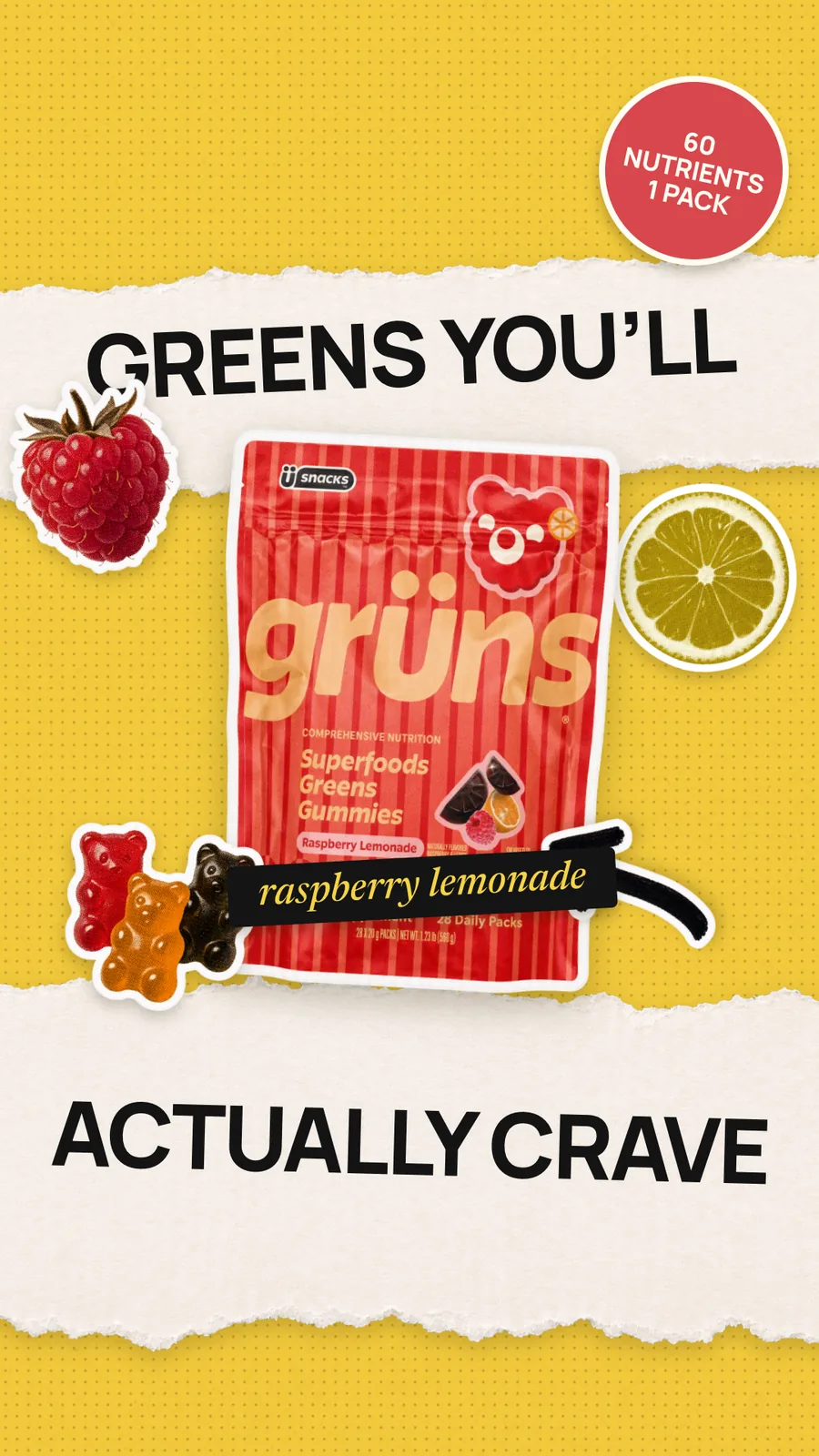
Output: the component was assembled with fruit pieces, paper texture and separate typography, then the assembled still was animated through Advibly. Watch the six-second collage motion output (MP4).
The useful change is the composition and motion—not a better supplement or a proven advertising winner. The artwork contains specimen promotional copy, including a nutrient badge; this article does not verify those claims. Do not carry that copy into a real campaign without product-specific substantiation.
To reproduce the method, separate the product, decorative pieces and type, assemble a readable still, and use that still as the motion reference. This example combines Advibly-generated assets with local compositing; it is not evidence of a native editable-layer editor or a one-click workflow. Choose a simpler image-ad direction if a static comparison already makes your point. Generate your first creatives for free.
Other before-and-after structures—and the evidence they need
The campaign references below broaden the format choices. They are linked observations and planning patterns, separate from the actual creative outputs above. Do not treat every named pattern as a customer result or a campaign we produced.
Key takeaways
- Show the connection between the two states: an action, a process, a repair or a stated period of time.
- Preserve the original material and explain meaningful edits or changed conditions.
- Use generated scenes for creative execution, not as evidence of a real customer result.
- Choose a split image, carousel or video according to what the viewer needs to inspect.
Pick the pattern your material can support
|
Available material |
Useful pattern |
|---|---|
|
One source and a visible operation |
Controlled demonstration. |
|
Several stages behind a polished result |
Process reveal. |
|
A real space with documented changes |
Makeover. |
|
The same object before and after restoration |
Repair or rescue. |
|
A recorded sequence over time |
Time progression. |
|
A real customer's documented experience |
Customer outcome, with the claim and expected results reviewed. |
|
A source asset and the finished deliverable |
Workflow or output transformation. |
These are editorial categories, not legal permissions. Start with the material you actually have; don't choose a claim and ask the image generator to invent its evidence.
1. Controlled demonstration: Adobe's Remove Tool
A controlled demonstration makes one operation inspectable. In Adobe's Photoshop Remove Tool tutorial, published January 12, 2026, Jesús Ramirez removes distracting objects from a photograph while keeping the source intact on a separate layer. Toggling the edit layer lets the viewer compare the result with the original.
The important connection is same photograph, named operation, visible output. The tutorial also explains that its Auto setting may use generative AI. This is a software-editing example, not a documentary claim that the photographed street changed.
For your own ad, choose one job a buyer recognizes: remove a background distraction, align a layout, or assemble a component. Show enough of the action for the result to make sense. Keep crop and scale stable when they aren't the thing being changed.
A useful hook is a question the footage can answer: “Can we remove the distracting object without rebuilding the photograph?” Avoid attaching a business claim, such as increased sales, to a demonstration that only establishes an edited image.
2. Process reveal: Dove's Evolution
In Dove's account of Evolution, the 2006 film moves from a woman without makeup through styling and then digital image manipulation. The final image means something different once the viewer sees how it was constructed.
This is not a product-result testimonial. It is a reveal of the production behind an image.
Use this pattern when your method is worth understanding. A packaging studio could show the sketch, mockup, print test and finished pack. A creative team could show a product photograph becoming a campaign layout. The intermediate frames explain the work instead of hiding it behind a jump cut.
Keep the transformations in their actual order. If the final composition also needed manual retouching, don't edit that step out while claiming the whole result came from one automated operation. “Here is the process” is a more useful promise than a misleading suggestion that no process was needed.
3. Documented makeover: IKEA's Home Transformation
IKEA UK's Home Transformation episode pairs a crowded living room with specific design choices. Its account describes changing seating, moving the television to the wall and adding shelving to address space and storage problems.
That intervention list is what makes the comparison teachable. The after-image doesn't have to carry the whole explanation alone.
For a room, store display or website redesign, use three beats: the constraint, the decisions and the finished state. A website example might identify an unclear offer, show the revised hierarchy and then display the actual published page. That's a design comparison, not evidence of a conversion increase unless you also have a valid measurement.
Don't attribute a multi-part makeover to one item if layout, lighting, furniture and decoration all changed. Name the package of work. If budget or construction scope would materially change the viewer's interpretation, include it near the result rather than burying it in a separate document.
4. Repair or rescue: IKEA Norway's Trash Collection
Repair stories depend on the identity of the object. IKEA Norway's Trash Collection account describes finding discarded furniture for the 2021 campaign. Its examples include a recovered mirror receiving varnish and stools with legs straightened before being presented again.
The useful pattern is this object, in this condition, receiving these repairs. The original is part of the story, not a prop to swap out before the reveal.
For a restoration service, capture an identifying detail at intake, the important repair step and the final object. Keep the work record with the footage. If a part was replaced, say which part; don't imply the whole item was restored without replacement.
This pattern can also fail through overstatement. A cleaner-looking chair is not automatically a structurally sound chair, and a polished exterior doesn't establish a repaired mechanism. Show or describe the particular improvement you can support.
5. Time progression: Burger King's Moldy Whopper
The after-image can be deliberately unattractive. Ogilvy's Moldy Whopper campaign page describes a film and outdoor creative showing a Whopper left out for more than a month. The campaign used decay to communicate its formulation message about artificial preservatives.
Treat that as a historical campaign account, not a current ingredient claim for every market or a nutritional conclusion. The creative lesson is that time gives the contrast its meaning.
For your own time-based demonstration, decide which conditions matter before capture. Record the interval and preserve the sequence. If you compare two materials, the exposure, handling and inspection method should support the comparison you intend to make.
An accelerated animation can explain a proposed process, but it isn't recorded evidence that the process happened at that speed. Label a simulation as such. A time-lapse should show elapsed time honestly, even when the edit compresses the viewing time.
6. Customer outcome: make the experience specific
A customer outcome combines a real person's experience with a claim about your product or service. It can carry a heavier evidence burden than a simple visual demonstration, especially when health, safety or exceptional results are involved.
Imagine a design agency documenting a client's new booking page. The actual old and new pages can support a design-change story. A statement that the redesign increased bookings needs separate records and a defensible explanation of the measurement. The images alone don't establish that result. This is a hypothetical example, not a customer case study.
For US advertising, the FTC's advertising FAQs explain that endorsements must reflect honest experience and that an unusual outcome cannot be made representative just by adding “results may vary.” Review what customers can generally expect, any relevant relationship with the endorser and the evidence for the claim before running the ad.
Keep permission to use the person's material, original files and the relevant timeline together. An AI presenter can explain a service; it must not be passed off as that customer giving a genuine testimonial. If the required evidence isn't available, choose a bounded product or output demonstration instead.
7. Workflow transformation: from source asset to campaign
For creative software, the transformation can be the deliverable itself: a real product photo becomes an approved ad, or actual app screens become a feature explainer.
Show the source, the meaningful production choices and the final file. If several generations and human corrections were needed, don't label the result “one click” without evidence. If your claim concerns production time, measure the complete workflow rather than only the render.
Advibly supports this kind of connected production. A saved brand can carry its product information, visual direction and references into static images, videos and carousels. An app team can use real screenshots for a launch sequence; a Shopify brand can reuse an approved product photograph for a new campaign setting. The output demonstrates creative production, not improved sales or a physical transformation of the product.
One useful sentence test is: Did the product change, or did its representation change? “We changed the background of this product photo” describes an image edit. “The product produces this result” is a different claim. Don't let a visual before-and-after silently turn the first into the second.
Match the claim to the evidence
Before running an ad, write down what its words and images imply together. The FTC's US advertising guidance requires objective support for objective claims before dissemination. A technically accurate caption doesn't fix an overall misleading impression.
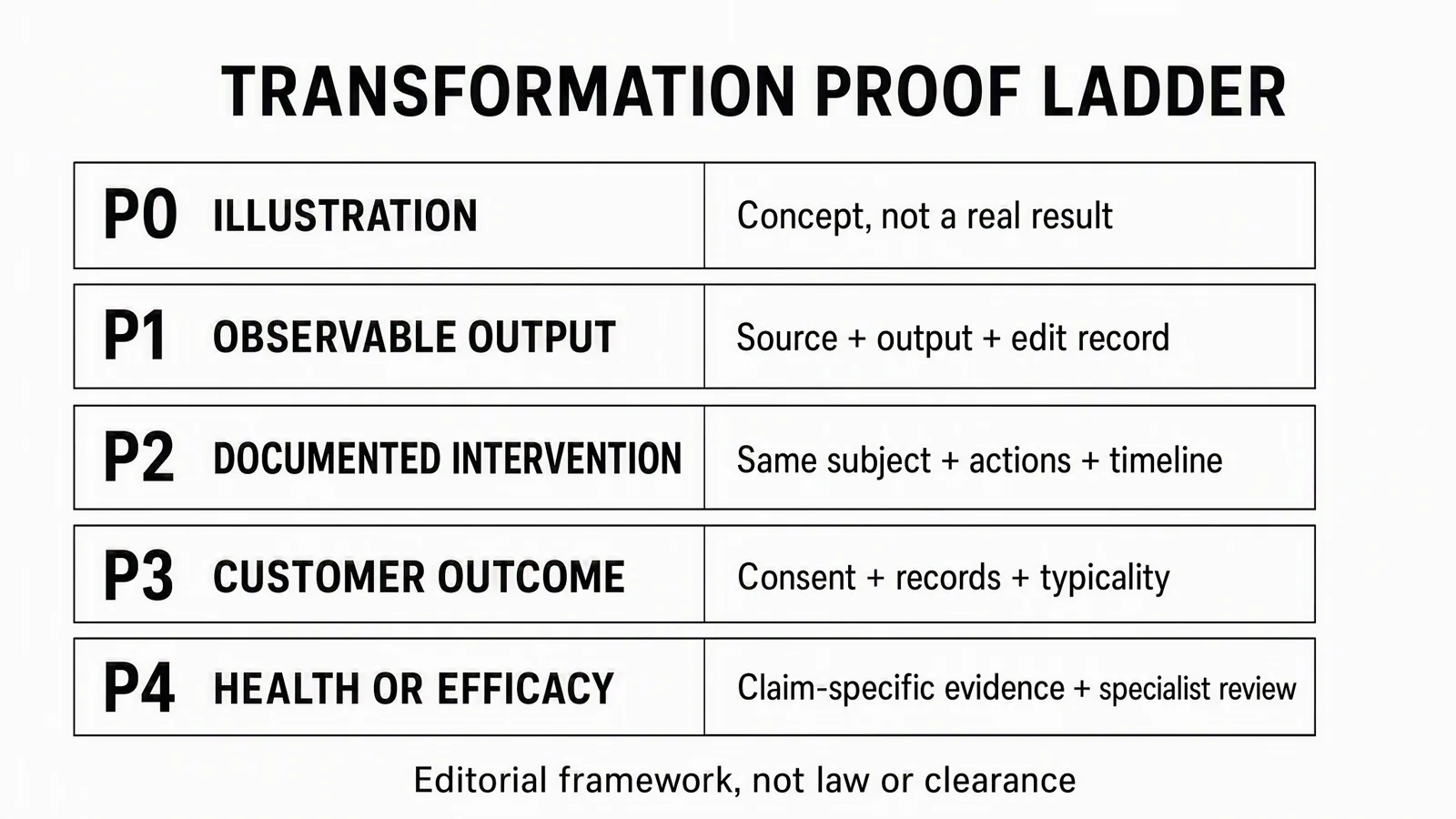
Editorial planning framework, not an FTC classification, legal clearance or QA severity scale. Categories can overlap: a customer testimonial can also make a health claim. A higher label is not a better creative direction.
Use the categories as questions, not a compliance score:
- Illustration: Is this clearly a concept rather than a result that happened?
- Observable output: Can someone inspect the source, operation and real output?
- Documented intervention: Can you show what changed, to which subject and when?
- Customer outcome: Is the experience authentic, properly authorized and supported in the way the ad presents it?
- Health or efficacy: Does the evidence meet the standard for the specific implied and express claim?
The FTC's Health Products Compliance Guidance illustrates how before-and-after imagery can imply a substantial health improvement even without saying it directly. Health-benefit and safety claims require appropriate scientific substantiation; have qualified specialists assess the evidence. A photograph or testimonial alone isn't that substantiation.
Platform permission is a separate question. TikTok's Weight Management and Body Image policy, updated August 2026, rejects easy or guaranteed weight-change messaging and product-alone claims, and prohibits body-shaming or suggestions that appearance determines success or happiness. Rules also vary by market and category. Don't infer that a before-and-after ad is permitted everywhere because a historical campaign used the format.
This is production guidance, not legal advice. Apply the rules for your jurisdiction, product, audience and placement before launch.
Make the comparison fair
A changed camera angle or brighter exposure can manufacture contrast even if the product did nothing. Decide which variables must stay fixed, and record any material differences you need to introduce.
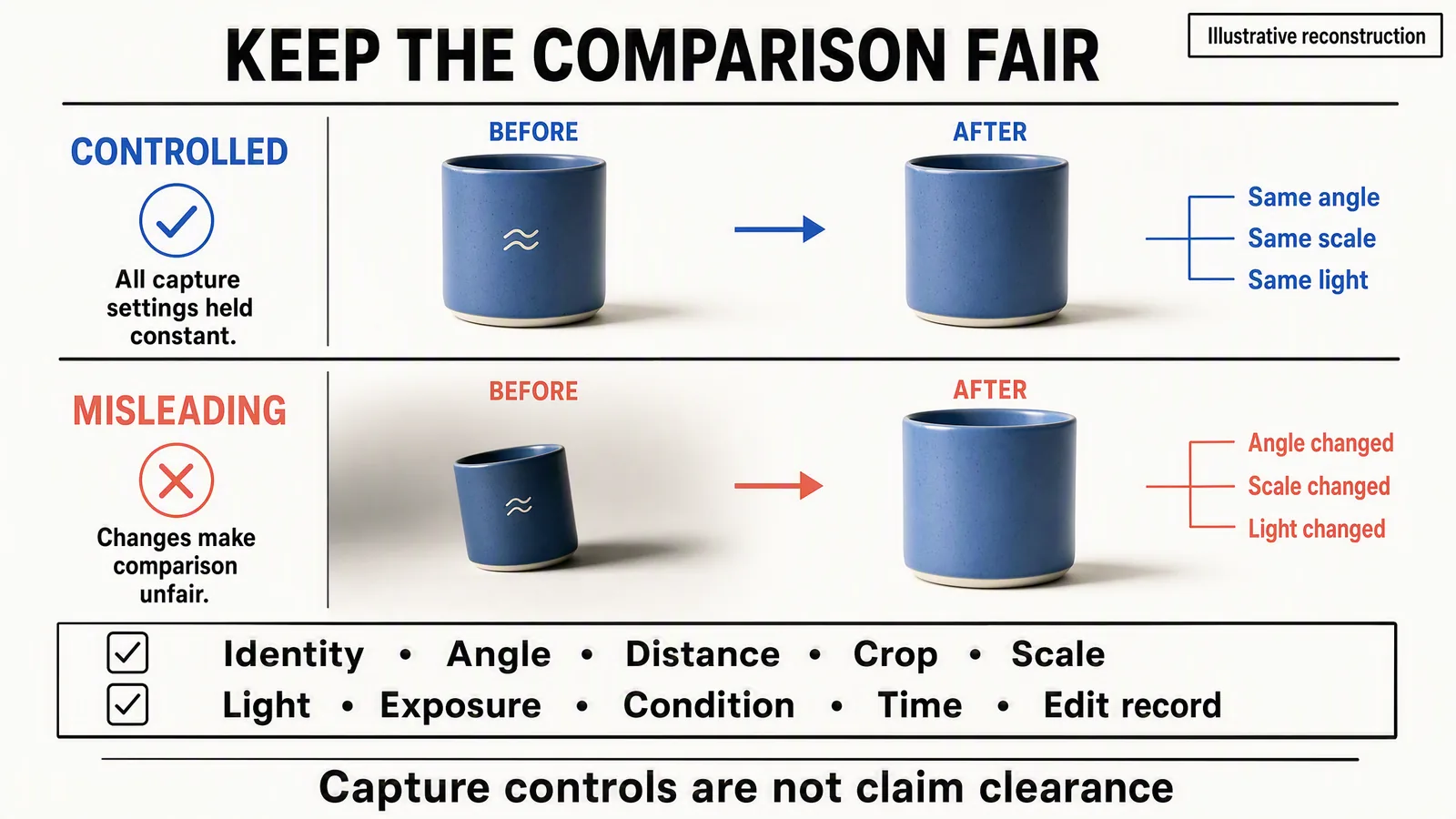
Generated fictional illustration, not documentary capture. The white mark disappears in the after images, so this depicts an image edit, not a cleaning or product-performance result. The “controlled” label describes the intended comparison; no measured test established identical lighting or camera settings. Checkmarks are conceptual, not claim clearance.
For a physical demonstration, retain the same subject, camera position, crop, scale, lighting and exposure where those variables should not change. Keep a record of quantities, handling, time and conditions that could explain the result. For a software demonstration, preserve the original file, settings and material edits.
Don't interpret “controlled” as meaning nothing can change. A room makeover changes the room; a repair can replace a damaged part. The point is to distinguish the intervention you are advertising from unrelated changes that make the result look better.
Build and distribute the approved creative in Advibly
Start by checking the connected brand library. Reuse cleared photos, real app screens, logos and existing outputs that already fit. Use saved brand context to maintain the right product and voice; keep different clients' sources separate.
If the angle is unclear, Brand Intelligence can help organize product research, customer language and competitor context into a sourced brief. That research can inform what to explain. It doesn't establish a customer outcome or grant rights to another brand's artwork.
Use reference-led image creation for a new background or static direction. For the process story, create a related carousel from the same brief. An app workflow can use real screens in an explainer; Whiteboard Doodle or Isometric Flat Vector can illustrate an idea when a literal product demonstration is not the claim. Label conceptual sequences accordingly.
The portal and MCP provide two ways to coordinate the supported steps. Select the approved files, prepare destination-specific copy, then schedule and publish to supported connected social accounts. Check publication status and use available analytics for the next iteration. Social publishing is separate from buying or managing paid advertising in an ad platform.
Keep the approved originals when making variants. A crop that removes the qualification or hides an important intervention changes the message, even when the main photo is unchanged.
If all you need is a matched split from existing approved photos, a simple design editor may be sufficient. If the claim depends on a physical repair, cleaning action or customer experience, capture that real evidence first. Use Advibly to turn it into clear creative, not to manufacture the underlying event.
The strongest before-and-after ad is the one a viewer can understand and the advertiser can explain: this was the starting point, this is what we did, and this is the change the evidence supports.